
VSL player features: what a direct-response video player must do
A VSL player has a different job from a normal video player: carry a paid visitor from the first frame to the offer, then prove what happened. This guide covers every feature that matters, why each one exists, what to check before you trust a player with ad spend, and a must-have checklist.
On this page
- What makes a VSL player different from a normal video player?
- Fast start: adaptive streaming and a CDN
- Muted autoplay, the unmute prompt and restart on unmute
- Controls: seek bar, progress bar and pause screen
- Timed CTA: reveal the offer at the pitch
- Pause, resume and exit intent
- Captions for sound-off viewers
- Mobile and portrait video
- Playback speed and speed tests
- Protection: encryption, domain lock and watermark
- Tracking: pixels, server events and click IDs
- Analytics that tie watch time to revenue
- A/B testing inside the player
- Custom domain and page control
- VSL player checklist: must-haves and nice-to-haves
- How to test a VSL player in one afternoon
- Frequently asked questions
A VSL player is a video player built to sell one video to visitors who didn't ask to see it. Beyond play and pause, it has to start instantly on weak mobile connections, turn a muted start into a listening viewer, keep the story in order, reveal the offer at the pitch, and connect every view to revenue. Those five jobs decide which features matter.
What makes a VSL player different from a normal video player?
Most video players are built for libraries. A viewer picks a video, skips what bores them, and gets offered the next one. That's the right design for a course platform, a help center or YouTube.
A VSL is the opposite case. The visitor came from an ad, the video is long, it was written as one continuous argument, and the business outcome is a click on an offer that appears near the end. That flips almost every default:
Library player vs VSL player
Six decisions, and the default each player makes
Library player
- Start: click to play
- Sound: on after the click
- Seeking: full scrubbing
- The end: often suggests the next video
- Success: views and watch time
- Data: plays and minutes
VSL player
- Start: instantly, muted, with an unmute prompt
- Sound: off until the visitor taps, then restart at 0:00
- Seeking: optional, often hidden on long VSLs
- The end: the offer is already on the page
- Success: pitch reach, CTA clicks, revenue per visitor
- Data: events tied to each click and sale
The five jobs of a VSL player
Every feature in this guide does one of five jobs. When you compare players, ask which job a feature serves and which number proves it's working. Open each job in turn:
From the first frame to proof of the sale
Each job: the features that do it, the number that proves it works, what goes wrong without it
1Start
What happens: Adaptive streaming, a CDN and a light poster start the video instantly, even on weak mobile connections.
Why it matters: A VSL can lose a visitor before it shows a single frame. Number to watch: time to first frame.
What goes wrong:
- Spinner, black screen, bounce.
Read more: VSL Page Speed: Make Video Pages Load Fast on Mobile
2Sound
What happens: Muted autoplay, an unmute prompt, a restart at 0:00 and captions turn a muted start into a listening viewer.
Why it matters: Browsers block autoplay with sound for first-time visitors. Number to watch: unmute rate.
What goes wrong:
- Visitors watch muted, then leave.
Read more: VSL Autoplay: Muted Autoplay That Earns the Unmute
3Story
What happens: Seek control, the progress bar, the pause screen, resume and speed keep the story in order.
Why it matters: A VSL is written as one continuous argument, and every visible control hands the viewer a decision. Number to watch: retention at 1 minute and at the pitch.
What goes wrong:
- Viewers skip ahead, stall or quit.
Read more: VSL Progress Bar: Standard, Hidden or Smart?
4Offer
What happens: A timed CTA reveal shows the button and the offer block at the pitch.
Why it matters: A buy button that's visible from the first second invites people to skip to a price they haven't been sold on. Numbers to watch: pitch reach, CTA click rate.
What goes wrong:
- Price shock, or a button nobody sees.
5Proof
What happens: Pixels, server events, click IDs and reports connect every view to revenue.
Why it matters: A player that can't tell you which ad produced a sale is a player you can't scale. Numbers to watch: revenue per visitor, EPC.
What goes wrong:
- You can't tell which ad paid.
Protection sits across all five. It doesn't sell anything, but a copied VSL can cost you the offer.
Fast start: adaptive streaming and a CDN
A VSL can lose a visitor before it shows a single frame. The fix lives in how the video is delivered. A plain MP4 is one file at one quality, so a phone on one bar of signal has to pull the same heavy file as a laptop on fiber.
HTTP Live Streaming (HLS), documented in RFC 8216, solves this with a master playlist that offers the same video as several variant streams at different bitrates. The player starts with a stream the connection can handle and switches as conditions change. Serve those segments from a CDN and the first seconds come from a server near the viewer.
What to look for: at least three renditions (for example 1080p, 720p and 480p), CDN delivery, a compressed poster that loads early, and a player script that doesn't block the page. To check it, open the page on a mid-range phone with network throttling turned on in your browser's developer tools, and time it from load to the first moving frame. Repeat on desktop. Those two numbers are your baseline.
RevvyScales transcodes every upload into a 1080p, 720p and 480p HLS ladder delivered from a CDN. Poster weight, scripts and tags are the rest of the story, covered in our guide to VSL page speed.
Muted autoplay, the unmute prompt and restart on unmute
The browser decides whether your video may start with sound, not you. Chrome's autoplay policy, in force since Chrome 66 in April 2018, always allows muted autoplay. It allows sound only if the visitor has interacted with your domain, has crossed Chrome's Media Engagement Index threshold on desktop, or has added your site to their home screen or installed it. WebKit's iOS policy lets a muted video autoplay, and on iPhone the video needs the playsinline attribute to play inside the page instead of going fullscreen.
So on cold traffic, design for a muted start in three steps:
A muted start in three steps
- Start muted, instantlyMotion shows the visitor the video is already running, so the next decision is about sound, not about pressing play on a long video.
- Ask for sound in plain wordsA large, high-contrast "Tap for sound" prompt over the video, with the presenter's face visible behind it.
- Restart at 0:00 on unmuteA visitor who taps at second nine has missed the hook. Rewinding means they hear it from the first word.
Once the video autoplays, play rate stops telling you much, because almost everyone "plays". Watch unmute rate instead: visitors who unmute divided by unique visitors.
Say you split 4,000 visitors between your current prompt and a bigger one centered on the presenter. With the old prompt, 1,100 of 2,000 unmute (55%); with the new one, 1,260 of 2,000 do (63%). That's 160 more people hearing your hook from the same spend.
RevvyScales handles the mechanics on every plan: smart muted autoplay starts the video as a muted teaser, a first-time viewer who taps for sound is rewound to 0:00, and returning viewers resume from the deepest point they watched (player conversion features). Browser rules, prompt design and fallbacks are in the VSL autoplay guide.
Controls: seek bar, progress bar and pause screen
Every visible control hands the viewer a decision. In a VSL, two controls shape the outcome more than the rest: the seek bar and the progress bar.
The seek bar. If viewers can scrub, some will jump to the price without the argument that justifies it, and some will drag to the end just to see how long it runs. Hiding the seek bar keeps the story in order. The cost is control: viewers can't rewind a point they missed, and some will feel boxed in.
Hide seeking on long VSLs for cold traffic if your tests support it, but never hide pause, volume or captions. WCAG success criterion 2.2.2 (Level A) asks for a way to pause moving content that starts automatically and lasts more than five seconds, and the W3C lists synchronized media among its examples (Understanding 2.2.2).
The progress bar. A standard bar shows the true share of the video that has played. On a 40-minute VSL it barely moves in the first minutes, which tells a cold viewer exactly how big the commitment is.
A non-linear bar fills faster early and slower later. It changes how long the video feels; it changes nothing about the offer. If you use one, use it honestly: never next to claims like "this short video", and state the real runtime on the page. The options, the research and the tests are in the VSL progress bar guide.
The pause screen. A frozen mid-blink frame is a poor last image. A pause screen that shows your poster, or a custom image with a reason to keep watching, gives the viewer something to come back to.
In RevvyScales, hiding the seek bar, muted autoplay and the smart progress bar (you set how long the fast phase lasts and how far it fills) are per-VSL settings (VSL settings), and pausing shows your pause image instead of a frozen frame, or a built-in pause screen when you haven't set one. Here is a VSL's settings page, with the settings this guide covers numbered:
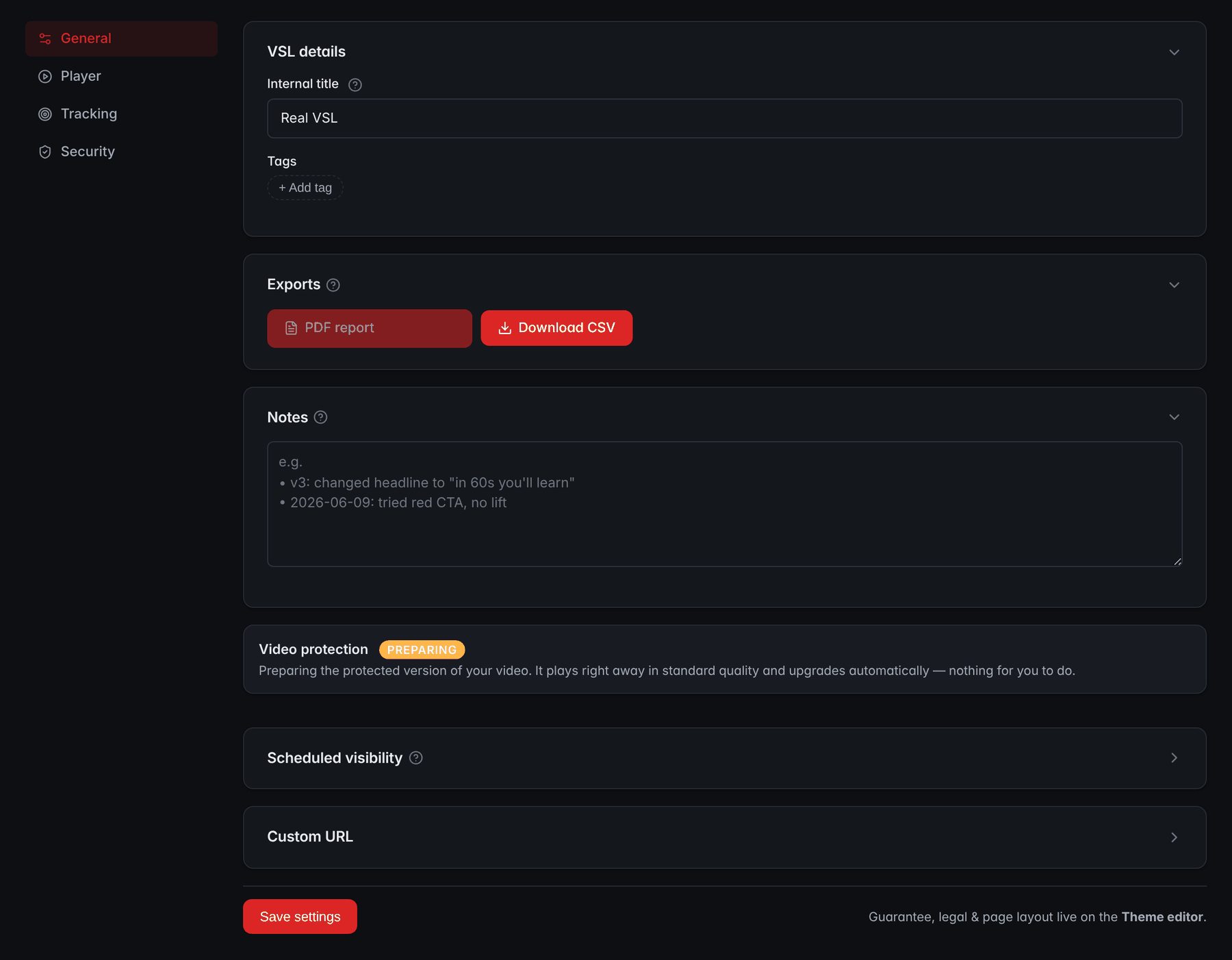
- Player, Tracking and Security tabsThe Player tab holds the seek bar, autoplay and smart progress bar settings, Tracking holds the pixels and Security holds the domain lock.
- Video protectionIt shows the state of the protected streaming version made from the upload; while it is being prepared, the video plays in standard quality.
- Scheduled visibilitySet a time for the page to go live or to expire.
- Custom URLServe the VSL at a custom path on your connected domain.
Timed CTA: reveal the offer at the pitch
A buy button that's visible from the first second invites people to skip to a price they haven't been sold on, and it pulls eyes off the video. That's the reason to hide the button and the offer until the pitch: the moment the video first presents the offer and its price.
Take the reveal second from the final edit, not the script draft, and check it against your retention graph. If only a small share of viewers reach it, the problem is the content before it, and moving the button earlier treats the symptom. If you test an earlier reveal anyway, judge it by revenue per visitor, not by clicks, because an early button can collect clicks from people who only want to see the price.
What appears with the button matters as much as when: the offer block with any bundles, the guarantee, and the terms that qualify the price, placed right beside it.
In RevvyScales the offers, guarantee and CTA stay hidden until the pitch second you set, and the retention chart marks that second, so you can see how many viewers are still there when the button appears. Picking the second, mobile placement and measurement are in the delayed CTA button guide.
Pause, resume and exit intent
Long videos get interrupted: a call, a notification, a closed tab. Three behaviors decide whether those viewers make it back to the pitch.
- Resume for returning viewers. Someone who watched 18 minutes yesterday shouldn't start at 0:00 today. Resume from the deepest point they reached. First-time viewers still start at the beginning.
- A pause screen with a reason. Show the poster or a pause image that hints at what's coming, not a frozen frame.
- One respectful exit prompt. Asking once, as a visitor moves to leave, whether they're sure gives you one last chance. Asking repeatedly, or making the page hard to leave, spends trust you need at the checkout.
RevvyScales resumes returning viewers from the deepest point they watched (using a viewer cookie), shows the pause poster, and can show an exit-intent gate. Follow-up by watch depth, through email or retargeting, is covered in the pause and resume guide.
Before the next features, a quick check on the sound, control and offer decisions so far:
Check yourself: sound, controls and the offer
Show the answer
Restart at 0:00. A visitor who taps at second nine has missed the hook. Rewinding means they hear it from the first word.
Show the answer
Unmute rate. Once the video autoplays, play rate stops telling you much, because almost everyone "plays". Unmute rate is visitors who unmute divided by unique visitors.
Show the answer
Pause, volume and captions. WCAG success criterion 2.2.2 (Level A) asks for a way to pause moving content that starts automatically and lasts more than five seconds. Never hide pause, volume or captions.
Show the answer
The content before the pitch. If only a small share of viewers reach it, the problem is the content before it, and moving the button earlier treats the symptom.
Show the answer
At the deepest point they reached. Someone who watched 18 minutes yesterday shouldn't start at 0:00 today. First-time viewers still start at the beginning.
Captions for sound-off viewers
With muted autoplay, your opening seconds are watched without sound by design. Captions keep those viewers following, help people watching in a second language, and are an accessibility baseline: WCAG success criterion 1.2.2 (Level A) asks for captions on prerecorded audio in synchronized media (Understanding 1.2.2).
Player captions (a separate VTT or SRT file) can be switched on or off and offered in several languages. Burned-in captions are always visible but fixed in one language and one size. A practical mix is burned-in text for the muted opening and a player caption track for the rest.
RevvyScales accepts VTT or SRT caption files per language on every plan; you can set one track to be on by default, and a CC button appears in the player. Formatting rules and caption tests are in the VSL captions guide.
Mobile and portrait video
Check your device split before you design anything. If phones dominate, the player has to work upright and one-handed: an unmute target big enough for a thumb, captions readable at phone size, and the buy button directly under the video when it appears.
A 16:9 video on an upright phone fills a strip across the top, about a third of the screen height or less. A 9:16 cut fills the screen but needs its own edit, because framing, text placement and b-roll all change. If you make one, serve it to phones and keep landscape for desktops. In RevvyScales a portrait companion video (Growth plan and up) does exactly that: phones and tablets get the 9:16 cut and desktops get landscape, on the same URL with the same analytics.
Playback speed and speed tests
A VSL doesn't have to play at the speed it was recorded. At 1.1x, a 30-minute video runs about 27 minutes and the pitch arrives sooner, so more viewers may reach it. Browsers correct the pitch of the voice by default when the speed changes (MDN on preservesPitch), so 1.1x sounds like a brisk speaker, not a cartoon.
The risks are comprehension and trust. Dense explanations, viewers listening in a second language, music cues and spoken disclaimers can all suffer when rushed. That's why speed is a test, not a setting.
On the Growth plan and up, RevvyScales can run playback-speed variants inside one VSL (for example 1.0x against 1.1x), each shown by weight and sticky per viewer (speed A/B test). Test design and how to read the results are in the VSL playback speed guide.
Protection: encryption, domain lock and watermark
VSLs that work get copied. The threats differ, and so do the defenses:
- Downloading the file. If the page exposes an MP4 URL, anyone can save it. Encrypted HLS streaming avoids handing over a file: the HLS specification defines an AES-128 method that encrypts each media segment, and short-lived signed key URLs make the keys hard to reuse.
- Embedding on other sites. A domain lock makes the player refuse to load anywhere you haven't listed.
- Screen recording. Nothing stops it. A watermark (your logo or a compliance mark) marks every recorded copy as yours.
Be clear-eyed about the limit: protection raises the cost of copying; it doesn't make copying impossible. RevvyScales streams AES-128 encrypted HLS with short-lived signed keys and never exposes a downloadable MP4. It can lock each VSL to the domains you list, with your connected custom domains added automatically, and adds an image watermark on the Growth plan and up. The full threat model is in how to protect a VSL from piracy.
Tracking: pixels, server events and click IDs
A player that can't tell you which ad produced a sale is a player you can't scale. The tracking chain has four links, and a break anywhere breaks attribution:
The four links of the tracking chain
A break anywhere breaks attribution
- ArrivalThe page records campaign, ad set and ad, usually from a URL parameter.
- On-page eventsPlays, milestones, the pitch and CTA clicks reach your ad platforms through pixels.
- Click to checkoutEach CTA click gets an ID that travels to the checkout.
- SaleThe checkout's thank-you page or a store webhook reports the sale back with that ID, and a server-side event tells the ad platform.
Server-side events back up the browser pixel. Meta recommends running its Conversions API alongside the pixel, and it deduplicates the pair when both carry the same event name and event ID, within 48 hours of the first event (Meta's deduplication docs).
In RevvyScales you set Meta, Google and TikTok pixels once on a folder or VSL, and the rvs URL parameter carries campaign, ad set and ad. Each CTA click gets a click ID, and Shopify, Whop, CartPanda or any checkout that can report that ID from its thank-you page closes the loop. On the Growth plan and up, Meta's Conversions API sends sales server-side, deduplicated so each reaches Meta once, and milestone webhooks (watched 25, 50 or 75%, pitch reached, completed, CTA click, lead captured) pass watch depth to your CRM or backend. The full setup is in the VSL tracking guide.
Analytics that tie watch time to revenue
Views and average watch time don't pay for ads. These reports change decisions:
- A second-by-second retention chart with the pitch marked, so you see where viewers leave and how many remain when the offer appears.
- Pitch reach: visitors who reached the pitch second ÷ unique visitors. It equals play rate × pitch retention (viewers at the pitch ÷ viewers who started).
- CTA click rate (clicks ÷ visitors who reached the pitch) and EPC (revenue ÷ CTA clicks): whether the offer converts the people who see it.
- Revenue per visitor (RPV): revenue divided by unique visitors, the number that combines everything above.
A worked example of why RPV gets the final word: two cuts of the same VSL each get 20,000 visitors. Cut A holds 31% of viewers to the pitch and makes 260 sales at an $80 average order: $20,800, or $1.04 per visitor. Cut B holds only 27% to the pitch but makes 320 sales: $25,600, or $1.28 per visitor.
Revenue per visitor: two cuts of one VSL
Worked example: 20,000 visitors each, $80 average order
A has the prettier retention curve. B makes more money from the same traffic, and at this sample the gap in sales clears 95% confidence in a two-proportion test. Ship B, then find out why its viewers buy more.
RevvyScales reports play rate, pitch retention, CTA clicks, conversion rate, orders, RPV, EPC and RPM, with a second-by-second retention chart that marks the pitch. Heatmaps of engagement across the timeline are on Growth and up. For the reading workflow, see how to read a retention graph.
A/B testing inside the player
Most VSL tests happen in the player, so testing should be part of it rather than bolted on. What to look for:
- Sticky assignment. A returning visitor sees the same variant, or your numbers mix.
- Weighted splits. You can send 50/50, or 80/20 while a risky variant proves itself.
- Money metrics. Variants judged on revenue per visitor, not just plays or clicks.
- Discipline about winners. A loser is cut on evidence, not on day two.
In RevvyScales, folders split traffic between whole VSLs by weight, sticky per new visitor, on every plan (folders and A/B testing). On the Growth plan and up you can also test inside one VSL: headline, poster, offer (bundles, prices, offer headlines) and playback-speed variants, each shown by weight and sticky per viewer (offer split tests). Here is a folder splitting new visitors evenly between two VSLs:

- RPVRevenue per visitor of each VSL: the money metric that judges the test.
- Traffic %Each VSL's weight and its share of new visitors; a visitor stays on the VSL they first saw.
Also on Growth and up, smart traffic split moves a folder's traffic toward the VSLs earning the most per viewer, and bring-your-own player lets you split-test an outside player on the same page. Test design that holds up is in VSL A/B testing.
Custom domain and page control
Your VSL's address appears in the ad preview and the browser bar. A custom domain with automatic SSL keeps the brand consistent from ad to checkout, and it keeps your URLs yours if you ever change hosts.
Scheduling matters more than it looks: a page can go live or expire at set times, which suits launches and promotions that really end. RevvyScales connects custom domains with automatic SSL, can put a VSL, folder or presell at a custom path, and can schedule a page to go live or expire.
VSL player checklist: must-haves and nice-to-haves
Use this table to compare players, or to audit the one you have. "Must" means must for paid cold traffic to a long VSL.
| Feature | Priority | Why it matters | In RevvyScales |
|---|---|---|---|
| Adaptive HLS from a CDN | Must | Fast start on weak connections | 1080p/720p/480p ladder |
| Muted autoplay | Must | Sound autoplay is blocked | Smart muted autoplay |
| Restart on unmute | Must | Hook heard from the first word | Every plan |
| Timed CTA reveal | Must | Offer appears at the pitch | Timed pitch reveal |
| Pause control and pause screen | Must | Accessibility and recovery | Pause screen |
| Captions | Must | Sound-off viewers, accessibility | VTT or SRT per language |
| Encrypted streaming, no MP4 | Must | Blocks simple downloads | AES-128 HLS, signed keys |
| Domain lock | Must | Stops other sites embedding it | Per VSL |
| Pixels and server-side events | Must | Platforms optimize on real sales | Pixels; Meta CAPI on Growth and up |
| Click ID to checkout and back | Must | Every sale tied to an ad | Shopify, Whop, CartPanda, others |
| Retention chart with pitch marker | Must | Shows where viewers leave | Second by second |
| RPV and EPC reports | Must | Tests judged on money | Built in |
| Resume for returning viewers | Must for long VSLs | Interrupted viewers finish | Every plan |
| Sticky, weighted A/B splits | Must at scale | Clean tests | Folders; in-VSL variants on Growth and up |
| Custom domain with SSL | Must at scale | Brand and portability | Automatic SSL |
| Hidden seek bar | Nice | Keeps the argument in order | Per-VSL setting |
| Smart progress bar | Nice, used honestly | Changes how long it feels | Per-VSL setting |
| Speed tests | Nice | Shorter trip to the pitch | Speed variants, Growth and up |
| Exit-intent prompt | Nice | One last, polite ask | Exit-intent gate |
| Portrait cut for phones | Nice | Fills an upright screen | Growth and up |
| Watermark | Nice | Marks recorded copies | Growth and up |
| Milestone webhooks | Nice | Follow-up by watch depth | Growth and up |
| Heatmaps | Nice | Engagement across the timeline | Growth and up |
| Lead-capture gate | Nice | Email from engaged viewers | Growth and up |
How to test a VSL player in one afternoon
Don't trust a feature list, including this one. Run your real VSL through these checks before you send traffic:
Test a VSL player in one afternoon
0 of 10 done
Anything that fails here will fail at scale, with your ad budget running.
Frequently asked questions
What is the best video player for a VSL?
There's no single best player for every funnel, so judge by job, not by brand. For paid cold traffic, the shortlist needs adaptive streaming, muted autoplay with a restart on unmute, a CTA timed to the pitch, captions, encrypted streaming with a domain lock, and sales attribution down to the ad. Then split-test your finalists on the same traffic for at least a week and keep the one with higher revenue per visitor.
Can I use a free video player for a VSL?
You can, and it's a reasonable way to test an offer before you invest. General-purpose players often lack what matters at scale: a CTA timed to the pitch, restart on unmute, sales attribution back to the ad, and protection against downloads. Once ad spend grows, work out whether those gaps cost you more each month than a dedicated VSL host would.
Should a VSL player show controls?
Keep the controls that protect the viewer and trim the ones that break the story. Pause, volume, captions and fullscreen should stay. Seeking is a choice: hiding it keeps the argument in order on long VSLs for cold traffic, while warm audiences and short videos have less to protect. Whatever you choose, test it against revenue per visitor rather than gut feel.
Does the video player affect page speed?
Yes. The player's script, the poster image and the way the first video segments load all affect how fast the page becomes usable and how soon the video moves. Adaptive streaming lets the first seconds start at a quality the connection can handle, and a compressed, early-loading poster gives visitors something to see immediately. Measure on a real phone on mobile data, not only on office Wi-Fi.
Can people download my VSL from the player?
Not easily, if the player streams encrypted HLS segments with short-lived keys instead of exposing an MP4 file, which closes the simple save-the-file route. No web player can stop screen recording, though. A watermark with your logo or a compliance mark makes recorded copies traceable to you, and a domain lock stops other sites from embedding your player.
What should happen when a VSL ends?
By the end of a VSL the offer should already be on the page, revealed at the pitch, so the end screen matters less than you might think. Avoid anything that sends viewers away, such as suggested videos from another platform. A clean option is to hold on the final frame or the poster, with the offer and the buy button still visible right below.
Sources
- Autoplay policy in Chrome — Chrome for Developers
- New video policies for iOS — WebKit
- RFC 8216: HTTP Live Streaming
- Understanding Success Criterion 2.2.2: Pause, Stop, Hide — W3C
- Understanding Success Criterion 1.2.2: Captions (Prerecorded) — W3C
- HTMLMediaElement: preservesPitch property — MDN
- Handling duplicate Pixel and Conversions API events — Meta for Developers