
VSL hosting: what your host must do, the four options compared, what it costs and how to switch safely
VSL hosting decides how fast your video starts, who can copy it, when the buy button appears and whether a sale can be traced back to the ad that paid for it. This guide gives you ten requirements, compares the four ways to host, shows how cost scales with traffic and lays out a migration plan that won't break live ads.
On this page
- What does VSL hosting include?
- What must a VSL hosting platform do? Ten requirements
- Where should you host a VSL? Four options compared
- How much does VSL hosting cost?
- What to ask before you commit to a VSL host
- How to move a live VSL to a new host without breaking ads or pixels
- How much protection does a VSL need?
- Hosting a VSL for Shopify and ecommerce
- What RevvyScales provides
- What to do next: a 30-minute hosting audit
- Frequently asked questions
VSL hosting is the service that stores your video sales letter, streams it to every visitor and runs the player and page around it. For paid traffic it must start fast on weak mobile connections, resist copying, reveal the offer at the right second and tie each sale back to the ad that paid for it. Storage is the easy part; the rest decides revenue.
What does VSL hosting include?
A generic video host solves one problem: getting a file from a server onto a screen. A VSL host has to solve four, and a weakness in any of them shows up as lost revenue rather than an error message, which is why it can go unnoticed for months.
The four layers of VSL hosting
Each layer's job, and what a weak one costs you
Delivery
Its job: Encode the video at several quality levels and stream it from servers close to the viewer.
What a weak layer costs you: Slow starts and buffering on phones, so paid clicks leave before the hook.
Player
Its job: Control behavior: muted autoplay, restart on unmute, when the offer appears, what pause looks like.
What a weak layer costs you: Viewers miss the hook, skip to the price or see the button too early.
Page
Its job: Hold the headline, video, offer, guarantee and legal footer on your own domain.
What a weak layer costs you: Navigation leaks, missing disclaimers, slow third-party clutter.
Data
Its job: Record plays, retention, CTA clicks and sales, tied to the ad and the VSL version.
What a weak layer costs you: You can't tell which ad, angle or version makes money, so you can't scale.
Protection runs across all four layers: how the stream is encrypted, which domains may embed the player and whether copies carry your mark.
What must a VSL hosting platform do? Ten requirements
Use this as your spec sheet. Each requirement has a reason tied to paid traffic and a check you can run during a free trial in a few minutes.
| Requirement | Why it matters with paid traffic | How to check it in a trial |
|---|---|---|
| 1. Adaptive streaming from a CDN | One fixed-quality file stalls on weak connections | Throttle your browser to a slow mobile profile and time the first frame |
| 2. No downloadable file | A plain MP4 can be saved by anyone who can play it | Open the network tab and look for an .mp4 request |
| 3. Embed control | Stops other sites playing your video on your bandwidth | Embed the player on a domain you haven't allowed |
| 4. Muted autoplay, restart on unmute | The hook should be heard from its first word | Load the page, tap for sound, check it rewinds to 0:00 |
| 5. Timed offer reveal | A price shown before the argument invites early exits | Set a reveal second and watch the button appear |
| 6. Resume for returning viewers | People who come back mid-pitch shouldn't sit through the hook again | Watch half, close the tab, return |
| 7. Click-level sale attribution | You need your own record of which click bought | Buy through an ad-style URL and find the sale |
| 8. Revenue-based testing | Tests judged on plays alone can crown the version that sells less | Check the test metric and that assignment is sticky |
| 9. Custom domain with SSL | Trust, and the freedom to change hosts without editing ads | Connect a subdomain and check the certificate |
| 10. Stream monitoring and support | A broken stream on a scaling day burns budget by the minute | Ask how broken streams are detected and who answers |
Three of these deserve more than a table row.
Start speed is a revenue number
Every paid visitor who leaves before the first frame is spend with no chance of a return. A worked example: you buy 10,000 clicks at $1.20, a $12,000 day, and the page earns $1.80 per visitor. If a slow start loses 5% of visitors before the video begins, that's 500 people who, had they behaved like everyone else, would have produced about $900. You pay for that gap every day, and no script rewrite can recover it.
Here is the same math as a formula for your own traffic:
What a slow start costs
Visitors lost before the first framepaid clicks × the share who leave before the video begins
Revenue those visitors would have producedvisitors lost × revenue per visitor, had they behaved like everyone else
Worked example: 10,000 clicks at $1.20 is a $12,000 day. A 5% loss is 500 people, and at $1.80 per visitor they would have produced about $900, every day.
Adaptive streaming is the fix. HLS (HTTP Live Streaming) encodes the video at several quality levels, and its specification tells players they "should switch between different Variant Streams to adapt to network conditions" (RFC 8216). A phone on one bar starts at a low rendition and climbs; a desktop on fiber gets 1080p. The page matters as much as the stream, since a heavy poster or a stack of tags can delay the first frame too; the VSL page speed guide covers that side.
The player belongs to the host, not to a plugin
Direct-response mechanics depend on the page and the player talking to each other. The page hides the offer until the player reports the pitch second. The player starts muted and rewinds to 0:00 when a first-time viewer taps for sound, because Chrome, for example, always allows muted autoplay but allows sound only in limited cases, such as after the visitor has interacted with the site (Chrome's autoplay policy). A returning viewer resumes where they left off.
You can rebuild some of this on a generic player with its API and custom code, but you'll maintain that code yourself, and some platforms restrict what you may place on their player. YouTube's rules for embedded players say you "must not display overlays, frames, or other visual elements in front of any part" of the player (YouTube API Services), which rules out an unmute prompt or a buy button on the video itself. The full list of behaviors worth having is in the VSL player guide.
Attribution is what lets you scale
Ad platforms count conversions under their own attribution rules, so their numbers rarely match your orders exactly. To move budget with confidence you need your own chain: the ad click lands with campaign parameters, each CTA click gets an ID, the checkout reports the sale with that ID, and the sale is credited to the ad, the VSL version and the offer. Without that chain, every split test and every budget shift is a guess.
Where should you host a VSL? Four options compared
Answer two questions to see which of the four options fits; each one is covered in more detail below.
Where should this VSL live?
Two questions, from the decision rule below and what each option is best for
Will you buy traffic to this VSL every day?
Do you have engineers who want to own video infrastructure, and unusual needs?
What is the video for right now?
Best fit
A general video platform, such as YouTube
You don't buy traffic every day yet, and the video is proving a message with organic or token traffic. A general platform is best for organic content and first message tests.
- What you give up: platform branding and ads, related videos at the end, no overlays, no sale attribution.
Best fit
A marketing video host, such as Vimeo or Wistia
You don't buy traffic every day yet, and the video is brand, lead-gen or webinar video, which is what marketing video hosts are best for.
- What you give up: reports built on viewing, not revenue; plan fine print such as bandwidth thresholds.
Best fit
Self-hosting: cloud storage, a CDN and an open-source player
You buy traffic every day, and you have engineers who want to own video infrastructure and unusual needs. Self-hosting is best for teams with engineers and unusual needs.
- What you give up: you build and maintain every layer.
Best fit
Dedicated VSL hosting: RevvyScales and other direct-response hosts
You buy traffic every day and don't have engineers who want to own video infrastructure. Dedicated hosting is best for paid traffic to sales videos.
- What you give up: a monthly plan and reliance on a vendor built for one job.
Read more: Best VSL Hosting: How to Choose the Right Platform
General video platforms
YouTube costs nothing to use, and its terms explain the trade: uploading grants YouTube "the right to monetize your Content", which may include ads "on or within Content" (YouTube Terms of Service). Embeds keep YouTube branding (YouTube deprecated the modestbranding parameter in August 2023 and says it has no effect), and related videos still appear at the end; since 2018, setting rel=0 only limits them to your own channel (YouTube player parameters). That's acceptable for a first test and a steady leak on paid traffic. The platform-by-platform detail is in hosting a VSL on YouTube, Vimeo or Wistia.
Marketing video hosts
Paid Vimeo plans can hide the Vimeo logo and play bar, set what appears after the video ends and restrict which sites may embed it (Vimeo embedding features by plan). Wistia documents muted autoplay, an email gate, a post-roll call to action and annotation links in its embed options, plus domain restriction in its account settings. These are capable players.
Check two things before you send paid traffic. First, their reports describe viewing, so tying a sale to an ad is left to you. Second, read the fine print. Vimeo, for example, publishes a monthly bandwidth threshold of 2TB. It doesn't cut streams when you pass it, but accounts that keep exceeding it and don't resolve it within seven days risk a temporary suspension, during which their videos "will no longer play for viewers" wherever they're embedded (Bandwidth on Vimeo).
Self-hosting an MP4 or HLS stream
An MP4 on cloud storage behind a CDN looks cheapest and is the most expensive to do well. A single MP4 has one quality level, so the same file goes to fiber and to a weak signal. Its index should sit at the front of the file; FFmpeg's faststart option moves it there "for better playback" and is off by default (FFmpeg formats documentation). And the file's URL sits in the page, so anyone can save it.
Doing it properly means owning all of this:
Self-hosting: what you build and run
- EncodingA ladder of renditions and HLS packaging for every upload and every re-edit.
- DeliveryCDN setup, signed URLs, cache rules, cost monitoring.
- PlayerHLS playback in every browser your traffic uses (Safari has it built in; a library such as hls.js plays it through Media Source Extensions), muted autoplay, restart on unmute, timed reveal, resume, captions.
- DataPlay and retention events, CTA click IDs, checkout passback, pixels plus server-side events without duplicates.
- TestingSticky visitor assignment, revenue-based reporting, a safe way to stop a test.
- OperationsAlerts when a stream breaks and someone on call on scaling days.
Dedicated VSL hosting
A dedicated host is organized around the funnel rather than the video: player, page, tracking and testing are meant to work together, with reports in revenue terms. Depth varies between vendors, and the trade-off is a monthly plan and dependence on one of them, so judge candidates by a head-to-head test on your own traffic. The guide to choosing VSL hosting software includes a weighted scorecard and a two-week bake-off.
How much does VSL hosting cost?
Plan fees are the visible part of the cost. The rest depends on how the pricing model meets your traffic, so compare models first and fees second.
The three pricing models
Each model charges for something different:
Three ways hosts charge
Ad-supported (free)
You pay with control: platform branding, ads you don't choose and an ending that can send viewers elsewhere.
Plan-based
A monthly fee for features, seats and storage.
Read the limits page for bandwidth thresholds, play caps and overage rules, because the campaign that works is exactly the one that reaches them.
Usage-based
You pay for data delivered or for plays.
Cost scales with minutes watched, so a VSL that holds attention costs more to serve. That's a good problem, but it still belongs in your unit economics.
How to estimate bandwidth
Data per viewer equals minutes watched times average bitrate. Bitrate is in megabits per second, so divide by 8 to get megabytes.
Say your VSL runs 25 minutes, the average viewer watches 9 and the adaptive ladder averages 2.5 Mbps across devices. Each viewer pulls 9 × 60 × 2.5 ÷ 8 ≈ 169 MB. At 50,000 viewers a month that's about 8.4 TB, more than four times a 2TB threshold. Change one assumption, such as 12 minutes watched or more desktops pulling 1080p, and the total moves with it, so run the formula with your own retention numbers.
Bandwidth, per viewer and per month
Data per viewer (MB)minutes watched × 60 × average bitrate in Mbps ÷ 8
Data per monthdata per viewer × viewers a month
Example: 9 minutes watched at 2.5 Mbps is 9 × 60 × 2.5 ÷ 8 ≈ 169 MB a viewer. At 50,000 viewers a month that is about 8.4 TB, more than four times a 2TB threshold.
Price the plan in revenue per visitor
Divide the monthly plan cost by monthly visitors. The result is the extra revenue per visitor the host has to earn to pay for itself. At 40,000 visitors a month, every $100 of plan cost needs a quarter of a cent more revenue per visitor, about a 0.2% lift on a $1.20 RPV. A trial's job is to show whether faster starts, a hook heard from its first word and attribution that lets you cut losing ads clear that bar on your own traffic. RevvyScales plans and the 15-day free trial are on the plans page.
What to ask before you commit to a VSL host
A trial shows how the product behaves. These questions cover what a trial can't:
- What happens to my pages if I cancel or a payment fails? You want a grace period, not dark pages in the middle of a campaign.
- Can I export my data? Orders, leads, test results and retention, as CSV files or through webhooks while you're live.
- What are the limits? Bandwidth, plays, pages, seats and domains, and what happens when you pass them.
- How are broken streams detected? Automatic checks beat a customer email at midnight.
- Who answers support, and when? Scaling days don't keep office hours.
- How is the account secured? Two-factor authentication and separate seats for each team member.
- Which checkouts does sale attribution support? Your store platform should be on the list, or able to report a click ID back.
How to move a live VSL to a new host without breaking ads or pixels
Most migration damage comes from something nobody wrote down: a pixel left firing on two pages, an email link to the old URL, a presell domain missing from the embed allowlist. Work through this in order.
Moving a live VSL in eight steps
Open each step: what can break there, and how to prevent it, is listed under it
1Inventory everything that points at the page
What happens: Every ad's destination URL and parameters, email and retargeting links, presell buttons, pixel IDs, server-side event setup, checkout links and thank-you page tracking.
Why it matters: This list becomes your test plan.
What goes wrong:
- Domain missing from the allowlist. Symptom: the video won't play on a presell or second domain. Prevention: list every funnel domain before launch.
2Rebuild before you switch
What happens: Same video file, poster, headline, pitch second, offer block, prices, guarantee, captions and legal footer.
Why it matters: Small differences turn a migration into an unplanned split test.
What goes wrong:
- Prices differ between video and page. Symptom: refund requests, complaints, abandoned checkouts. Prevention: check the offer block against the script.
- Pitch second off after re-encoding. Symptom: the button appears early or late. Prevention: re-check the reveal time on the new file.
3Choose the URL strategy
What happens: If you control the domain, build and test the new page on a temporary subdomain, then point the live address at the new host at cutover, so ads never need editing. In RevvyScales a VSL can live at a custom path on your own domain with automatic SSL (custom domains). If the URL must change, update ads one ad set at a time and keep the old page live.
4Recreate tracking, then remove duplicates
What happens: Set pixels and server-side events on the new page. Remove the old page's pixels the moment traffic moves.
Why it matters: Two copies of one event inflate reported conversions.
What goes wrong:
- Pixel on both pages. Symptom: reported purchases jump while orders don't. Prevention: remove old pixels at cutover; compare with checkout.
5Buy something end to end
What happens: Click an ad-style URL with your campaign parameters, purchase, confirm the sale appears in the new dashboard, the ad platform and your checkout, then refund it.
What goes wrong:
- Click ID lost before checkout. Symptom: orders in checkout, none in the dashboard. Prevention: a test purchase before cutover.
6Run a parallel slice
What happens: Send one duplicated ad set, or 10 to 20% of traffic, to the new page for at least a few full days and compare play rate, pitch retention and revenue per visitor with the old one.
7Cut over at a quiet hour and watch for 72 hours
What happens: Compare checkout orders with tracked orders every few hours.
Why it matters: A gap means a broken link in the chain.
8Redirect the old URL
What happens: Old emails, bookmarks and shared links can keep getting clicks long after launch, so send them to the new page instead of an error.
Step 3 starts with the domain your ads point at. In RevvyScales that is Settings → Domains:
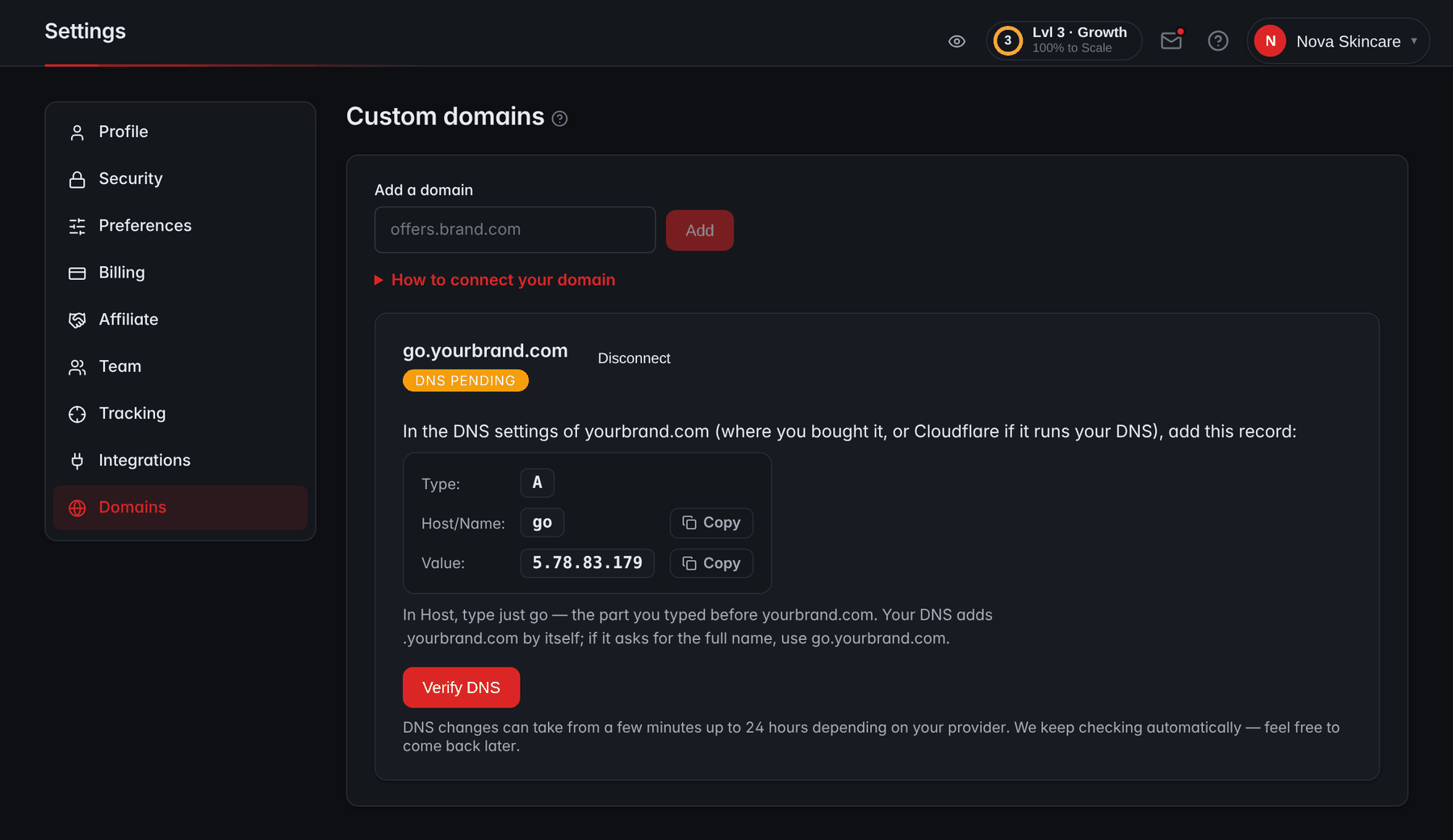
- Add a domainAdd the subdomain your ads will point at, such as go.yourbrand.com.
- The DNS recordThe one A record to add at your DNS provider, with Copy buttons for the host and the value.
- Verify DNSChecks the record now; the note under it says the DNS keeps being checked automatically.
How much protection does a VSL need?
A sales video is meant to be watched by strangers, so the goal isn't secrecy. It's making theft slow and copies short-lived. The baseline is no downloadable file, encrypted streaming with short-lived keys and a domain allowlist; add a watermark when copies of your video start appearing elsewhere. Nothing stops a screen recording, so treat any host that promises otherwise with suspicion. The threat model and a DMCA takedown routine are in how to protect a VSL from piracy.
Hosting a VSL for Shopify and ecommerce
Ecommerce VSLs add two requirements. The checkout lives on your store platform, so sales have to be passed back across systems. And if most of your traffic arrives on phones (check your device report), a vertical cut of the video matters. The VSL for Shopify guide covers cart permalinks and tracking through Shopify's checkout, and VSL for ecommerce covers product fit, bundles and profit per visitor.
What RevvyScales provides
RevvyScales is VSL hosting built for direct-response advertisers. Here is what it does against the requirements above, including what it leaves to other tools.
| Requirement | In RevvyScales |
|---|---|
| Delivery | Every upload transcoded into a 1080p, 720p and 480p HLS ladder served from a CDN; broken streams are detected and stuck transcodes retried |
| Protection | AES-128 encrypted streams with short-lived signed key URLs, no downloadable MP4, domain lock with wildcards; an image watermark on Growth plans and up |
| Player | Smart muted autoplay, restart on unmute, resume for returning viewers, timed pitch reveal, pause poster and exit-intent gate on every plan; optional hidden seek bar; caption tracks |
| Page | Block-based theme editor with offer, guarantee, references and legal footer blocks; presell, advertorial and listicle templates; custom domains with automatic SSL |
| Data | Meta, Google and TikTok pixels; the Meta Conversions API (Growth plan and up); the rvs parameter for ad-level attribution; click_id sale passback with Shopify, Whop, CartPanda or any checkout that can report it |
| Analytics and testing | Revenue per visitor, EPC and a second-by-second retention chart with the pitch marked; folders that split traffic between VSLs on every plan; headline, poster, offer and speed variants inside one VSL on Growth and up |
| Not included | No checkout, quiz builder, email marketing or course hosting; checkout stays on your platform |
What to do next: a 30-minute hosting audit
Run it on your live VSL and tick each check off; the ticks stay in this browser:
A 30-minute hosting audit
0 of 8 done
Frequently asked questions
Do I need a custom domain for my VSL?
You don't strictly need one, but it pays off. A domain you own builds trust with visitors, keeps your brand consistent from ad to presell to VSL, and lets you change hosts later by pointing the domain at the new platform instead of editing every live ad. Use a subdomain such as watch.yourbrand.com so your main site stays separate, and check that the host provisions SSL automatically.
Can I host the video on one platform and build the page on another?
Yes, if your host offers an embed code. Place the player on the page you built elsewhere, such as WordPress or a funnel builder, then check two things: add that page's domain to the embed allowlist, or the video won't play there, and confirm that timed features such as the delayed buy button still work when the player and the page come from different systems. If they don't, you'll need custom code or the host's own page.
What video file should I upload for a VSL?
Upload the best master you have, ideally a 1080p export straight from your editor at a high bitrate, and let the host create the streaming versions. Every extra round of compression costs quality, so avoid uploading a file that was already squeezed for social media. Keep the master files too: you'll need them for re-edits, captions, a vertical cut and any future move to another host.
How do I know if my VSL host is slowing the page down?
Test the page with Google's PageSpeed Insights and on a real phone over cellular data, then compare the time to the first video frame with and without the player loaded. Look for a heavy poster image, a player script that blocks rendering and tracking tags that fire before the video starts. If the video itself starts slowly, ask whether the host streams adaptive HLS from a CDN or serves one large file.
Will I lose my analytics history if I switch VSL hosts?
Inside the new tool, yes: retention curves, test results and attribution history stay with the old platform. Before you cancel, export what you can, such as CSV reports, lead lists and test results, and write down your baselines for play rate, pitch retention and revenue per visitor so you can judge the new host against them. Your checkout and ad platforms keep their own records either way.
Sources
- RFC 8216: HTTP Live Streaming — IETF
- YouTube Terms of Service
- YouTube embedded players and player parameters — Google for Developers
- YouTube API Services: Required Minimum Functionality — Google for Developers
- Embedding features by plan type — Vimeo Help Center
- Bandwidth on Vimeo — Vimeo Help Center
- FFmpeg Formats Documentation (mov/mp4 muxer, faststart)
- hls.js — HTTP Live Streaming client (GitHub)