
VSL page speed: how to make a video sales letter page load fast and pass Core Web Vitals
Every paid click that leaves before your video starts is money spent on a blank screen. This guide covers what slows VSL pages down, how to measure speed honestly when your traffic comes from ads, the fixes to make first, and a speed budget to hold your page to.
On this page
- Why does page speed matter more on a VSL page?
- What are good Core Web Vitals for a VSL page?
- How do you measure VSL page speed?
- What slows down a VSL page?
- How do you make a VSL page load faster?
- Is a self-hosted MP4 fast enough for a VSL?
- A VSL page speed budget
- How do you prove a speed fix made money?
- A 30-minute VSL page speed pass
- Frequently asked questions
VSL page speed is how quickly your video sales letter page shows the video and responds on real phones. Aim for Google's "good" Core Web Vitals at the 75th percentile: Largest Contentful Paint within 2.5 seconds, Interaction to Next Paint at or under 200 milliseconds and Cumulative Layout Shift at or under 0.1. On a VSL page, the biggest levers are the poster, the player and third-party tags.
Why does page speed matter more on a VSL page?
On a VSL page, the expensive part happens before the page loads: you already paid for the click. A visitor who leaves while the player is still a gray box costs the same as one who watched to the pitch. And because the video carries the whole argument, any delay before the first frame is a delay before your hook.
A worked example: 10,000 paid clicks at $1.10 each cost $11,000. If 14% leave before the video appears, 8,600 people see your hook. Get that early exit down to 9% and 9,100 do: 500 more viewers from the same spend, and every later number, from pitch reach to orders, scales from that base.
Who sees the hook, out of 10,000 paid clicks
Illustrative: 10,000 clicks at $1.10 each, $11,000 in all
There is outside evidence that speed work can pay. In a 2021 case study published on web.dev, Vodafone ran an A/B test on a landing page with paid traffic split evenly and no other differences between the versions; the optimized version improved LCP by 31% and produced 8% more sales (web.dev). That's one company's test on its own page, not a benchmark for yours. Treat it as a reason to run your own test. The player features that sit on top of a fast page are covered in the VSL player features guide.
What are good Core Web Vitals for a VSL page?
| Metric | What it measures | Good | Needs improvement | Poor |
|---|---|---|---|---|
| LCP | When the largest element in view renders | 2.5 s or less | Up to 4.0 s | Over 4.0 s |
| INP | How fast the page responds to taps and clicks | 200 ms or less | Up to 500 ms | Over 500 ms |
| CLS | How much visible content jumps | 0.1 or less | Up to 0.25 | Over 0.25 |
Google assesses each metric at the 75th percentile of page loads, separately for mobile and desktop, and a page passes when all three are good (PageSpeed Insights). Interaction to Next Paint replaced First Input Delay as a Core Web Vital on March 12, 2024 (web.dev), so a checklist that still mentions FID is out of date.
What each one means on a VSL page:
- LCP is usually your poster, the first video frame or the headline. For video elements, LCP uses the poster load time or the first frame, whichever comes first (web.dev).
- INP covers the taps that matter most: unmute, play, the buy button, FAQ toggles. Heavy scripts make those taps feel dead.
- CLS counts unexpected shifts during the entire life of the page, not just loading. Only shifts within 500 milliseconds of a user input are excluded (web.dev). If a timed reveal pushes visible content down at minute 20, no user input caused it, so it can count.
How do you measure VSL page speed?
Use two kinds of data, and know what each one can't see.
Field data is what real visitors experienced. PageSpeed Insights shows it from the Chrome User Experience Report (CrUX), aggregated over the previous 28 days, and falls back to the whole origin when a URL lacks enough data. For VSL pages, CrUX has three blind spots (Chrome for Developers):
- It covers Chrome only, and excludes Chrome on iOS and Android apps that use WebView. If much of your traffic comes from iPhones or from Android apps that open links in a WebView, the field data describes other people.
- A page must be publicly discoverable. A page with a noindex robots tag or header doesn't qualify, so if your VSL is set to noindex, it won't have page-level field data.
- Pages and origins need enough visitors to be included. A new VSL often has no field data at all.
Lab data is a simulated load. Lighthouse, which powers the lab half of PageSpeed Insights, emulates a mid-tier phone. Its default mobile throttling uses 150 ms of latency, 1.6 Mbps down and 750 Kbps up, labeled "Slow 4G", plus a 4x CPU slowdown (Lighthouse docs). Lab runs start with a cold cache and no real interactions, so web.dev advises using field data to prioritize and lab data to debug (web.dev).
Your own numbers close the gap. Your play rate is field data from exactly the traffic you pay for. If it drops for one device, browser or traffic source, check speed there first (play rate guide).
A routine that covers all three:
A measuring routine that covers all three
- Run PageSpeed Insights on the VSL URLNote the field data, if any, and which element the lab run reports as LCP.
- Open the page on a mid-range Android phoneOver mobile data, from inside the app your ads run in, by sending yourself the link there.
- Repeat on an iPhone
- In Chrome DevToolsThrottle to a slow mobile profile, record a performance trace and check what loads before the poster.
What slows down a VSL page?
| Culprit | Why it hurts | Metric it hits |
|---|---|---|
| Heavy poster image | Often the LCP element; competes with the stream | LCP |
| Player or poster that appears late | LCP waits for the scripts that create it | LCP |
| One big MP4 file | One quality for every connection | Start time, stalls |
| Third-party tags | Downloads plus main-thread work | LCP, INP |
| Web fonts | Extra files; late swaps shift text | LCP, CLS |
| Eager images below the fold | Steal bandwidth from what's on screen | LCP |
| Elements without reserved space | Content jumps when they load or appear | CLS |
| Redirect chains before the page | Each hop is another request | LCP |
To find which culprit dominates, break LCP into the four sub-parts web.dev uses: time to first byte, resource load delay (the wait before the LCP image starts downloading), resource load duration and element render delay (web.dev). Its rough guide is about 40% each for the first byte and the download, and under 10% each for the two delays.
The four parts of LCP
web.dev's rough guide, as a share of the time to Largest Contentful Paint
A large load delay suggests the poster is discovered late, for example behind a player script. A long load duration suggests the image is too heavy.
How do you make a VSL page load faster?
Fix in this order. It starts with the changes that most directly decide when the video appears, then moves to the ones that affect taps, stability and the first request.
- Shrink and prioritize the poster. Size it for its slot times the screen's pixel density, use WebP or AVIF where your setup supports them, never lazy-load it, and make sure it's discoverable in the HTML rather than injected late. The VSL thumbnail guide has the sizing math. RevvyScales hosted pages preload the poster from the page head and serve large PNG or JPEG uploads as lighter JPEG copies, at most 1,920 pixels wide.
- Stream adaptively. Apple describes HLS as adapting playback to the available speed of the connection and as deliverable from ordinary web servers and CDNs (Apple). The video is split into segments at several bitrates (MDN), so a phone on a weak signal can start on a lighter version instead of choking on one big file. RevvyScales transcodes every upload into an HLS ladder (1080p, 720p and 480p) delivered from a CDN.
- Defer everything that isn't the video. web.dev's rule for third-party scripts: use async or defer unless the script is needed to render the page, and remove any script that doesn't add clear value (web.dev). Chat widgets, heatmap recorders and survey tools can wait until after the first frame.
- Consolidate tracking. One pixel per ad platform, installed once. For extra destinations such as a CRM or a reporting tool, send events server-side instead of adding more browser tags. Keep the Meta pixel: Meta recommends running the Conversions API alongside it and deduplicating the two by event ID and event name (Meta). In RevvyScales, you set pixels once on a folder or VSL (pixels); on the Growth plan and up, the Meta Conversions API connection is deduplicated so each sale reaches Meta once, and webhooks can feed Zapier, Make or your backend instead of another script on the page.
- Trim fonts. One family, two weights, WOFF2. web.dev puts it plainly: the fastest font is one that isn't requested at all. It also explains that font-display set to optional avoids swap-related layout shifts, while swap needs the font delivered early to avoid them (web.dev).
- Reserve space. Give the video box a fixed aspect ratio, give images width and height so the browser can reserve room for them (web.dev), and make timed content appear in space that doesn't push what the viewer is looking at.
- Lazy-load what's below the fold. Testimonial photos, offer images and footer logos can load as the visitor scrolls. The caveat from the same web.dev article: never lazy-load images likely to be in the first viewport.
- Cut redirects. Each redirect makes the browser request another URL before your page starts, which can delay loading by hundreds of milliseconds (Chrome for Developers). Point ads straight at the final VSL URL and keep attribution in URL parameters; in RevvyScales, the rvs parameter carries campaign, ad set and ad attribution for Meta, Google and TikTok (rvs parameter).
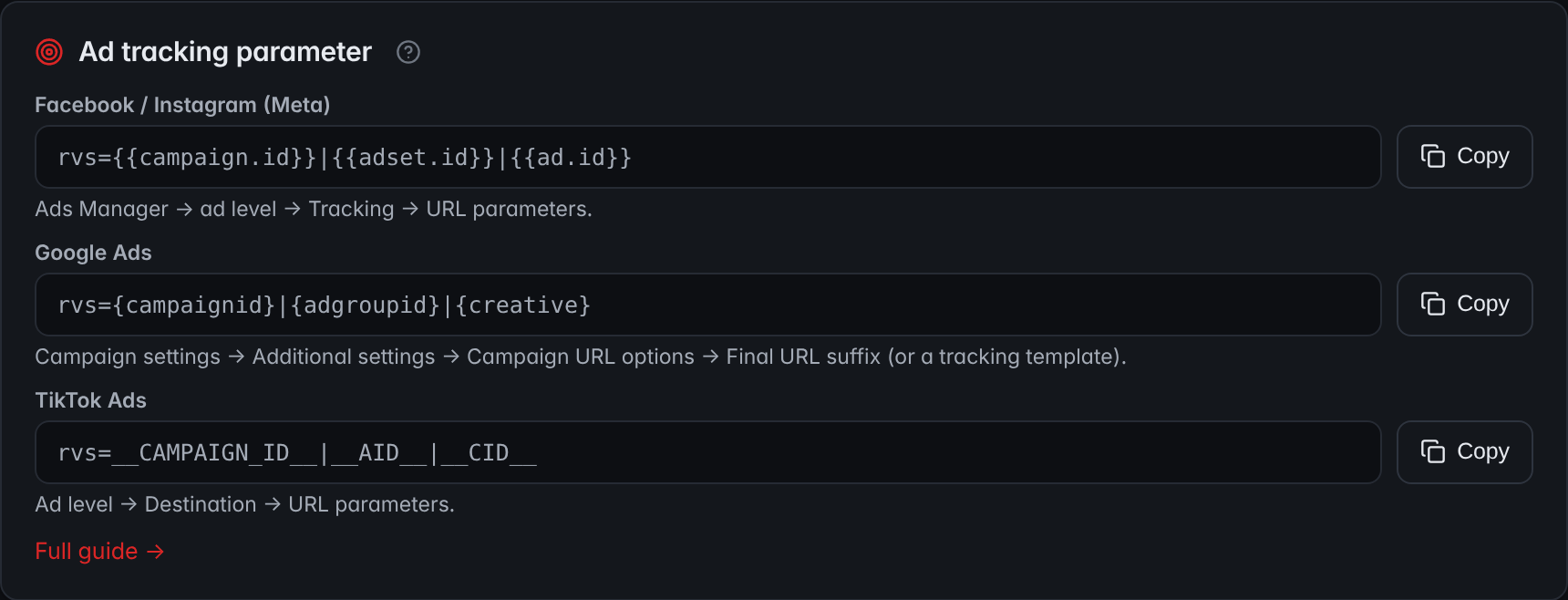
- MetaThe line for Meta goes in Ads Manager, at the ad level, under Tracking and URL parameters.
- Google AdsThe line for Google Ads goes in the campaign's final URL suffix.
- TikTok AdsThe line for TikTok goes in the URL parameters of the ad's destination.
Put together, here is what a fast VSL page loads, and when:
What a fast VSL page loads, and when
- The page itselfThe ad points straight at the final VSL URL, because every redirect is another request before the page starts.
- The poster and the streamA light poster, discoverable in the HTML and never lazy-loaded, and an adaptive stream that lets a phone on a weak signal start on a lighter version.
- After the first frameChat widgets, heatmap recorders and survey tools. Other third-party scripts load async or deferred unless the page needs them to render.
- As the visitor scrollsTestimonial photos, offer images and footer logos load lazily.
- At the pitchThe offer appears in space reserved for it, so it doesn't push what the viewer is looking at.
Is a self-hosted MP4 fast enough for a VSL?
For a short clip on fast connections, often yes. For a 20-minute VSL on mobile traffic, it's the weakest option. A single MP4 has one quality, so a phone on a weak signal has to pull the same bitrate as a desktop on fiber, and it stalls or starts late. MDN notes that when autoplay is set, the browser has to start downloading the video regardless of the preload hint (MDN). A plain file URL is also easy to download and re-host. The trade-offs between hosting options are covered in the VSL hosting guide.
A VSL page speed budget
| Item | Budget | How to check |
|---|---|---|
| LCP on phones, 75th percentile | 2.5 s or less | PageSpeed Insights |
| INP | 200 ms or less | Field data, or tap tests on a mid-range phone |
| CLS | 0.1 or less, including at the reveal | Performance trace while the offer appears |
| Poster | 100 KB or less, sized to the slot | File size and dimensions |
| Third-party scripts before the first frame | Only what the page can't work without | DevTools network panel |
| Font files | Two or fewer | DevTools network panel |
| Redirects before the page | Zero or one | Follow the ad's URL |
The first three rows are Google's thresholds. The rest are starting budgets, not standards: tighten them once you meet them. To check the reveal without watching 20 minutes, make a test copy of the VSL with the pitch second set to 0:10 and record a trace as the offer appears.
How do you prove a speed fix made money?
Before/after comparisons mislead, because traffic, creative and seasonality change from week to week. Copy the Vodafone design instead: two versions of the page, identical except for the speed work, with traffic split evenly. In RevvyScales, put both copies in a folder and split new visitors 50/50 (folders and A/B splits). Judge by play rate first (unmute rate, if the page autoplays muted), then by pitch reach and revenue per visitor.
A worked example: 5,000 visitors per side. The original page gets a 48% play rate (2,400 of 5,000 visitors start the video); the lighter page gets 53% (2,650 plays). A two-proportion test gives z = 5.0, far past the 95% confidence line. If revenue per visitor rises too, ship the lighter page. If play rate rises but revenue per visitor doesn't, check whether one of the scripts you removed was doing a job you need, such as recording sales.
Speed is one part of the page's design; the rest, from the headline to the offer block, is covered in the VSL landing page guide.
A 30-minute VSL page speed pass
Work through it in one sitting; the ticks stay in this browser:
A 30-minute VSL page speed pass
0 of 9 done
Frequently asked questions
What is a good load time for a video landing page?
Use Google's Largest Contentful Paint threshold as the target: 2.5 seconds or less at the 75th percentile of page loads, on mobile. For a video element, LCP uses the poster load or the first frame, whichever comes first, so a light poster and a fast stream start both help. Then watch your play rate, which shows how real visitors respond.
Does a video slow down a landing page?
Not if it is delivered well. With a poster sized for its slot and adaptive streaming, the browser fetches a light image and the first short segments, not the whole file. What slows video pages is a heavy poster, one large MP4, player scripts that load late, and the extra tags and widgets added around the video.
Why does PageSpeed Insights show no field data for my VSL?
Field data comes from the Chrome User Experience Report, which only includes publicly discoverable pages with enough eligible Chrome visitors. A noindex tag disqualifies a page, and a new or low-traffic VSL may not reach the threshold. PageSpeed Insights then falls back to origin-level data, or shows none. Use the lab results plus your own play rate instead.
Should I remove the Facebook pixel to speed up my VSL page?
No. Meta recommends running its Conversions API alongside the pixel, with the two deduplicated. Speed comes from removing everything else that does not earn its place: duplicate installs of the same pixel, tags for tools nobody checks, and browser scripts whose job could be done server-side through webhooks or your backend.
Should a VSL page have a live chat widget?
Only if it pays for its weight. A chat widget is a third-party script that runs on every visit and can delay the page and make taps feel slow. If you need chat for a high-ticket offer, load it after the first frame or at the pitch, and test it by revenue per visitor before keeping it.
Sources
- Web Vitals — web.dev
- About PageSpeed Insights — Google for Developers
- CrUX methodology — Chrome for Developers
- Interaction to Next Paint becomes a Core Web Vital on March 12 — web.dev
- Optimize Largest Contentful Paint — web.dev
- Cumulative Layout Shift (CLS) — web.dev
- Handling duplicate Pixel and Conversions API events — Meta for Developers
- Vodafone: a 31% improvement in LCP increased sales by 8% — web.dev case study