
How to protect a VSL from piracy: the threat model, the layers that work and their honest limits
You can't make a web video impossible to copy, but you can make your VSL slow to steal and quick to take down. This guide shows how to protect a VSL from piracy by matching each way sales videos get copied to the layer that stops it, explains what encryption really does and gives you a takedown routine for the copies that slip through.
On this page
- What can you protect, and what can't you?
- How do you protect a VSL from piracy? Start with a threat model
- Layer 1: Why a downloadable MP4 is the first thing to remove
- Layer 2: What does AES-128 HLS encryption actually do?
- Layer 3: How do you stop other sites from embedding your VSL?
- Layer 4: Can you stop someone from screen recording your VSL?
- Layer 5: How do you find copies and get them taken down?
- What does VSL protection cost you?
- A 20-minute VSL protection checklist
- Frequently asked questions
To protect a VSL from piracy, never expose a downloadable file, stream it as AES-128 encrypted HLS with short-lived signed keys, lock embeds to your own domains, watermark the video so copies carry your mark, and monitor for copies you can take down. Nothing stops screen recording, so the realistic goal is to make theft slow and copies short-lived.
What can you protect, and what can't you?
Start with what the law and the technology can actually protect. The U.S. Copyright Office says copyright "does not protect facts, ideas, systems, or methods of operation", although it may protect the way these things are expressed (Copyright Office FAQ). For a VSL, that splits your assets into two groups.
What copyright covers in a VSL
And the practical protection for each asset
CoveredProtected by copyright
- The video file and its footage. Yes, as your expression. Practical protection: encryption, domain lock, watermark, takedowns.
- Script and page copy, word for word. Yes. Practical protection: monitoring and takedowns.
Not coveredNot protected by copyright
- Your angle, mechanism or big idea. No, ideas aren't covered. Practical protection: speed — keep testing new angles.
- Offer structure and price points. No. Practical protection: compete on execution.
- Product names, slogans, short phrases. Not by copyright; they may qualify as trademarks. Practical protection: trademark advice, if it matters to you.
Registration isn't required for protection, since copyright exists from the moment a work is created and fixed. The Copyright Office does note that you must register before you can sue over a U.S. work (Copyright Office FAQ).
How do you protect a VSL from piracy? Start with a threat model
VSLs get stolen in six different ways, and each needs its own defense. Map them before you buy or build anything.
| Threat | How it happens | Layer that stops or slows it | What's left |
|---|---|---|---|
| File download | The page loads a plain MP4, which anyone can save from the network tab or with a browser extension | Stream HLS segments, never a single file | Stream ripping |
| Stream ripping | A downloader reads the playlist, fetches every segment and joins them | AES-128 encryption with short-lived, signed key URLs | A skilled attacker during a live session |
| Hotlinking and embedding | Another site embeds your player or links your stream, on your bandwidth | Domain allowlist and signed URLs | Copies made other ways |
| Screen recording | Recording software, or a phone pointed at the screen | Nothing prevents it; a watermark marks the copy | Takedowns |
| Page copying | Someone saves your HTML, text and images and rehosts them | Monitoring and copyright takedowns | Re-uploads elsewhere |
| Link leakage | Old test pages and unlisted links keep circulating | Expire retired pages | Copies already made |
Protection is one of the ten requirements in the VSL hosting guide, and the layers below work best together.
Layer 1: Why a downloadable MP4 is the first thing to remove
A progressive MP4 is one file at one URL. To play it, the browser downloads it, so anyone who can watch it can save it: from the network tab, from the page source or with a one-click browser extension. Hiding the download button or blocking right-click changes nothing about that URL. It only annoys honest viewers.
HLS changes the shape of the problem. The video is cut into short segments listed in a playlist, so there's no single file to grab (RFC 8216). On its own, though, HLS only adds effort: tools that read a playlist can fetch every segment and stitch them back together. That's what encryption is for.
Layer 2: What does AES-128 HLS encryption actually do?
The HLS specification defines an encryption method called AES-128. Each media segment is "completely encrypted" with AES using a 128-bit key, in CBC mode with PKCS7 padding, and the playlist's EXT-X-KEY tag carries a URI that tells the player where to fetch the key (RFC 8216). Without the key, downloaded segments are noise.
That makes the key URL the real lock. If it's long-lived and public, a ripper fetches it once and decrypts everything at leisure. If key URLs are signed and expire quickly, the key link inside a copied playlist stops working soon after it's taken, so the copy can't be decrypted later or passed around as a working stream.
Be clear about the limit. The player has to receive the key to play the video, so someone with the skills to capture it during a live session can still decrypt that session's segments. AES-128 HLS raises the cost of theft from one click to real effort; it isn't DRM.
Put together, the chain looks like this:
From playlist to playback: where AES-128 HLS puts the lock
- A playlist of short segmentsThe video is cut into short segments listed in a playlist, so there's no single file to grab.
- Every segment encryptedEach media segment is completely encrypted with AES using a 128-bit key, in CBC mode with PKCS7 padding. Without the key, downloaded segments are noise.
- EXT-X-KEY points to the keyThe playlist's EXT-X-KEY tag carries a URI that tells the player where to fetch the key.
- A signed, short-lived key URLThe real lock. If key URLs are signed and expire quickly, the key link inside a copied playlist stops working soon after it's taken.
- Playback, and the limitThe player has to receive the key to play the video, so someone with the skills to capture it during a live session can still decrypt that session's segments. It isn't DRM.
DRM systems such as Apple's FairPlay Streaming add a key server and protected playback on the device (FairPlay Streaming), which makes sense for content people pay to watch, like a course library. For a sales video that every visitor is meant to see, encryption plus a watermark is usually the proportionate choice, because a phone pointed at the screen gets around any system.
If you self-host, apply the same idea at the CDN. Amazon CloudFront, for example, recommends signed cookies when you need to grant access to multiple restricted files, such as "all of the files for a video in HLS format" (CloudFront documentation). In RevvyScales, every stream is AES-128 encrypted with short-lived, signed key URLs, and the page never exposes a downloadable MP4.
On a VSL's Settings tab in RevvyScales, the video protection card shows whether that protected version is ready:
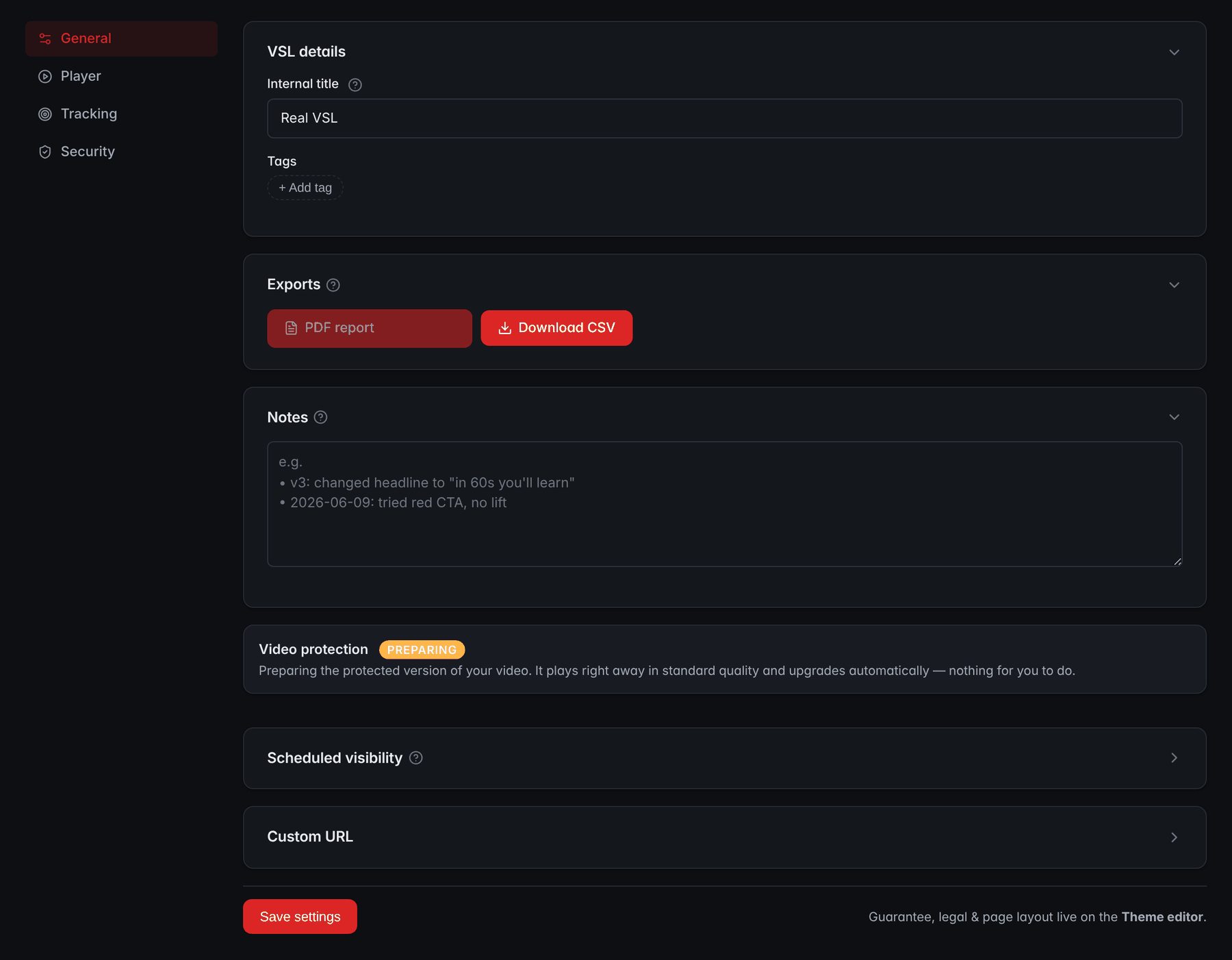
- Video protectionShows whether the protected version of the video is ready. Here it is still being prepared, and the VSL plays in standard quality until then.
- Scheduled visibilitySets a time for the page to go live or expire, so a leaked link to a retired version stops showing your VSL.
Layer 3: How do you stop other sites from embedding your VSL?
Hotlinking is the quiet theft. Another site embeds your player or points at your stream, so your video plays on their page while your bandwidth pays for it. A domain allowlist tells the player to refuse to play anywhere except the domains you list.
List every domain your funnel touches: the VSL domain, presell and advertorial domains, staging and any page builder you embed on. Wildcards cover every subdomain of a domain you own. The failure to watch for is a missing domain, where the video quietly stops working on a presell nobody re-checked after a domain change. RevvyScales restricts each VSL to the domains you list, with wildcard support, and adds connected custom domains automatically (embed security).
Retire old URLs too. Test versions and expired promotions can keep circulating in forums and swipe files. Scheduled visibility lets a page expire at a set time, so a leaked link to a retired version stops showing your VSL (scheduled visibility).
Layer 4: Can you stop someone from screen recording your VSL?
No. On the open web, any video a screen can show can be captured by recording software or filmed with a phone. What you control is what the copy looks like. An image laid over the video, such as your logo, your brand's web address or a compliance mark like "Paid advertisement", appears in every recording. It tells viewers of the copy where it came from and makes the copy less useful to anyone who wants to pass it off as theirs.
Where you place the mark is a trade-off:
- Corner marks are unobtrusive but easy to crop out.
- Marks closer to the subject survive cropping but compete with your presenter or product for attention.
- Timed marks split the difference: show the mark through key stretches, such as the demo and the pitch, rather than every second.
- Keep it small and semi-transparent. Honest viewers come first; the mark should be legible in a copy, not loud in the original.
- Use a compliance mark if your claims depend on a disclaimer, so a re-upload carries that context with it. What a disclaimer has to do is covered in the VSL compliance guide.
RevvyScales' video watermark (Growth plan and up) is an image overlay you position, size and time (video watermark). Protection is also one item on the VSL player checklist, next to the features that sell.
Layer 5: How do you find copies and get them taken down?
A 15-minute weekly monitoring routine
- Search the web for two or three distinctive sentences from your headline and script, in quotation marks.
- Search public ad libraries for your product name, brand and key phrases.
- Run a reverse image search on your poster and a few key frames.
- Check your web analytics referral reports for traffic from domains you don't own.
- Keep dated originals: master files, script drafts and captures of the published page. They're your evidence.
How to send a DMCA takedown notice
Under U.S. law, a hosting provider keeps its safe harbor only if it has designated an agent to receive notices and "responds expeditiously" to valid ones by removing or disabling access to the material (17 U.S.C. 512). Find the agent in the Copyright Office's DMCA Designated Agent Directory, or use the platform's own form. A valid notice contains six elements:
The six elements of a valid DMCA notice
0 of 6 done
Two more rules matter. If the uploader files a counter-notice, the provider restores the material 10 to 14 business days later unless you notify it that you've filed a court action against the uploader. And anyone who knowingly and materially misrepresents infringement is liable for damages, so don't file against reviews, commentary or other uses that may be fair use.
Platforms add their own processes. YouTube accepts removal requests through YouTube Studio or by email, fax or mail, lets you schedule a removal to take effect in seven days so the uploader can act first, and warns that misusing the process can get your account terminated (YouTube copyright removal). Google says it complies with DMCA notices and asks for a separate notice for each product where the content appears (Google legal help).
What does VSL protection cost you?
Every measure has a cost to someone. Good protection puts nearly all of it on the thief.
What each measure costs, and the verdict
UseBaseline
- Encrypted HLS with short-lived keys. Cost to honest viewers: nothing visible. Cost to a thief: high for casual copying. Verdict: baseline.
- Domain allowlist. Cost to honest viewers: nothing, if every funnel domain is listed. Cost to a thief: blocks embedding elsewhere. Verdict: baseline; audit after domain changes.
SometimesAdd when it matters
- Watermark. Cost to honest viewers: slight visual clutter. Cost to a thief: every copy carries your mark. Verdict: add when copies appear or a compliance mark matters.
SkipSkip for a sales VSL
- Right-click and keyboard blocking. Cost to honest viewers: annoyance. Cost to a thief: next to none. Verdict: skip.
- An email gate before the pitch. Cost to honest viewers: fewer viewers reach the offer. Cost to a thief: little. Verdict: wrong tool for theft.
- Full DRM. Cost to honest viewers: more setup and device testing. Cost to a thief: highest, though camera copies remain. Verdict: for paid content, not sales videos.
When you compare hosts, put protection questions on the list: whether an MP4 is ever exposed, how keys are delivered and whether playback can be locked to your domains. The full vendor question list is in the guide to choosing VSL hosting software.
A 20-minute VSL protection checklist
Work through it with your VSL open; the ticks are kept in this browser:
A 20-minute VSL protection checklist
0 of 10 done
Frequently asked questions
Can you stop people from screen recording a VSL?
No. Anything a screen can display can be recorded by software or filmed with a phone, and no browser setting changes that. What you can do is make the copy carry your mark with a watermark, keep the original stream encrypted so nobody gets a clean file, and get recordings taken down when they're reposted. Treat any promise of record-proof web video as a red flag.
Is AES-128 HLS encryption the same as DRM?
No. AES-128 encryption scrambles each video segment, and the player fetches a key to unscramble it, so the protection depends on how that key is delivered. Short-lived, signed key URLs stop copied links from working, but a skilled attacker can still capture a key during a session. DRM systems such as Apple's FairPlay Streaming add secure key exchange and protected playback, at the cost of a key server and more setup.
Does disabling right-click protect my video?
No. Right-click blocking hides one menu, but the video's address is still visible in the browser's developer tools and network log, and download extensions don't need the menu at all. It also frustrates honest visitors who right-click to open links in new tabs. Spend that effort on streaming without a file URL, encrypting the stream and restricting embeds instead.
Can a competitor legally copy my VSL idea?
Usually, yes. U.S. copyright protects your expression, meaning the exact video, script and page copy, but not facts, ideas, systems or methods. A competitor can write their own VSL around the same mechanism or angle without infringing. Copying your footage or your script word for word is different, and that's what takedown notices are for. This isn't legal advice; ask a lawyer about close cases.
How fast does a DMCA takedown work?
The law doesn't set a fixed number of days. A provider that wants its safe harbor must respond expeditiously to a valid notice, and large platforms run their own forms and queues. If the uploader files a counter-notice, the provider restores the material 10 to 14 business days later unless you tell it you've filed a court action. Complete notices with exact URLs are the easiest to act on.
Do I need to register my copyright to send a takedown notice?
No. In the U.S., copyright exists from the moment a work is created and fixed, and the six elements of a takedown notice don't include a registration number. Registration matters if you want to sue over a U.S. work, because the Copyright Office says you must register before bringing an infringement lawsuit. If a VSL is central to your business, ask a lawyer whether registering it makes sense.
Sources
- RFC 8216: HTTP Live Streaming — IETF
- 17 U.S.C. Chapter 5, including Section 512 — U.S. Copyright Office
- DMCA Designated Agent Directory — U.S. Copyright Office
- What Does Copyright Protect? (FAQ) — U.S. Copyright Office
- Copyright in General (FAQ) — U.S. Copyright Office
- Submit a copyright removal request — YouTube Help
- FairPlay Streaming — Apple Developer
- Decide to use signed URLs or signed cookies — Amazon CloudFront Developer Guide