
What is a VSL? The video sales letter explained: anatomy, formats, funnel and metrics
A plain-English explainer of the video sales letter: what a VSL is and what the letters stand for, the seven parts of the script, the formats, where it sits in a funnel, how the page differs from a normal video page, when not to use one, and the numbers that show it's working.
On this page
- What does VSL stand for?
- How a VSL works: three layers, not one video
- The anatomy of a VSL: seven parts and what each one does
- VSL formats: which style fits your offer?
- How is a VSL page different from a normal video page?
- Where does a VSL sit in a funnel?
- Why do VSLs work?
- When is a VSL the wrong tool?
- How long is a VSL?
- Which metrics show a VSL is working?
- A short history of the VSL
- VSL terms you'll hear
- How to make your first VSL: a 10-step plan
- Frequently asked questions
A VSL, or video sales letter, is a scripted video that sells one offer through a complete sales argument delivered in a fixed order: hook, problem, story, mechanism, proof, offer and close. It plays on a page built for a single decision, where the buy button usually appears only when the offer does and each sale is tracked back to the ad that paid for the visit.
What does VSL stand for?
VSL stands for video sales letter. The name comes from direct mail, where a sales letter was a long, personal-sounding letter that sold by argument: it opened with a promise, described a problem, told a story, proved its claims and asked for the order. A VSL keeps that argument and moves it to video, with a presenter, a voiceover or words on screen doing the talking.
In marketing, the VSL meaning is narrow. A VSL is not any video that mentions a product. It is a direct-response format: one offer, one audience, one requested action, and a result you measure in sales rather than views.
Here is how that sets it apart from the other videos a business makes:
A VSL next to other business videos
Each kind of video has its own job, its own ending and its own measure
Other videos
- Brand film. Its job: be remembered. It ends with a logo. Judge it by reach and recall.
- Explainer. Its job: show how something works. It ends with a link to learn more. Judge it by clicks or sign-ups.
- Product demo. Its job: prove a feature. It ends with an invitation to try. Judge it by trials started.
- Webinar. Its job: teach, then pitch. It ends with Q&A and an offer. Judge it by attendance and sales.
Direct responseVSL
- Its job: sell one offer.
- It ends with: a buy button.
- Judge it by: revenue per visitor.
People also use "VSL" for the whole page: the headline, the video and the offer block. That's fair, because in VSL marketing the page around the video is half of the format.
How a VSL works: three layers, not one video
A finished VSL is three layers stacked together. Most advice covers only the first.
- The argument. The script: the order of ideas that moves a stranger from "not for me" to "I'll buy". Most of the selling happens here, and our VSL script guide covers it step by step.
- The delivery. How the argument reaches the viewer: a presenter, words on screen, animation or footage, plus voice, pace and edit. Delivery decides whether people listen long enough for the argument to work.
- The page. The headline above the video, how the player starts, when the offer and the button appear, what happens when someone pauses or comes back, and how each sale is tied back to its ad.
The layers fail in different places, which makes them useful for diagnosis. If viewers leave in the first 30 seconds, look at the hook and the first frames. If they leave in the middle, look at the argument. If they reach the offer and don't click, look at the offer and the proof behind it. If they click and don't buy, look at the checkout. Treat the VSL as "just the video" and you hide most of these problems. The next three sections take the layers in order: the argument, the delivery, then the page.
The anatomy of a VSL: seven parts and what each one does
Copywriters name the parts differently, but the jobs stay the same across niches. Here they are, with fictional example lines for an imaginary smart watering timer, and what each part's failure looks like in your data.
The seven parts of a VSL
Open a part to see its job and what its failure looks like in your data
1Hook
What happens: It earns the next minute and signals who the video is for.
What goes wrong:
- A steep drop in the first 30–60 seconds; few taps for sound.
2Problem
What happens: It names the problem in the viewer's words.
What goes wrong:
- Early exits from viewers who don't recognize themselves.
3Story
What happens: It gives the problem a person and keeps curiosity open.
What goes wrong:
- A slow, steady slide through the middle.
4Mechanism
What happens: It explains why the problem exists and why this works.
What goes wrong:
- Drops during the explanation, or weak clicks at the pitch.
5Proof
What happens: It makes the claims believable.
What goes wrong:
- Weak clicks even when many viewers reach the pitch.
6Offer
What happens: It shows what they get, the price and the guarantee.
What goes wrong:
- A sharp drop at the price.
7Close
What happens: It asks for one action and answers the last objections.
What goes wrong:
- Viewers watch past the pitch without clicking.
1. Hook
The hook is the first 5 to 30 seconds. It doesn't explain anything. It makes the right viewer want the next minute, usually with a specific problem, a surprising claim you can back up, or a story already in motion. Example: "If your timer watered on schedule and your tomatoes still split, the schedule was the problem." On autoplay pages the hook works twice: silently, through captions or text on screen, and again from the first word once the viewer taps for sound.
2. Problem
Name the problem the way the viewer would describe it to a friend, then make its cost concrete: money, time, frustration, risk. The viewer should think "that's me" before you mention any product. Example: "You've replaced plants you didn't kill. The weather did, because your timer waters by the clock, not by the soil."
3. Story
A story gives the problem a human face and carries attention through the middle of the video. It can be the presenter's own experience or a real customer's, told with permission. Start it at the moment of trouble, not at the beginning of someone's life, and let each scene leave a question that the next one answers.
4. Mechanism
The mechanism is the reason the problem exists and the reason this solution works when others didn't. In crowded markets it does much of the persuading, because buyers have heard every promise and need a new reason to believe. It has to be true and explainable in plain words. Example: "A probe six inches down tells the valve when the roots are actually dry, so it skips watering after rain."
5. Proof
Proof makes the claims believable: demonstrations, real customer results shared with permission, honest before-and-after footage, credentials, and sources for factual claims. Proof only counts if it supports the specific claim you made. Testimonials must be real. The FTC's Endorsement Guides, revised in 2023, say an endorsement must reflect the endorser's honest opinion and that a paid connection usually needs a clear disclosure. The FTC's separate rule on fake reviews and testimonials bans fake ones, including AI-generated testimonials from people who don't exist. (This is general information, not legal advice.)
6. Offer
The offer is what the viewer gets, what it costs and why the price is fair: the product, any bundles or bonuses, the guarantee and the terms. On a well-built page the offer block appears at the same second the video reveals it, so the price on the page always matches the price in the video.
7. Close
The close asks for one action, says exactly what happens after the click, restates the main reasons and answers the last objections. Many VSLs add a second close after the first call to action, built from real customer questions, for viewers who are interested but not yet sold. Urgency belongs here only if it's real: a deadline that actually ends, stock that actually runs out.
VSL formats: which style fits your offer?
The same argument can be delivered in very different ways. Choose the format by what your proof needs and what you can produce well.
Six VSL formats
What each one looks like, when it fits and what to watch out for
Text on screen ("slides")
Words on a plain background, highlighted as a voiceover reads them.
- Best when: you need speed and low cost, and the argument is strong.
Watch out for: monotony over long runtimes; small text on phones.
Talking head
One presenter speaking to camera.
- Best when: the presenter is part of the proof: founder, expert, practitioner.
Watch out for: every rewrite means a reshoot; energy has to last.
Presenter plus b-roll
The presenter intercut with footage of each claim.
- Best when: the product can be demonstrated.
Watch out for: footage that decorates instead of proving.
Animated
Illustration or motion graphics with a voiceover.
- Best when: the mechanism is abstract or invisible.
Watch out for: it can feel like an explainer; slow and costly to revise.
UGC-style
Looks like a customer or creator filming on a phone.
- Best when: social traffic, where native-looking video fits in.
Watch out for: paid creators and actors must not pose as ordinary customers.
Mini-VSL
A compressed version, roughly 2–10 minutes.
- Best when: low prices, warm traffic, retargeting, upsells.
Watch out for: too little explanation for cold traffic.
A practical rule: use the cheapest format that can show your proof. If the proof is a demonstration, you need footage. If it's an argument, a well-paced slides VSL can carry it. If the presenter is the proof, film the presenter. For annotated openings in several formats, see our VSL examples.
How is a VSL page different from a normal video page?
A normal video page is built for watching. A VSL page is built for one decision, and that changes almost every detail.
Standard video page vs VSL page
The same video, built for watching or built for one decision
Standard video page
- Goal: views and watch time.
- Start: click to play.
- Turning sound on: continues from the current point.
- Buy button: always visible, or none.
- Surroundings: menus, links, other content.
- Pausing: a frozen frame.
- Coming back: usually starts over.
- Measurement: views, average watch time.
- Tracking: page analytics.
VSL page
- Goal: one purchase or booking.
- Start: muted autoplay with a clear "tap for sound" prompt.
- Turning sound on: restarts at 0:00 so the viewer hears the hook.
- Buy button: hidden until the pitch, then shown with the offer.
- Surroundings: no navigation; one way forward.
- Pausing: a pause screen that gives a reason to continue.
- Coming back: resumes where the viewer left off.
- Measurement: retention by the second, pitch retention, revenue per visitor.
- Tracking: ad click to sale: pixels, server-side events, click IDs.
The silent start follows a browser rule. Chrome's autoplay policy, in place since Chrome 66 in April 2018, always allows muted autoplay but allows sound only after the visitor interacts with the site or meets other engagement conditions. So VSL players start muted and ask for a tap.
That's why hosting a VSL takes more than a video file on a server. You need adaptive streaming that starts fast on a phone connection, protection against the file being downloaded and re-uploaded elsewhere, a player with the mechanics compared above, conversion tracking, and retention data by the second.
RevvyScales is built for that job: uploads are transcoded into an adaptive HLS stream (1080p, 720p and 480p) served from a CDN, streams are AES-128 encrypted so the page never exposes a downloadable MP4 (though no web video can be made impossible to screen-record), and the offer, guarantee and button stay hidden until the pitch second you set. For what to demand from any host, read our guides to VSL hosting and VSL player features.
This is how such a page looks in the RevvyScales theme editor, block by block:
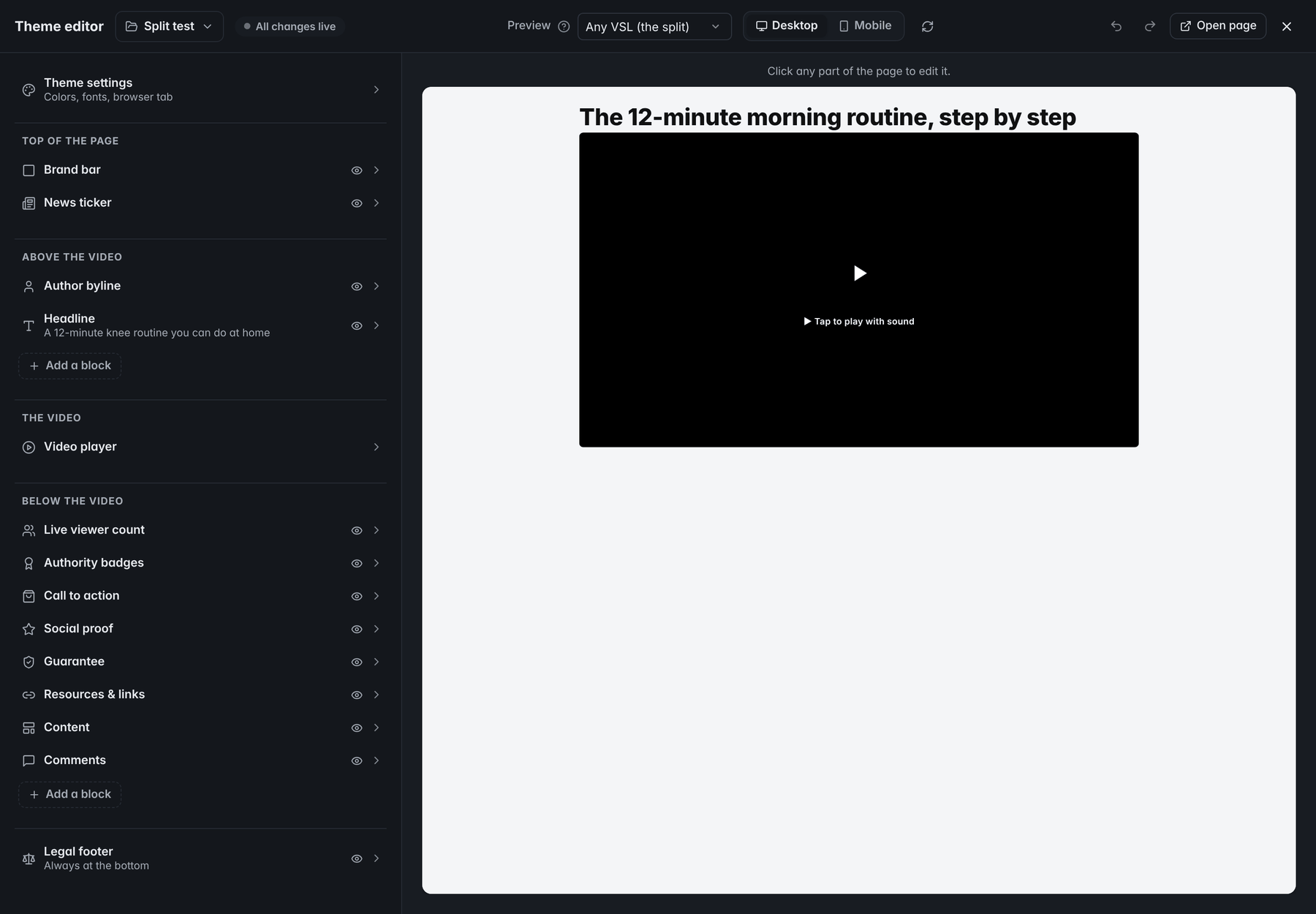
- Above the videoBlocks placed here show above the player, the headline among them.
- Tap for soundA first-time viewer's tap on this prompt restarts the video from 0:00 with sound.
- Call to actionThis block holds the offer and the button, which can stay hidden until the pitch second you set.
- Legal footerThe disclaimer, privacy policy and terms sit here, always at the bottom of the page.
Where does a VSL sit in a funnel?
A VSL is rarely the first thing a buyer sees. A typical paid-traffic funnel runs like this:
A typical paid-traffic funnel
- AdStops the scroll and makes a promise the VSL will keep. Its job is the right click, not the most clicks.
- Presell (optional)A short article, advertorial or listicle that warms cold traffic before the video.
- VSL pageMakes the sale: headline, video, and the offer revealed at the pitch.
- CheckoutOn your store or cart platform, often with an order bump.
- Upsells and downsellsOne-click offers after the first purchase, often with short VSLs of their own.
- Thank-you page and follow-upDelivery and onboarding for buyers; email or retargeting for non-buyers, ideally segmented by how far they watched.
Each handoff must keep two things intact: the message (the promise in the ad is the promise in the video) and the tracking (the click that started the visit is still attached when the sale happens). High-ticket offers often swap the checkout for a booked call. The full map is in our video sales funnel guide.
Why do VSLs work?
No format converts on its own. VSLs hold their place in direct response because of a few plain mechanisms:
- Sequence control. On a text page, a reader can jump straight to the price. In a video, the viewer meets the problem before the solution and the value before the cost, in the order the argument was built.
- One thing at a time. A VSL page has no menu, sidebar or second offer. Attention can go forward or leave, nowhere else.
- Voice and face. Tone, pace and conviction come through without effort. A presenter who knows the subject can earn trust that a paragraph has to work hard for.
- Self-selection. The viewers still watching at the pitch chose to spend minutes with your argument, so the offer reaches a smaller, warmer group.
- Testability. The whole sale happens on one page, so you can split traffic between versions and read the result in revenue.
The same mechanisms carry costs. Sequence control frustrates people who already want to buy. Video is slower to edit than text. And a video can't be skimmed like a page; its spoken words don't become page text unless you publish a transcript. We weigh these trade-offs in VSL vs sales page.
When is a VSL the wrong tool?
A VSL persuades strangers. Use something else when:
- The buyer has already decided. Reorders, returning customers and people searching your brand name need a product page or a direct checkout link, not twenty minutes of argument.
- The product sells on specs. When buyers compare sizes, compatibility or features, give them a page they can scan and a table they can compare.
- The sale needs a conversation. Custom pricing and high-ticket services close on calls. A VSL can still qualify people and pre-sell the call.
- The market expects teaching first. Some audiences buy after a training session with live questions; compare the formats in VSL vs webinar.
- You can't track sales. If you can't tie a sale to its visit, you can't tell a winning VSL from a losing one. Fix tracking before you film.
- The claim can't be proven. A VSL amplifies whatever you say. If the promise can't be substantiated, a better video only spreads the problem faster.
Run the VSL fit test on your own offer, one question at a time:
The VSL fit test
If the first two answers are yes and at least two of the other three are too, a VSL is a strong bet
Does the buyer need persuading, not just information?
Is there a story or mechanism that takes more than a paragraph to explain?
Will most traffic arrive cold or lukewarm from ads?
Does each sale earn enough to pay for testing?
Can you track every sale back to its visit?
Does each sale earn enough to pay for testing?
Can you track every sale back to its visit?
Best fit
A VSL is a strong bet
The buyer needs persuading, the story or mechanism takes more than a paragraph to explain, and at least two of these are true: most traffic arrives cold or lukewarm from ads, each sale earns enough to pay for testing, and every sale can be tracked back to its visit.
Best fit
Start with a simpler page
The buyer doesn't need persuading, the argument fits in a paragraph, or fewer than two of these are true: most traffic arrives cold or lukewarm from ads, each sale earns enough to pay for testing, every sale can be tracked back to its visit.
Read more: VSL vs Sales Page: When Video Beats Text
How long is a VSL?
Anywhere from about two minutes to well past half an hour. Length follows three things: price (more money asks for more reasons), awareness (people who already know the problem and the solutions need less explaining) and traffic temperature (cold ad clicks need more trust than your email list does). The number to protect is time-to-pitch: how long someone must watch before the offer appears.
For planning, scripts typically run at about 140 to 160 spoken words per minute; the National Center for Voice and Speech puts average American English speech at about 150 words per minute. So a 1,500-word script runs about 10 minutes and a 4,500-word script about 30. Time a read-aloud with your presenter before you record. The decision table is in how long should a VSL be, and short formats are covered in mini-VSLs.
Which metrics show a VSL is working?
Views tell you almost nothing. Read these numbers in order and they show where a VSL wins or leaks:
| Metric | Formula | What it tells you |
|---|---|---|
| Play rate | Visitors who started the video ÷ unique visitors | Whether the page earns a start (with muted autoplay, nearly everyone "plays") |
| Unmute rate | Visitors who tap for sound ÷ unique visitors | Whether the headline, poster and first seconds earn attention |
| Hook retention | Viewers left at 30 and 60 seconds ÷ viewers who started | Whether the hook works |
| Pitch retention | Viewers at the pitch second ÷ viewers who started (with muted autoplay, viewers who unmuted) | Whether the argument holds people to the offer |
| Pitch reach | Visitors who reached the pitch ÷ unique visitors (play or unmute rate × pitch retention) | How much of your traffic hears the offer |
| CTA click rate | Button clicks ÷ viewers at the pitch | Whether the offer persuades |
| Checkout conversion | Orders ÷ button clicks | Whether checkout friction or price surprise loses buyers |
| Revenue per visitor (RPV) | Revenue ÷ unique visitors | What each visit is worth: the verdict |
| Earnings per click (EPC) | Revenue ÷ button clicks | What each click on the button is worth |
Here's an illustrative week. An ad set sends 5,000 visitors. 2,300 tap for sound, a 46% unmute rate. 920 of those are still watching when the offer appears: 40% pitch retention, counted from the unmute, so the pitch reach is 18% of all visitors (46% × 40%). 110 click the button, 12% of the viewers at the pitch, and 55 buy a $69 offer, a 1.1% conversion rate; 14 of them also take a $39 upsell. Revenue is 55 × $69 + 14 × $39 = $4,341, so RPV is $0.87 and EPC is $39.46.
An illustrative week, stage by stage
One ad set, a $69 offer
- Visitors5,000
- Tapped for sound46% of the step before2,300
- Still watching when the offer appears40% of the step before920
- Clicked the button12% of the step before110
- Bought50% of the step before55
The question is then whether $0.87 per visitor covers what a visitor costs you, plus product costs and fees. If it doesn't, compare each stage with your own history and fix the biggest drop first. There is no universal "good" pitch retention or click rate; your own baseline is the benchmark. The full metric tree, with formulas and first fixes, is in VSL metrics explained.
Put your own stages in to see where a change would move revenue per visitor. It starts at the week above: on a muted-autoplay page the play rate is your unmute rate, the click rate is 110 ÷ 920 (11.96%), and the average order is $78.93 because of the upsells ($4,341 ÷ 55):
Calculator
VSL funnel calculator
From visitors to revenue, one stage at a time. Each rate is a share of the stage before it.
- Pitch reach (visitors who see the pitch)
- 920 of 5,000 visitors
- Orders
- Conversion rate
- orders ÷ unique visitors
A change at any stage multiplies through to revenue per visitor: 10% more viewers at the pitch means 10% more orders while the later rates hold. Take every number from one traffic source and one period, so the stages describe the same visitors.
A short history of the VSL
The VSL is a new form of an old idea. Direct-response advertisers spent a century learning to sell in print and to measure every reply. Claude Hopkins, whose Scientific Advertising was published in 1923, tested headlines, offers and propositions against one another and tracked responses with coupons. Later copywriters such as Eugene Schwartz described how a message must match what the reader already knows. Infomercials then showed that a long, scripted pitch could sell on screen.
The online VSL, as marketers use the word today, is usually traced to copywriter Jon Benson. On episode 44 of the I Love Marketing podcast in 2011, he described how, after his talking-head videos disappointed him, he made a video of words on a screen, with no face, to sell his Every Other Day Diet, and he called himself the format's inventor. He also said he taught the approach to Ryan Deiss, who later made a course on it, and that many people believe Deiss created it. The fuller story is in who invented the VSL.
VSL terms you'll hear
A quick glossary of the words used across VSL work and in our guides:
| Term | What it means |
|---|---|
| Hook | The first seconds of the video, built to earn the next minute |
| Lead | The opening of the script; writers often test several leads on one body |
| Big idea | The single concept the whole VSL is built around |
| Mechanism | Why the problem exists and why this solution works |
| Pitch | The moment the offer and price are first presented |
| Pitch reveal | Showing the offer block and buy button at the pitch second |
| Offer stack | Everything the buyer gets, presented piece by piece |
| Second close | More answers and a repeated call to action after the first one |
| Presell | A page before the VSL that warms up cold traffic |
| Unmute rate | The share of visitors who tap for sound |
| Pitch retention | The share of viewers who started (or, with muted autoplay, unmuted) who are still watching at the pitch |
| Pitch reach | The share of all visitors who reach the pitch |
| RPV | Revenue per visitor: revenue divided by unique visitors |
| EPC | Earnings per click on the buy button |
How to make your first VSL: a 10-step plan
Work through the steps in order and tick each one off; the ticks stay in this browser:
Your first VSL in 10 steps
0 of 10 done
Frequently asked questions
Is a VSL the same as a sales video?
Not quite. Any video that promotes a product can be called a sales video. A VSL is a specific direct-response format: a scripted, complete sales argument for one offer, played on a page built for one action, with the result measured in sales. A product demo or brand film can support a sale, but it doesn't take a stranger from first attention to a buying decision on its own.
Do VSLs still work?
Be wary of any answer that comes with an industry-wide number. Results depend on the offer, the price, the traffic and the execution, so averages across all of them mean little. What hasn't changed is the mechanism: one argument, delivered in a fixed order, to one viewer at a time. Treat your VSL as a hypothesis, track it from ad click to sale, and judge it by revenue per visitor.
Can I make a VSL without showing my face?
Yes. The text-on-screen format, often called a slides VSL, uses words on screen with a voiceover and no presenter, and it is one of the cheapest ways to start. Voiceover over footage and animation also work. If you use an actor or an AI avatar, don't present them as a customer or an expert they are not; under the FTC's Endorsement Guides, endorsements must be honest and not misleading.
What's the difference between a VSL and a webinar?
A VSL is a recorded sales video that someone can watch the moment they click. A webinar is a longer teaching session that people register for and attend at a set time, live or as a replay. VSLs skip the registration and show-up steps, which suits cold paid traffic. Webinars suit offers that need teaching or live questions before a larger purchase.
Can you use a VSL for high-ticket or B2B offers?
Yes, but the job changes. For expensive or complex offers, the VSL often doesn't close the sale. It qualifies the viewer, explains the mechanism, handles common objections and asks the right people to book a call. B2B buyers who must convince colleagues also need something they can forward, so pair the video with a written summary or a full transcript.
Where should I host a VSL?
On a host built for selling one offer rather than for growing a video audience. Look for adaptive streaming that starts fast on phones, muted autoplay that restarts from the beginning when sound is turned on, a buy button you can time to the pitch, protection against downloads and unauthorized embeds, pixel and server-side conversion tracking, and retention analytics by the second.
Sources
- Episode #44: The one with Jon Benson (video sales letters) — I Love Marketing
- Autoplay policy in Chrome — Chrome for Developers
- Voice Qualities tutorial — National Center for Voice and Speech
- FTC's Endorsement Guides: What People Are Asking — Federal Trade Commission
- Federal Trade Commission Announces Final Rule Banning Fake Reviews and Testimonials (Aug. 14, 2024)
- Claude C. Hopkins — Wikipedia