
Delayed CTA button: when to reveal the buy button in a VSL
A delayed CTA button keeps the buy button hidden until your VSL reaches the offer. Here is why that works, how to pick the exact reveal second, what should appear with the button, and how to tell from your numbers whether the timing is right.
On this page
- Why VSLs use a delayed CTA button
- When should a delayed CTA button appear?
- What should appear with the button?
- Where should the CTA button go on mobile?
- Should returning viewers and warm traffic see the button earlier?
- How to measure your CTA timing
- Common delayed CTA button mistakes
- A 20-minute CTA timing checklist
- Frequently asked questions
Reveal the buy button at the second your VSL first presents the offer and its price: not earlier, and not at the end. Before that point, a visible button invites viewers to jump to a price they haven't been sold on. After it, every second of delay costs you viewers who were ready to buy. Take the second from your final edit and check it against your retention graph.
Why VSLs use a delayed CTA button
A VSL is one argument in a fixed order: problem, story, mechanism, proof, offer. The price only makes sense after the value. A delayed CTA button is how the page respects that order, and it's one of the core VSL player features. A button visible from the first second breaks the order in three ways:
- It invites skipping. Viewers click through to see the price before the video has given them a reason to pay it, and a price seen without context is easy to dismiss.
- It splits attention. A button and an offer block under the video pull eyes and scrolling away from the presentation.
- It blurs your data. A clean reveal turns "reached the pitch" into a measurable moment, so you can see where the funnel leaks.
The delay has a cost too. Some buyers decide early, especially returning visitors and warm traffic, and a hidden button makes them wait. The rest of this guide is about keeping the benefits without paying more of that cost than you need to.
When should a delayed CTA button appear?
Reveal at the pitch second: the first moment the video presents the offer with its price. Not when the product is first named, not at the guarantee, and not at the final close.
How to find and set it:
How to find and set the reveal second
- Find the line in the scriptIt's usually a transition such as "Here's everything you get when you order today", followed by the price.
- Read the exact timestamp off the final exportScript estimates drift once the video is cut, and a reveal that's 40 seconds off lands in the middle of the story or after the price.
- Choose your leadRevealing a few seconds before the price is spoken means the button is ready when the viewer is. Revealing exactly on the price keeps the moment clean. Both are defensible: pick one, write it down, and test the other later.
- Check it against the retention graphNote what share of starting viewers are still watching at that second. That's your pitch retention, and it caps how many people can ever see the button.
- Re-check after every change to the edit, the intro or the playback speedTrim 40 seconds from the first act and the pitch moves 40 seconds earlier.
What if few viewers reach the pitch?
Then the problem sits upstream, in the video. Say a 32-minute VSL has its pitch at 24:10, and 1,000 viewers start it. The retention graph shows 190 still watching at 24:10: 19% pitch retention. About 12% of them click the button, roughly 23 clicks.
Who is still watching when the button appears
Illustrative curve for a 32-minute VSL with its pitch at 24:10: share of starting viewers still watching
Minutes into the video
Show the numbers
| Minutes into the video | Still watching |
|---|---|
| 0:00 | 100% |
| 4:00 | 58% |
| 8:00 | 44% |
| 12:00 | 35% |
| 16:00 | 28% |
| 20:00 | 23% |
| 24:10 | 19% |
| 28:00 | 17% |
| 32:00 | 15% |
Revealing the button at 12:00 would show it to more people, but most of them haven't heard the mechanism or the proof yet, so many of the extra clicks would come from people who only want to see the price.
The better fix is to cut slack from the first 24 minutes. Trim six minutes of repeated story and the pitch lands at 18:10. If 260 of 1,000 viewers now reach it and the same 12% of them click, CTA clicks rise from about 23 to about 31, from the same traffic and the same offer. How to read a retention graph shows how to find the slack.
In RevvyScales the offers, guarantee and CTA stay hidden until the pitch second you set, so the button appears exactly when the price is revealed, and the retention chart marks that second so you can read pitch retention at a glance (player conversion features).
What should appear with the button?
The reveal is the moment your page turns from a video into an offer. What appears should match what the video is saying, in the order the viewer needs it:
| Page element | Before the pitch | At the pitch | Why |
|---|---|---|---|
| Headline and video | Yes | Yes | The frame for everything else |
| Buy button | No | Yes | Appears as the price is presented |
| Offer block with bundles and prices | No | Yes | Mirrors the offer in the video |
| Guarantee | No | Yes | Answers the risk objection at the price |
| Terms that qualify the price | No | Yes, beside the price | Shipping, subscription and conditions sit next to the claim |
| FAQ | Optional | Yes, below the offer | Handles last objections for readers |
| Real customer comments | Optional | Optional | Only genuine comments, used with permission |
| References | Optional | Yes | Sources for claims made in the video |
| Legal footer | Yes | Yes | Disclaimer, privacy and terms always available |
Two rules matter more than layout:
- The price on the page must match the price in the video. If the video says three bottles for one price and the offer block shows another, buyers notice, and the mismatch turns into abandoned checkouts, refunds and chargebacks. If you split-test prices, use a cut of the video that doesn't name a price, or one video per price. On the Growth plan and up, RevvyScales offer split tests rotate bundles and prices by weight inside one VSL, sticky per viewer, so check this before every price test (offer split tests).
- Terms go beside the price, not in the footer. The FTC's guidance on digital disclosures tells advertisers to place a disclosure "as close as possible to the triggering claim" (.com Disclosures, 2013). A subscription, a shipping charge or a conditional guarantee is part of the offer. This isn't legal advice; see VSL compliance and the FTC's own pages.
For building the offer itself, see the VSL offer guide.
Where should the CTA button go on mobile?
On a phone the video sits at the top and takes the full width. When the reveal fires, the button has to appear where the viewer already is: directly under the video, inside the first screen.
- Insert below the video, never above it. Content that appears above the player pushes the video down mid-sentence.
- Make it big. WCAG 2.2 sets a minimum target size of 24 by 24 CSS pixels for pointer targets (success criterion 2.5.8). That's a minimum, not a goal for your most important button. Make the buy button full width with generous height.
- Say what happens next. "Choose my package" or "Get 3 bottles" tells the viewer more than "Submit".
- Leave it in place once it appears. Viewers who keep watching through the guarantee and the closing section should find it without hunting.
- Test the moment on a real phone. Watch to the pitch second on an actual device and confirm the button shows up without scrolling.
Should returning viewers and warm traffic see the button earlier?
Answer a question or two to find the reveal for your VSL and what to measure:
When should the button appear?
By the kind of VSL and who is watching it
What kind of VSL is it?
Who is watching it?
Best fit
Early, then repeated
A mini-VSL of a few minutes: the button can appear early and repeat. Measure CTA click rate and RPV.
Read more: Mini VSL: How to Script, Time and Test a Short VSL
Best fit
At the first pitch, then keep it visible
A long VSL with several closes: reveal once at the first pitch and keep the button visible, since later segments may restate the offer, and add a second button lower on the page, beside the FAQ, for readers. Measure clicks after each close.
Best fit
At the pitch second
A long VSL watched by cold traffic: reveal when the video first presents the offer with its price. Measure pitch retention and RPV.
Best fit
Test earlier than the pitch
A long VSL watched by a warm list or retargeted visitors, who may not need the full build-up: test an earlier reveal against the standard timing. Measure RPV by source.
Best fit
Resume where they stopped
A returning viewer of a long VSL resumes where they stopped instead of sitting through the argument again to get back to the offer. Measure revenue from return visits.
The delay exists to protect a first viewing. Some visitors don't need that protection:
- Returning viewers. Someone who watched to the pitch yesterday has already heard the argument. In RevvyScales, returning viewers resume from the deepest point they watched, so they don't sit through the first 20 minutes again to get back to the offer.
- Warm traffic. Email subscribers and retargeted visitors who have seen the VSL before may not need the full build-up. Consider a separate VSL with an earlier reveal for those sources, and test it against the standard timing.
- Short VSLs. In a mini-VSL of a few minutes, the button can appear early and repeat. See the mini-VSL guide.
- Long VSLs with several closes. In a 45-minute VSL, the first close comes at the pitch, and later segments may restate the offer. Reveal once at the first pitch and keep the button visible. Add a second button lower on the page, beside the FAQ, for readers.
How to measure your CTA timing
Four numbers tell you whether the timing works:
- Pitch retention = viewers at the pitch second ÷ viewers who started. Multiply it by play rate and you get pitch reach: visitors who reached the pitch ÷ unique visitors.
- CTA click rate = CTA clicks ÷ viewers who reached the pitch.
- EPC (earnings per click) = revenue ÷ CTA clicks.
- RPV (revenue per visitor) = revenue ÷ unique visitors.
RPV is the judge; the other three tell you where to look.
Here's why clicks alone mislead. Say you test two timings on 10,000 visitors each, at a $120 average order. Version A reveals the button at the price. Version B reveals it 90 seconds earlier, before the price is spoken.
Two reveal timings, 10,000 visitors each
Illustrative test at a $120 average order
Higher RPVA: reveal at the price
- CTA clicks: 410
- Orders: 82
- Revenue: $9,840
- EPC: $24
- RPV: $0.98
More clicksB: reveal 90 seconds early
- CTA clicks: 520
- Orders: 78
- Revenue: $9,360
- EPC: $18
- RPV: $0.94
B wins on clicks and loses on money: more people saw the button, but the extra clicks look like viewers who wanted to see the price, not buy. With about 80 orders per side, a gap like this could easily be noise, so you'd keep the test running. The lesson is which number gets the vote.
When RPV moves, the other numbers point to the cause:
- Pitch retention dropped: the content before the pitch lost people, or the pitch moved later in a re-edit.
- CTA click rate dropped: the offer presentation or the button placement isn't working.
- EPC dropped: the clicks are coming from less-committed viewers, or the checkout is losing them.
Run timing tests with sticky assignment, on the same traffic, for full weeks. In RevvyScales the practical setup is two versions of the VSL, same video and different pitch seconds, in one folder split by weight; analytics report pitch retention, CTA clicks, EPC and RPV for each. More on the formulas in revenue per visitor.
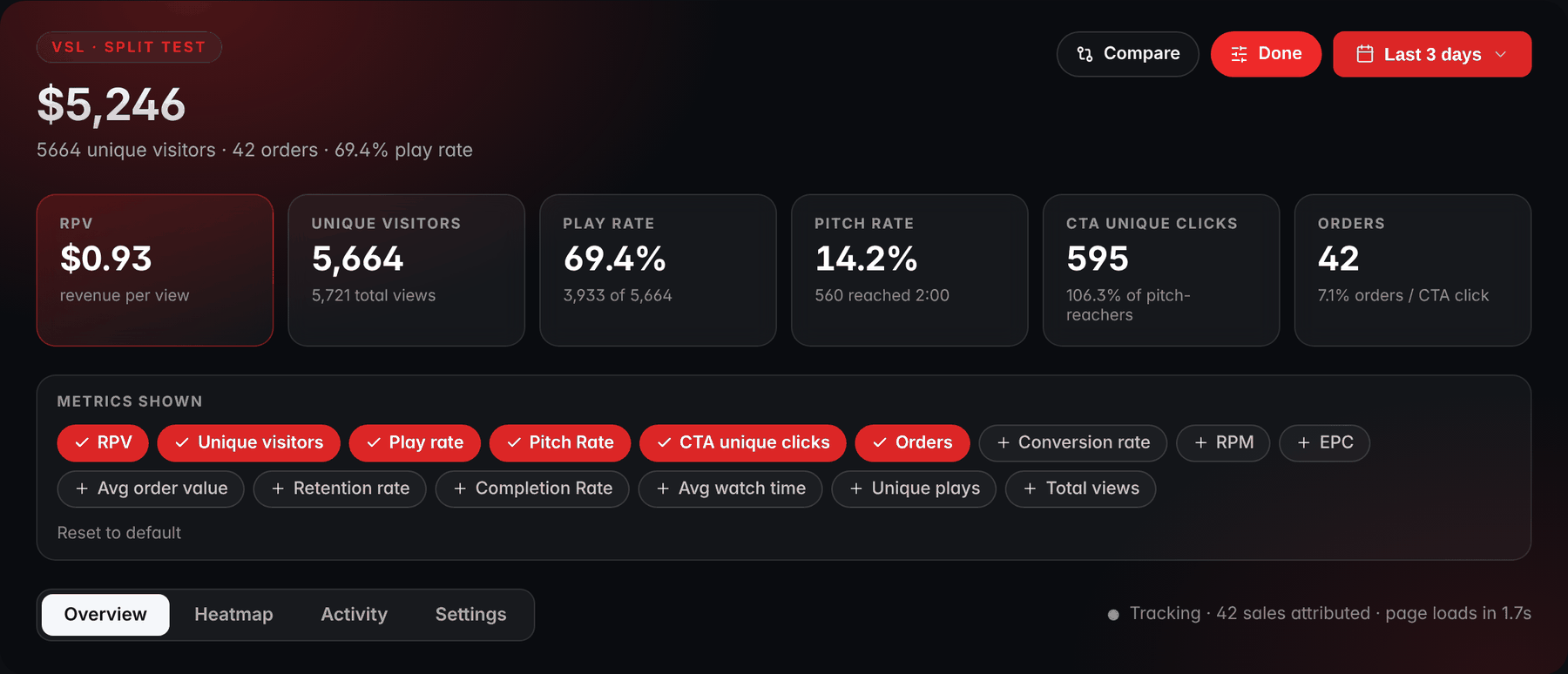
- RPVRevenue per view (RPV) is the number that judges a timing test.
- Pitch ratePitch rate is your pitch retention: the share of viewers still watching at the pitch second, here 2:00.
- CTA unique clicksCTA unique clicks shows how many viewers clicked the button.
- EPCEPC, earnings per CTA click, can be added to the band from the metrics picker.
Common delayed CTA button mistakes
| Mistake | What happens | Fix |
|---|---|---|
| Revealing at the end of the video | Many viewers have already left | Reveal when the offer is first presented |
| Setting the second from the script | The button lands mid-story or late | Read the timestamp off the final export |
| Not updating after an edit or speed change | The button drifts away from the price | Re-check after every change |
| Button below the fold on mobile | Viewers never see it | Insert it directly under the video |
| Page price differs from the video | Distrust, refunds, chargebacks | One source of truth for price |
| Terms only in the footer | Surprises at checkout | Terms beside the price |
| Fake countdown beside the button | Deceptive if the deadline isn't real | Show only real, enforced deadlines |
| Hiding the button again | Viewers lose it when they scroll | Once revealed, keep it visible |
Playback speed deserves a special mention. At 1.1x, a price spoken at 24:10 in the video arrives about two minutes sooner in real time. A reveal keyed to the video's own timeline stays on the price; one keyed to seconds since the page loaded lands late. Whatever tool you use, watch each speed variant to the pitch and confirm the button appears on the offer.
A 20-minute CTA timing checklist
Work through it in order; the ticks stay in this browser:
A 20-minute CTA timing checklist
0 of 8 done
Frequently asked questions
Should the buy button be visible from the start of a VSL?
For a long VSL on cold traffic, usually not. A button visible from the first second invites viewers to jump to a price they haven't been sold on, and it pulls attention away from the video. For short videos, warm audiences and returning viewers, an earlier or always-visible button can make sense. If you're unsure, split-test both and judge by revenue per visitor, not by clicks.
How do I show a button after a certain time in a video?
You need a player that reports its playback position and a page that reacts to it. In a custom build, you listen for the video element's time updates and reveal the button once playback passes your chosen second. In RevvyScales you enter the pitch second for the VSL and the page handles the reveal. Either way, key the reveal to the video's timeline, not to seconds since the page loaded, so pauses and slow starts don't throw it off.
Does a delayed CTA lose impatient buyers?
It can cost you a few buyers who decide early, which is why the delay should end exactly at the offer, never later. Returning viewers should resume where they left off rather than rewatch, and warm traffic can get a version with an earlier reveal. Measure it: if a test with an earlier button lowers revenue per visitor, the impatient buyers weren't the bigger group.
What is a good CTA click rate for a VSL?
There's no trustworthy universal number, because it depends on price, offer, traffic and how you count. Calculate it as CTA clicks divided by viewers who reached the pitch, set your own baseline over a week, and improve against it. Then check earnings per click: a higher click rate with lower EPC usually means curiosity clicks, not more buyers.
Should the price be in the video or only on the page?
Usually both, and they must match exactly. Saying the price in the video makes the offer feel complete and lets the presenter justify it, while the page makes it easy to act. If you plan to test prices, either record a version that doesn't name the price or make one video per price, so the page never contradicts what viewers just heard.
Can I use a countdown timer next to the CTA?
Only if the deadline is real. A timer that resets on every visit, or a price-goes-up-tonight message that never happens, is deceptive, damages trust and invites refunds, chargebacks and regulatory trouble. If you have a genuine deadline, such as a launch window or a stock limit you will actually enforce, a timer that shows it truthfully is fine. Otherwise, let the offer stand on its value.