
VSL tracking: how to connect every sale to the ad, the page and the video
VSL tracking is the chain that ties a sale on your checkout back to the ad, the page and the moment in the video that earned it. This guide covers click IDs and UTMs, pixels versus server-side events, deduplication, why platform numbers differ from yours, and an end-to-end test.
On this page
- How does VSL tracking work, step by step?
- UTMs, click IDs and the rvs parameter
- Pixel or Conversions API: why use both?
- How deduplication keeps each sale counted once
- What should you track on a VSL page?
- Why don't Meta's numbers match your sales?
- How do you connect the checkout?
- How to test your VSL tracking end to end
- Privacy and consent basics
- A VSL tracking setup checklist
- Frequently asked questions
VSL tracking connects each sale to the ad that brought the visitor and to what they did on the page. The chain: the ad click carries a click ID and UTMs, the page stores them, each CTA click gets its own ID, the checkout reports the sale with that ID, and the sale returns to the ad platform through the pixel and a server-side event, deduplicated so it counts once.
How does VSL tracking work, step by step?
Six handoffs carry a sale from the ad to your reports, and each one can break:
From the ad click back to the ad platform
Six handoffs: open each one to see what happens there and what breaks it
1The ad click
What happens: The platform adds its click ID to the URL: Meta adds fbclid, and Google Ads auto-tagging adds gclid. Your own UTM parameters and campaign labels ride along.
Why it matters: The click ID lets the platform match a later conversion to the exact click.
What goes wrong:
- Click IDs rewritten, lowercased or truncated on their way through redirects. Meta's click ID is case-sensitive.
2The landing
What happens: The page reads those parameters and stores them before the visitor moves on.
Why it matters: A buyer who clicks on Monday and returns on Thursday may arrive with no trace of the click, unless you stored it on your server or carried it forward in your own links.
What goes wrong:
- If the page doesn't store them, the trail ends here.
3The video
What happens: Plays, unmutes, watch milestones and the pitch moment are recorded against the same visitor.
Why it matters: These are the moments that explain revenue.
4The CTA click
What happens: The click gets its own ID, passed in the checkout URL so the order can be matched to this visit.
What goes wrong:
- Each extra redirect between the CTA and the payment page is a chance to lose the click ID.
5The checkout
What happens: The thank-you page or a store webhook reports the order, its value and the click ID back to your tracking.
What goes wrong:
- A thank-you page that fires the purchase again on reload.
6Back to the ad platform
What happens: The purchase goes to Meta, Google or TikTok through the browser pixel and, for Meta, a server-side Conversions API event, so the platform can attribute it and optimize delivery.
What goes wrong:
- The pixel and the server report the same purchase without the same event name and ID, and duplicates sneak in.
In RevvyScales, pixels for Meta, Google and TikTok are set once on a folder or VSL, and each CTA click gets a click_id that the checkout's thank-you page or a store webhook reports back with the sale (conversion tracking).
UTMs, click IDs and the rvs parameter
Three kinds of URL parameters do different jobs:
Three kinds of URL parameters
UTM parameters
- Who sets it: you
- What it's for: labeling source, medium, campaign and creative in analytics
Click IDs (fbclid, gclid)
- Who sets it: the ad platform
- What it's for: letting the platform match a later conversion to the exact click
rvs
- Who sets it: you, via RevvyScales
- What it's for: attributing sales to campaign, ad set and ad in your VSL analytics
Google Analytics treats utm_source, utm_medium and utm_campaign as the parameters you should always use, with utm_content to tell creatives apart and utm_term for paid keywords (Google's UTM guide). Google describes auto-tagging, which appends the gclid, as required for measuring how ad clicks turn into conversions with Google Ads conversion tracking or Google Analytics, and notes that some browsers need it to track conversions at all (About auto-tagging).
Meta's click ID is case-sensitive. Meta documents how to build its fbc value from the fbclid in the landing URL when no cookie exists, and how to send it with server events (ClickID and the fbp and fbc parameters). Never rewrite, lowercase or truncate click IDs on their way through redirects.
For ad-level revenue inside your VSL analytics, add the rvs parameter to every ad URL (setting up the rvs parameter). Keep one naming pattern for campaigns, ad sets and ads (lowercase, no spaces, a hook or angle ID in the ad name) so reports still join up months later.
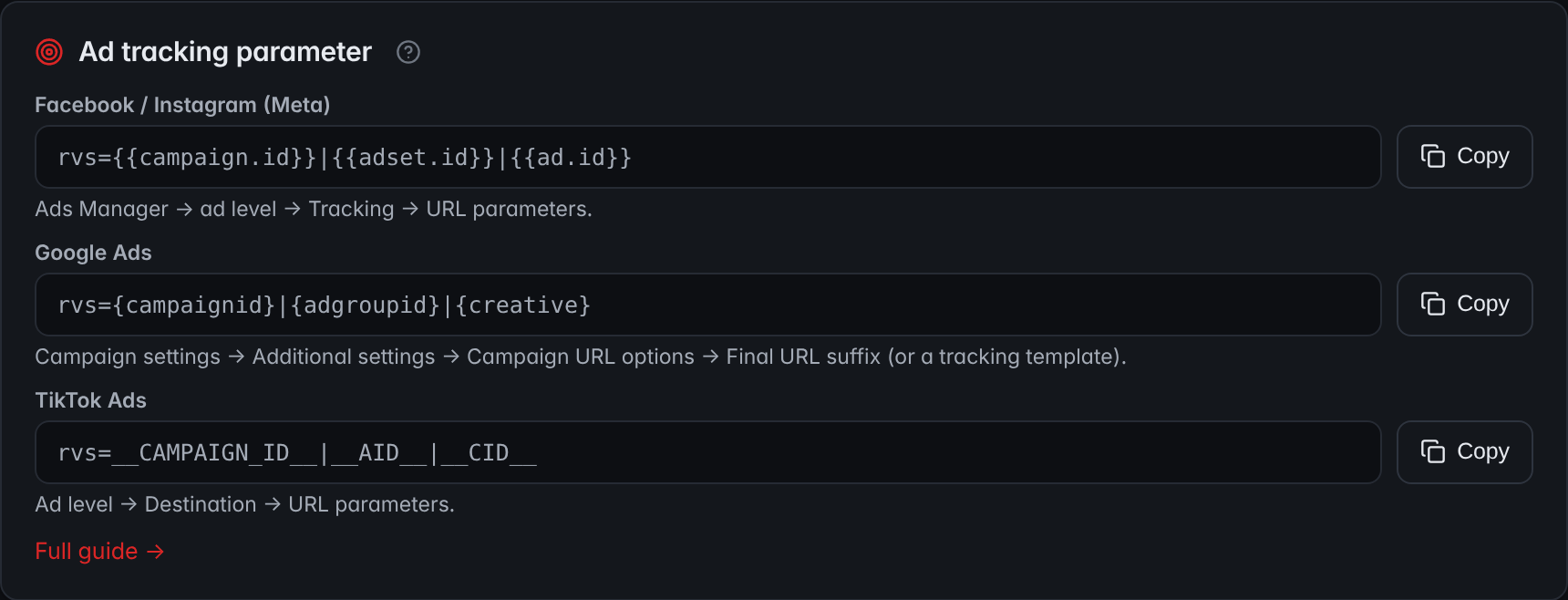
- MetaThe Meta line carries the campaign, ad set and ad IDs. It goes in Ads Manager at the ad level, under Tracking → URL parameters.
- Google AdsThe Google Ads line goes in the campaign's Final URL suffix, under Additional settings → Campaign URL options, or in a tracking template.
- TikTok AdsThe TikTok line goes at the ad level, under Destination → URL parameters.
Pixel or Conversions API: why use both?
A browser pixel is a script on your page that reports events from the visitor's browser. It's easy to install, and it sees what happens on the page. Its weakness is that the browser has to cooperate: ad blockers, privacy settings, consent choices and visitors who leave before the script loads all cost you events.
Browser privacy rules also shorten the memory of a click. Safari's Intelligent Tracking Prevention deletes cookies created by JavaScript after seven days without user interaction on the site. When a visitor arrives from a domain it classifies as a cross-site tracker through a link carrying a click ID, it caps cookies the landing page creates in JavaScript at 24 hours (WebKit tracking prevention). A buyer who clicks on Monday and returns on Thursday may arrive with no trace of the click, unless you stored it on your server or carried it forward in your own links.
A server-side event goes from your server or platform straight to the ad platform. Meta describes its Conversions API as a connection from an advertiser's server, website platform, app or CRM to Meta's systems (Conversions API overview), and recommends running it alongside the pixel, a setup it calls "redundant". When the checkout or a store webhook reports the sale to your server, the server event doesn't depend on the visitor's browser at all.
Use both. The pixel catches on-page behavior and gives the platform browser signals; the server event gets purchases through even when the browser blocks the pixel.
In RevvyScales, the pixels are set once, in the Tracking settings of a folder or VSL:
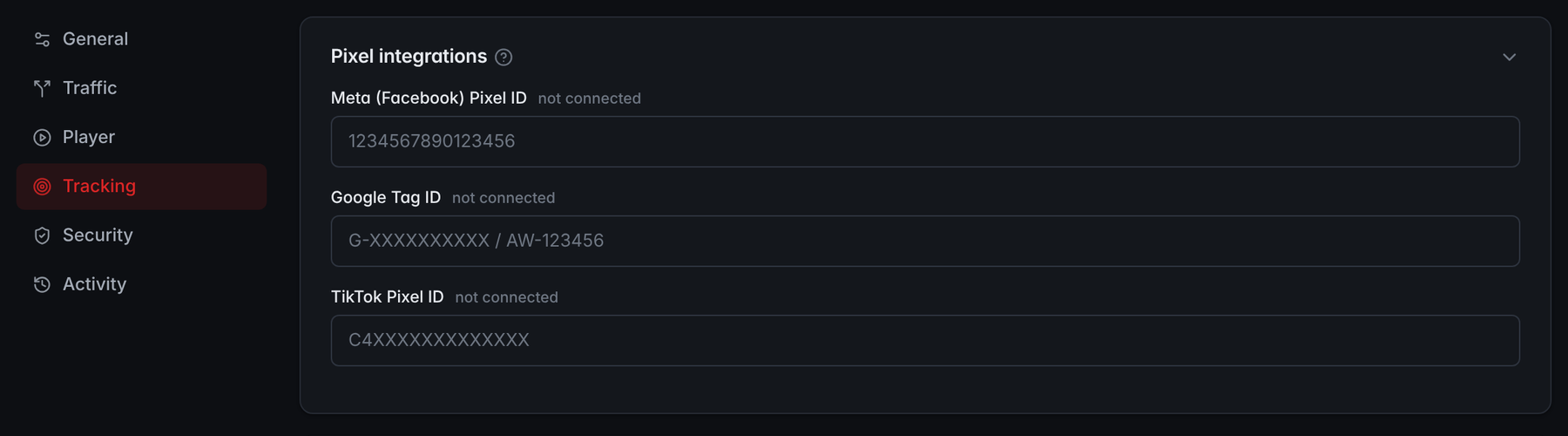
- TrackingThe pixels are set once, in the Tracking tab of the settings.
- One ID per platformThere is one field each for the Meta pixel, the Google tag and the TikTok pixel, and each shows whether it is connected.
How deduplication keeps each sale counted once
When the pixel and the server both report the same purchase, Meta needs to know it's one sale. Meta's recommended method is to send the same event name from both sources and the same ID: the pixel's eventID must match the server event's event_id (handling duplicate pixel and Conversions API events). When matching events reach the same pixel within 48 hours, Meta keeps one, generally the first it receives, and discards the rest. Events with the same ID that arrive more than 48 hours after the first are not deduplicated.
Meta also documents a fallback that matches on the fbp cookie or an external ID. It generally works only when the browser event arrives first, and it does nothing when only one source sends events.
The common ways duplicates sneak in:
One purchase, two reports
Meta keeps one purchase when both copies share the event name and the ID and arrive within 48 hours
Counted twiceHow duplicates sneak in
- Two systems sending the same purchase server-side, such as a store's own Meta integration and your VSL tracking, each with its own event ID. Meta sees two sales.
- An order ID used as the event ID in one place and a random ID in another.
- Different event names, such as Purchase from the pixel and a custom "Order" event from the server.
- A thank-you page that fires the purchase again on reload.
Counted onceHow to keep one
- Pick one sender per event, or make the senders share the ID.
- The IDs must match exactly.
- Send the same event name from both sources.
- Fire it once per order, and use the order ID as the event ID so the browser and server events always share one ID.
Meta's Events Manager has an Event Deduplication tab that reports the share of deduplicated events, and Meta says events should show up in Events Manager within about 20 minutes of sending (verifying your setup). On the Growth plan and up, RevvyScales sends purchases to Meta through the Conversions API with deduplication, so each sale reaches Meta once (Meta Conversions API setup).
What should you track on a VSL page?
Track the moments that explain revenue, not every scroll:
| Event | What it tells you | Use it for |
|---|---|---|
| Unique visitor | The denominator for every rate | Revenue per visitor, play rate |
| Play and unmute | The page earned attention | Headline and poster tests |
| Watched 25%, 50%, 75% | Where interest fades | Retention fixes, follow-up by watch depth |
| Pitch reached | The visitor heard the offer | The key leading indicator |
| CTA click, with its click ID | Purchase intent | Offer tests, earnings per click |
| Lead captured, if you use a gate | A contact for follow-up | Email sequences |
| Purchase, with value and order ID | Revenue | Revenue per visitor, ROAS, ad optimization |
For a sales VSL, the purchase event with its value is the one to get right first, because it's usually what you optimize the ads for. Earlier events like pitch reached are useful for audiences and diagnostics; the guide on running Facebook ads to a VSL covers when optimizing for an earlier event makes sense.
RevvyScales analytics report play rate, pitch retention, CTA clicks, orders, revenue per visitor and earnings per click, with a second-by-second retention chart. On Growth plans and up, webhooks can send CTA click, watched 25/50/75%, pitch reached, completed and lead captured events to tools like Zapier, Make or Klaviyo (webhooks and CRM events), so follow-up emails can depend on how much of the video someone watched.
Why don't Meta's numbers match your sales?
They measure different things, and some gap is normal. The usual reasons:
- Attribution settings. Meta credits a purchase to an ad according to the ad set's attribution setting: a window of days after a click and, if included, after a view or an engaged video view (ad set reference). Your checkout records every order, whenever it happens.
- View-through credit. A buyer who saw the ad but arrived another way can count in Meta's report and not in your click-based attribution.
- Lost signals. Blocked pixels, expired cookies and devices the platform can't connect leave sales unattributed.
- App tracking limits. In iOS 14.5 and later, apps need the user's permission through Apple's App Tracking Transparency framework to track them, and Apple's definition of tracking includes linking app data with other companies' websites for advertising measurement (Apple developer guidance). iOS 14.5 shipped in April 2021, and Meta changed its reporting in response, including dropping 28-day attribution windows from its API (Meta's April 2021 changelog).
- Time zones and currency. An ad account in one time zone and a store in another put the same sale on different days.
- Refunds. The platform keeps the purchase; your net revenue doesn't.
- Duplicates. A deduplication failure inflates the platform's count.
A practical rule: use checkout and server-side numbers for money decisions (profit, revenue per visitor, which VSL wins), and use platform numbers to compare ads inside that platform and to feed its optimization. Reconcile weekly. Say your checkout shows 180 orders attributed to Meta by click ID and Meta reports 150 purchases for the same week: Meta is seeing about 83% of your sales. Use that ratio to read Meta's intraday numbers until the next check. RevvyScales has a help page on why live sales and ad orders can differ.
The weekly reconciliation
Same week, same time zone
Meta's share of your salespurchases Meta reports ÷ checkout orders attributed to Meta by click ID
Example: Meta reports 150 purchases and your checkout shows 180 orders, so Meta is seeing about 83% of your sales. Use that ratio to read its intraday numbers until the next check.
How do you connect the checkout?
The sale has to come back from wherever the buyer pays. RevvyScales integrates with Shopify, Whop and CartPanda, and works with any checkout that can report the click_id back from its thank-you page. Whatever the platform, the checkout needs to pass back five things:
- The click ID from the CTA click, unchanged.
- The order ID, so repeats can be recognized.
- The value, defined one way and kept that way (for example, product revenue before tax and shipping).
- The currency.
- The product or bundle, so you can see which offer sold.
Pass the click ID through every redirect between the CTA and the payment page. Each extra hop is a chance to lose it, so test the exact path a buyer takes, including upsell pages. Store-specific details, such as bundles, product costs and Shopify's own Meta integration, are covered in the VSL for Shopify guide.
In RevvyScales, the three integrations sit side by side in Settings:
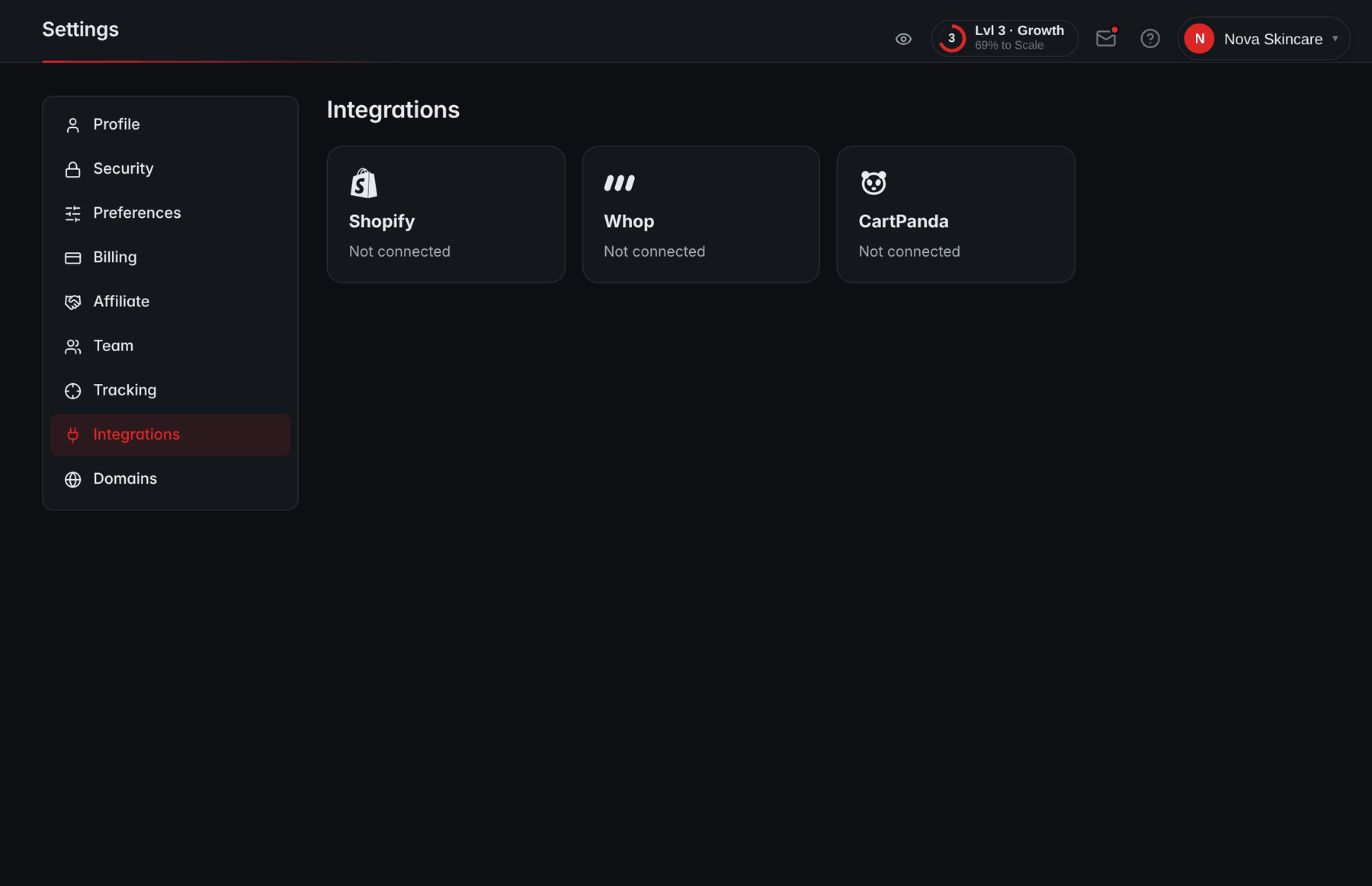
- IntegrationsIntegrations sits in Settings, between Tracking and Domains.
- Shopify, Whop and CartPandaEach checkout has its own tile, which shows whether it is connected.
How to test your VSL tracking end to end
Run this before you scale and after any change to the page, the checkout or the domain:
- Build a real ad URL with your UTMs and rvs parameter, and open it on a phone over mobile data.
- On desktop, confirm the pixel loads using the Meta Pixel Helper, a Chrome extension that flags pixels that fail to load or have errors (Meta Pixel Helper).
- Watch past the pitch and click the CTA. Check that the checkout URL carries the click ID.
- Buy a low-priced product or bundle with a real card, then refund it.
- Confirm the order appears in your checkout, in your VSL analytics under the right campaign and ad, and in Meta Events Manager within about 20 minutes.
- Check that the purchase was deduplicated rather than counted twice.
- Reload the thank-you page and confirm no second purchase is recorded.
- Repeat once on an iPhone in Safari and once with an ad blocker on, to see what still reaches you.
Privacy and consent basics
Tracking rules depend on where your visitors are. In the EU, for example, cookies used for behavioral advertising or analytics need the visitor's consent before they're set, consent has to be informed and specific to each purpose, and withdrawing it must be as easy as giving it (Your Europe: cookies). Other countries and US states have their own rules. For a health or supplement funnel, the My Health My Data Act shows what one state law and the FTC's cases mean for ad pixels.
This isn't legal advice. At a minimum, use a consent tool where the law requires one, describe your tracking in your privacy policy, and make sure your setup respects each visitor's choice. Server-side tracking changes how data travels, not whether you need permission to collect it, so ask your counsel how the rules apply to your setup.
A VSL tracking setup checklist
Tick these off as you set up; the ticks stay in this browser:
Tracking setup, end to end
0 of 8 done
For how these numbers feed decisions once they're flowing, see the VSL metrics guide.
Frequently asked questions
What is Event Match Quality in Meta?
It is Meta's score, out of 10, for how well the customer information sent with your server events can be matched to Meta accounts. You can check it for each event in Events Manager. It matters because only matched events can be used for ad attribution and delivery optimization, and Meta's guidance is that the higher the match quality, the better. Treat a low score as a prompt to review which customer details your server events include.
Should the purchase event fire from the thank-you page or a webhook?
Ideally both, with one shared event ID. The thank-you page can fire the browser pixel, which gives Meta browser signals, while a store webhook reports the order from server to server, so it still arrives if the buyer closes the tab or blocks scripts. Use the order ID as the event ID in both places so Meta deduplicates them into one purchase.
Can Meta report more purchases than my store?
Yes. View-through attribution can credit an ad for a sale you attribute elsewhere, a failed deduplication can count one order twice, a time zone difference can move sales into another day, and refunded orders stay counted on the platform. If Meta regularly reports more purchases than your checkout records, check deduplication first, then compare the attribution setting with your own click-based numbers.
What is the fbclid parameter?
It is the click ID Meta adds to your URL when someone clicks an ad. Meta uses it to connect later events to that click, and you can send it back with server events as part of the fbc value. It is case sensitive, so never change or truncate it. Store it when the visitor lands so it survives until the purchase.
How long does a test purchase take to show in Meta Events Manager?
Meta says you should be able to verify server events in Events Manager within about 20 minutes of sending them. Make your test purchase, wait that long, then check that the purchase arrived and that the browser and server copies were deduplicated into one. If nothing shows up, check the pixel ID, the server connection or integration, and whether the checkout actually reported the order.
Does iOS 14.5 still affect VSL tracking?
Yes. Since iOS 14.5, released in April 2021, apps must ask permission through Apple's App Tracking Transparency before tracking people across other companies' apps and websites, including for ad measurement. When people decline, ad platforms see less of what happens after the click, so some sales are harder for them to attribute. Server-side events and stored click IDs help keep your own records complete.
Sources
- User Privacy and Data Use — Apple Developer
- iOS 14.5 release announcement (April 26, 2021) — Apple Newsroom
- Handling Duplicate Pixel and Conversions API Events — Meta for Developers
- ClickID and the fbp and fbc Parameters — Meta for Developers
- Graph API changelog, April 27, 2021 — Meta for Developers
- URL builders: Collect campaign data with custom URLs — Google Analytics Help
- Tracking Prevention in WebKit — WebKit
- Online privacy: How to use cookies on your website — Your Europe