
Ecommerce landing page: when it beats a product page, the five types, and what goes on one from top to bottom
An ecommerce landing page is built for one product and one campaign, with nothing else to click. This post covers when it beats your store's product page, the five types and when each fits, the sections of a product landing page in order, and how to test it by revenue per visitor.
On this page
- What is an ecommerce landing page, and how is it different from a product page?
- Why can a product page waste paid social clicks?
- What are the five types of ecommerce landing pages?
- What goes on a product landing page, from top to bottom?
- Speed and mobile: build the landing page for a phone first
- Landing page vs product page: how to test which one earns more
- Your landing page checklist before you spend on traffic
- Frequently asked questions
An ecommerce landing page is a page built for one product and one ad campaign, with nothing else to click. It repeats the ad's promise in the headline, shows proof, explains why the product works, presents the offer and a guarantee, and sends the visitor to checkout. Cold paid traffic needs that focused story more than browsing shoppers do, so test it against your product page by revenue per visitor.
What is an ecommerce landing page, and how is it different from a product page?
A product page lives inside your store. It has the header menu, the search box, the cart, links to collections and a row of related products. That's right for its job. A shopper who came from search, an email or a bookmark already wants something like your product, and the page has to answer their questions fast and let them add to cart or keep browsing.
An ecommerce landing page is built for a different visitor: someone who was scrolling a feed ten seconds ago and stopped for one ad. They didn't come to shop. One promise caught them, and the page has to carry that promise from "what is this?" to "I'll take three" without offering any way forward except the order.
Here is the difference side by side:
Product page vs landing page
Built for shoppersStore product page
- Visitors arrive with intent: search, email, returning customers
- Menu, search, collections and related products
- Specs, variants and reviews up front
- One page written for every traffic source
- Add to cart, then keep browsing
Built for one campaignEcommerce landing page
- Visitors arrive cold, from one ad with one promise
- No menu: the only way forward is the offer
- Story first: problem, proof, how it works
- A headline that continues one ad angle
- Bundles and a guarantee, then straight to checkout
Neither page is better everywhere. A landing page that wins on cold traffic can lose on branded search, where people already know the product and want the price, the variants and the reviews. So keep both: the product page for shoppers, and one landing page per campaign or ad angle.
Why can a product page waste paid social clicks?
A paid click costs the same whether the visitor leaves after three seconds or reads to the end. A product page can lose cold visitors for four reasons.
- The intent doesn't match. The page assumes the visitor came to buy this product. A feed click came to find out what the ad was about.
- The message doesn't match. The ad made one specific promise. The product page opens with the product name and a price, and the visitor has to work out how the two connect.
- There are exits everywhere. Menu, search, collections, related products and footer links are useful to a shopper. To a paid click, they're ways to leave before the offer.
- One page has to speak to everyone. A product page serves every traffic source at once, so its copy can't follow one ad's angle. You can build a landing page for each angle.
A before-and-after shows what message match means. A fictional ad for a no-pull dog collar says: "Your dog pulls because its collar lets it." The product page it links to opens with "No-Pull Head Collar, 4 sizes, $34". The landing page opens with "Your dog pulls because its collar lets it. Here's the 30-second fix that turns its head back toward you." The second headline continues the conversation the ad started. The first one starts a new conversation, and the visitor has to decide whether to join it.
The path a paid visitor walks should be short, and every step should repeat the same promise:
The path of a paid click
- AdMakes one promise
- PresellOptional: a listicle or advertorial for cold audiences
- Landing or VSL pageRepeats the promise, proves it, makes the offer
- CheckoutThe chosen bundle, already in the cart
- UpsellOptional: one relevant add-on
None of this means you should switch off a product page that already makes money on paid traffic. Build the landing page, then test it against the product page on the same ads, and let the numbers decide.
What are the five types of ecommerce landing pages?
Landing pages for physical products come in five common types. The main difference is how much warming they do before the pitch.
| Type | What it is | Fits when | Watch out for |
|---|---|---|---|
| Listicle | Numbered reasons ("5 reasons…"), each with a short blurb, ending in a link to the offer | Broad, cold audiences who aren't looking for a solution yet | Every reason must be true; label it as an ad if it reads like editorial |
| Advertorial | An ad written as an article: a problem story that ends at the product | Visitors who don't see themselves as having the problem yet | It must be identifiable as an ad; never imitate a news site or invent a byline |
| Product landing page | Headline, product in use, proof, how it works, offer, guarantee and FAQ, with no store around it | Problem-aware visitors; products that sell on photos, demos and reviews | If the copy doesn't follow one angle, it's a product page with the menu removed |
| VSL page | A video sales letter, with the offer revealed at the pitch | Products that need showing and explaining; consumables sold in bundles | It needs a video worth watching; judge it by revenue per visitor, not plays |
| Quiz | A few questions, then a result page with the product or bundle that fits | Ranges where the right choice depends on the buyer: sizes, skin types, goals | More pages to build, and every result needs its own honest pitch |
A practical rule: the less your visitor knows about their problem, the more of the page goes to the problem before the product appears. That's why the first two types usually sit in front of another page. A listicle or advertorial works as a presell, and its link goes to a product landing page or a VSL page, which does the selling. The VSL for ecommerce guide covers which products justify a video, and the quiz funnel guide covers routing visitors by their answers.
Listicles and advertorials need one more thing: a label. The FTC says an ad shouldn't suggest it's anything other than an ad, lists labels likely to be understood, such as "Advertisement" and "Paid Advertisement", and advises placing the disclosure in front of or above the headline (Native Advertising: A Guide for Businesses). The advertorial guide shows how to label one and still have it read well.
In RevvyScales, presells come in three templates: Presell (a short warm-up page), Advertorial and Listicle. Each presell's button can link to a VSL, a folder or any URL, and the funnel's pixels carry over from the folder, so you don't set them twice (presells). This is the presell list, with the three templates underneath:
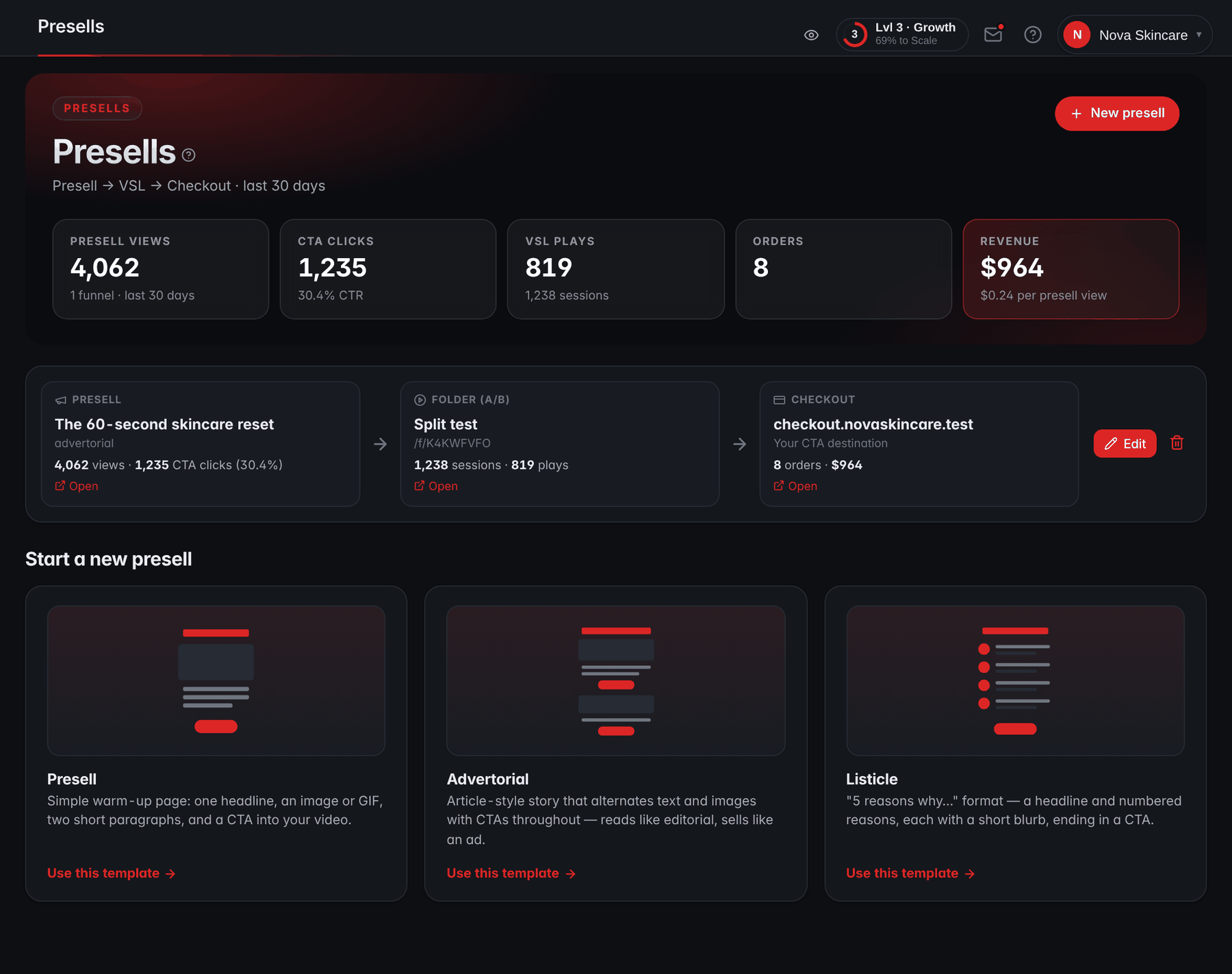
The band at the top sums every funnel's last 30 days, from presell views to orders, revenue and revenue per presell view. Compare that last figure with what the same ads earn per visitor when they go straight to the VSL. If the presell doesn't earn more, cut it: every extra page is one more place for a visitor to stop.
What goes on a product landing page, from top to bottom?
A product landing page answers the questions a buyer asks, in the order they ask them. Here's an order that suits most physical products, with the mistake to avoid at each step.
A product landing page, top to bottom
Open each section: what it does, and the common mistake
1Headline
What happens: Repeat the ad's promise, in the ad's words.
What goes wrong:
- The product name as the headline.
2The product in use
What happens: Show it doing the job on the first phone screen.
What goes wrong:
- A packshot on white where nothing happens.
3Early proof
What happens: Real reviews, a demo, a number you can back up.
What goes wrong:
- Review counts or star ratings you can't support.
4Problem and mechanism
What happens: Why the problem happens and why this fixes it.
What goes wrong:
- Claims you can't substantiate.
5How to use it
What happens: What to do, what to expect and when.
What goes wrong:
- Results buyers won't typically get.
6The offer
What happens: Bundles with per-unit prices and one recommendation.
What goes wrong:
- Five options, or reference prices you never charged.
7The guarantee
What happens: Remove the risk, in exact terms.
What goes wrong:
- Conditions hidden on the terms page.
8FAQ
What happens: Shipping, returns, ingredients or materials, sizing.
What goes wrong:
- Shipping times you can't meet.
9Checkout button
What happens: One destination, repeated after the offer and the FAQ.
What goes wrong:
- A "continue shopping" link.
10Footer
What happens: Contact details, policies, disclaimers.
What goes wrong:
- A contact form as the only way to reach you.
Two sections carry legal weight. If you call it a money-back or satisfaction guarantee, the FTC's guides say it should mean a refund of the full purchase price on request, with any material conditions disclosed (16 CFR Part 239). And if you state a shipping time, the FTC's Mail Order Rule expects you to have a reasonable basis for it; if you state none, it expects you to ship within 30 days (16 CFR Part 435). This isn't legal advice, and the primary sources are linked. Badges make claims too: our post on trust badges sorts the ones that reassure buyers at checkout from the ones that mislead.
The offer section deserves the most testing, because it sets the order value. Offer three bundles at most, show per-unit prices that reflect a real saving, and highlight one option with a reason. On a VSL page, the same section appears when the presenter reveals the price, not before.
On a RevvyScales VSL page, each of these sections is a block in the theme editor: headlines, the video, the bundle offer block, the guarantee, content sections for benefits, how it works, ingredients, testimonials and FAQ, and the legal footer (content blocks). You reorder them to match the questions your buyers ask.
Speed and mobile: build the landing page for a phone first
If your traffic comes from social feeds, check the device split in your analytics before you design anything. For feed traffic, design for a phone held upright, often on a cellular connection, in the hand of someone whose thumb is never far from the back button.
- The first screen decides. It needs the headline, the product doing its job and a reason to scroll. No pop-up on arrival.
- Weight is a cost. Compress every image, lazy-load what sits below the first screen, and stream video instead of loading a large file.
- Every script is a request. Each pixel, chat widget and review app adds load time. Keep only the ones you use.
- Size buttons for thumbs. Make them big and high-contrast, with the bundle and price stated on or next to them.
- Test like a buyer. Open the page on a mid-range phone over cellular data, not on office Wi-Fi.
The VSL page speed guide has the measuring method and a speed budget to hold the page to. On hosted RevvyScales pages, the poster image is preloaded from the page head, and large PNG and JPEG uploads are served as lighter JPEG copies, so an oversized picture doesn't hold back the first screen.
Landing page vs product page: how to test which one earns more
Test the two pages on the same traffic, with only the destination changed.
- Split before the click. Run two copies of the same ad with the same audience and budget, differing only in the URL, or use your ad platform's own A/B test tool if it has one.
- Keep everything else equal. Same offer, same prices, same checkout, same days.
- Run full weeks. At least two, so weekday and weekend buyers both count.
- Judge by revenue per visitor. Conversion rate alone misleads when one page sells bigger bundles.
A worked example with illustrative numbers. Each page gets 6,000 visitors from the same ads. The product page converts 1.7% (102 orders) at a $64 average order: $6,528, or $1.09 per visitor. The landing page converts 1.4% (84 orders), but its bundles lift the average order to $98: $8,232, or $1.37 per visitor. The landing page converts worse and earns 26% more per visitor.
Now take costs into account. Assume the same 45% contribution margin on both pages, after product, shipping and fees: the product page leaves $0.49 per visitor and the landing page $0.62. If a visitor costs $0.55 in ads, the product page loses 6 cents on every visitor and the landing page makes 7. Put your own numbers in:
Calculator
Revenue per visitor calculator
From one traffic source or one VSL over the same period.
- Conversion rate
- orders ÷ unique visitors
- Revenue
- Break-even cost per visitor
- the most a visitor can cost you
If one ad click brings one visitor, the break-even cost per visitor is also your break-even cost per click.
The break-even cost per visitor is the most a click can cost before the page loses money. If one page's figure sits above your real cost per click and the other's sits below it, you have your answer. Don't call a winner on a handful of orders; the revenue per visitor guide covers how much data a fair comparison needs. Once the landing page wins, it becomes the control, and the next test is a new headline or offer against it.
Your landing page checklist before you spend on traffic
Tick these off before the first dollar of ad spend. If you're building a whole store around a single product, the one product store post covers the pages and policies the rest of the store needs.
Before the first dollar of ad spend
0 of 12 done
Then run the landing page against your product page on the same ads, give it two full weeks, and keep the page that earns more per visitor.
Frequently asked questions
Do I need a separate website for an ecommerce landing page?
No. Put the landing page on a subdomain of your own domain, such as try.yourbrand.com, pointed at the page host. The page carries the brand without the store's navigation, every button links to the store's existing checkout, and the store itself stays as it is for shoppers who arrive from search or email. Buyers see one brand from the ad to the order confirmation.
Should an ecommerce landing page have a navigation menu?
Usually not. A menu gives a paid visitor ways to leave before they reach the offer, and on a page built for one product there is nowhere useful for it to go. Keep the footer links, though: contact details, refund and shipping policies, privacy policy and terms. Buyers check them before paying, and payment processors look for them when they review your site.
How long should a product landing page be?
As long as it takes to answer the buyer's questions in order, and no longer. A cheap product people already understand needs little beyond the promise, proof, offer and guarantee. A new product, a higher price or a problem the visitor doesn't fully see needs more: the mechanism, how to use it, more proof and a fuller FAQ. Watch where visitors stop scrolling, then cut or move what nobody reaches.
When should I send paid traffic to the product page instead?
When the visitor already knows the product. Branded search, retargeting of past buyers, emails to customers and shoppers comparing several products want specs, variants, reviews and the price, which a product page serves well. Cold social and native traffic needs the story first, which is the landing page's job. When in doubt, split the same ads between the two pages and compare revenue per visitor over two full weeks.
What is a good conversion rate for an ecommerce landing page?
There is no honest universal number. Conversion rate depends on the traffic source, the price, the offer and how much the visitor already knows, and a page that sells bigger bundles can convert less and still earn more. Compare the landing page with your own product page on the same traffic, and judge both by revenue per visitor, then by profit per visitor after ad cost.
Is it legal to make a landing page look like an article?
Yes, if it is clearly identifiable as an ad. The FTC's native advertising guide says an ad shouldn't suggest it is anything other than an ad, and lists labels such as Advertisement and Paid Advertisement, placed in front of or above the headline. Don't imitate a news site, invent a reporter or borrow a publication's branding, and keep every claim to what you can substantiate. This isn't legal advice.