
VSL landing page design: what goes above the video, what appears at the pitch and what to leave out
A VSL landing page has two jobs: get the video played, then put a clear, credible offer in front of the viewer when the pitch lands. This guide gives you the layout before and after the pitch, a mobile wireframe in words, the trust elements that hold up and a checklist.
On this page
- What makes a VSL landing page different from a normal landing page?
- What should a VSL landing page look like before the pitch?
- What should appear at the pitch?
- How do you stop visitors leaking off a VSL page?
- Which trust elements belong on a VSL landing page?
- How fast does a VSL landing page need to load?
- Common VSL landing page mistakes
- A block-by-block VSL landing page checklist
- Frequently asked questions
A VSL landing page is the page that hosts your video sales letter and turns its pitch into orders. A sound default: a headline above the video, the video at the top on mobile, nothing that leads away, and an offer block, guarantee and FAQ that appear when the pitch begins. Below them sit real proof, references and a legal footer.
What makes a VSL landing page different from a normal landing page?
A normal landing page argues in text. Visitors skim, and the call to action is visible from the top. On a VSL landing page the video carries the argument, and the page's job is to support it, then change state at the pitch. That changes almost every design decision.
Typical landing page vs VSL landing page
Typical landing page
- Main content: Copy sections
- Call to action: Visible from the start
- Navigation: Often present
- Proof: Throughout
- Success metric: Conversion rate
VSL landing page
- Main content: The video
- Call to action: Revealed at the pitch
- Navigation: Removed
- Proof: Mostly after the pitch
- Success metric: Pitch reach and revenue per visitor
The player itself, from muted autoplay to the timed reveal, is covered in the VSL player features guide. This guide is about the page around it.
What should a VSL landing page look like before the pitch?
Before the pitch, everything on the page exists to get the video started and keep it playing. Here is the wireframe for a phone, top to bottom:
The phone wireframe before the pitch, top to bottom
- No header bar, or a logo that doesn't link anywhereA clickable logo is an exit.
- The headlineOne promise, written for the ad that brought the visitor, two or three lines at phone width. The VSL headline guide covers formulas and testing.
- The videoFull width, directly under the headline.
- One optional line under the videoA sub-headline that adds a reason to keep watching. Never fake urgency.
- Nothing else until the pitchExcept the legal footer at the very bottom.
On desktop, keep the same order, centered, with the video taking most of the content width and no sidebar.
Check the first screen with arithmetic
At 390 pixels wide, a 16:9 video is about 219 pixels tall. Add a three-line headline at roughly 34 pixels per line plus some spacing, and the headline and the whole video take about 360 pixels, comfortably inside the first screen. A 9:16 portrait video at full width is about 693 pixels tall, which may leave no room for the headline once the browser's toolbars take their share. If you serve a portrait cut to phones, shorten the headline or cap the video's height, then check on a real phone that the headline and the bottom of the video are both visible without scrolling.
What about content below the video before the pitch?
It depends on how warm the traffic is.
What goes below the video before the pitch?
Who is landing on the page?
Best fit
Nothing but the legal footer
Cold paid social traffic: anything readable competes with the video.
Best fit
Optional "what you'll learn" bullets
Warm traffic from email or retargeting: they trust you; give them reasons to finish.
Best fit
A text-version link, if a test supports it
Visitors who prefer reading: a text version serves readers, but reveals the pitch early.
The read-instead option deserves a real test, not a guess. It serves visitors who will never watch a 20-minute video, and it also lets watchers skip straight to the price. Judge it by revenue per visitor, not by clicks on the link.
What should appear at the pitch?
When the presenter starts the offer, the page switches to order-form mode. The blocks, in order:
- The offer block, mirroring the script exactly: the same bundles, prices, bonuses and wording. If the video says "three jars for $147" and the page says $149, you create doubt at the worst possible moment. The VSL offer guide covers building the offer itself.
- The button, directly under the video or the offer, with a label that says what happens next: "Choose my bundle", not "Submit".
- The guarantee, in plain words: how long it lasts, what the conditions are, how to claim it.
- An FAQ built from real support questions and pre-sale objections.
- Proof: testimonials, before/after images and comments, all real and used with permission.
- References, if the video cites research.
- The legal footer: disclaimer, privacy policy and terms.
In RevvyScales, the theme editor builds the page from these blocks: headlines, the video, an offer block with bundle images and prices, guarantee, comments, scientific references, content sections such as benefits, FAQ and testimonials, and a legal footer. The timed pitch reveal keeps the offers, guarantee and button hidden until the second you set (theme editor). Choosing that second is covered in the CTA timing guide.
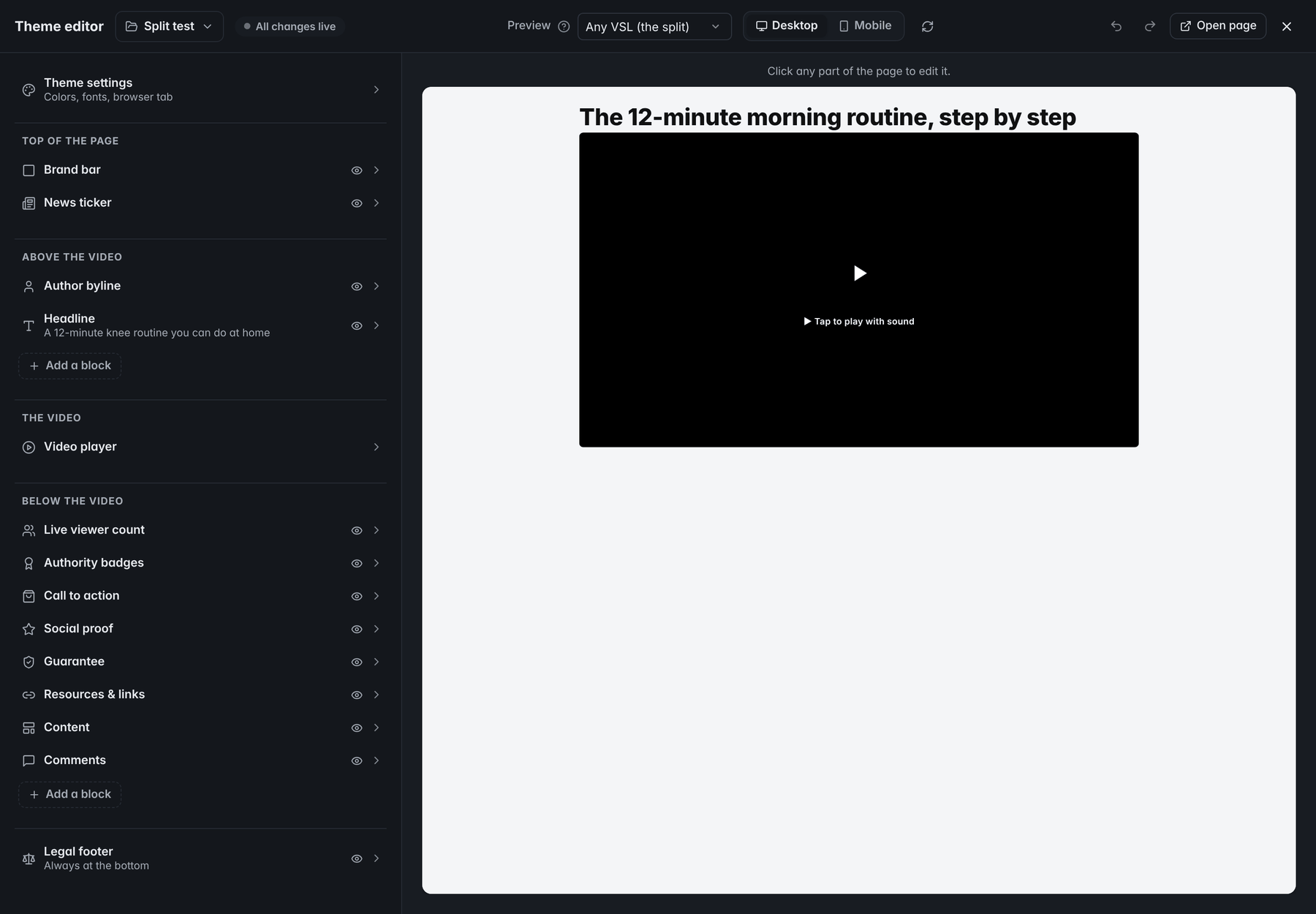
- HeadlineThe headline sits in the group above the video.
- Video playerThe video has a group of its own; every other block goes above or below it.
- Call to actionThe call to action holds the buy button, or an offer block with bundle images and prices.
- ContentContent sections carry benefits, an FAQ, testimonials and more.
- Legal footerThe legal footer, with the disclaimer, privacy policy and terms, always sits at the bottom.
- PreviewThe preview is the live page; click any part of it to edit that block.
Make the button impossible to miss and easy to hit. WCAG 2.2 sets a minimum target size of 24 by 24 CSS pixels at Level AA (W3C) and 44 by 44 at the stricter AAA level (W3C). A primary buy button should be far larger than either, ideally full width on phones. Its label needs a contrast ratio of at least 4.5:1 against the button color, or 3:1 for large text (W3C).
Mind where the reveal lands on a phone. The viewer is looking at the video at the top of the screen, so an offer that appears far below it can go unseen. Put the first button directly under the video and let the full offer block follow.
Order the blocks by objection
After the button, each block should answer the next question a hesitant buyer has. Use your support tickets and sales calls to decide which question comes first:
| Objection at the pitch | Block that answers it |
|---|---|
| "Is it worth the price?" | The offer block: bundles and exactly what's included |
| "What if it doesn't work for me?" | The guarantee |
| "Does it work for people like me?" | Real testimonials, with typical results |
| "Is this backed by anything?" | References |
| "How do shipping, billing or access work?" | The FAQ |
Judge layout changes by revenue per visitor
A worked example: 10,000 visitors, 30% reach the pitch (3,000 people), 10% of them click the button (300 clicks), 40% of clicks complete checkout (120 orders) at $120 each. That's $14,400, or $1.44 per visitor. Move the first button directly under the video and say clicks rise to 11% of pitch viewers: 330 clicks, 132 orders, $15,840, or $1.58 per visitor. Revenue per visitor captures the change end to end, which is why it's the number to judge layout tests by, not clicks alone.
How do you stop visitors leaking off a VSL page?
Every link is a door. On a VSL page, the only doors should be the button and the links you need for trust.
- Remove: menus, clickable logos, social icons, blog and "about" links, other products, and chat widgets that pop open on their own.
- Keep: the disclaimer, privacy policy, terms and a way to contact you. They build trust, and your pixels and checkout collect data that visitors deserve to read about.
- Keep the keepers quiet: small, in the footer, away from the video.
If your funnel puts a presell or an advertorial in front of the VSL, that page is where the reading happens. Keep the VSL page itself just as closed (presell page guide).
Which trust elements belong on a VSL landing page?
Proof works on a VSL page only when it would survive a skeptical buyer, a platform reviewer and a regulator.
Each trust element: the honest version and when it backfires
Holds upThe honest version
- Testimonials: Real customers, permission on file, connections disclosed
- Results: Typical results stated next to exceptional ones
- Comments: Real customer comments, used with permission
- References: Studies that support the exact claim
- Guarantee: Clear terms, easy to claim
- Badges and logos: Only certifications and mentions you really have
- Before/after images: Real, representative, consented
AvoidBackfires when
- Testimonials: Paid or gifted endorsers look like ordinary buyers
- Results: "Results not typical" hides in the footer
- Comments: Comments are invented or rewritten
- References: Citations are off-topic or cherry-picked
- Guarantee: Conditions make it hard to use
- Badges and logos: "As seen on" logos are borrowed
- Before/after images: Images are edited or atypical, with no context
The rules behind the comparison:
- Endorsements. The FTC's Endorsement Guides, revised in 2023, say that when an ad features endorsers with exceptional results and the advertiser can't show those results are typical, the ad must make clear what results people can generally expect. Material connections, such as payment or free product, must be disclosed (FTC).
- Reviews and testimonials. The FTC's rule on consumer reviews and testimonials, in effect since October 21, 2024, prohibits fake or false reviews and testimonials, and courts can impose civil penalties for knowing violations (FTC).
- Health claims. The FTC's December 2022 health products guidance expects competent and reliable scientific evidence and says studies can't be considered in isolation (FTC). A reference list is not a shield if the studies don't support the claim.
In RevvyScales, you enter the comments in the comments block yourself, so only ever use real customer comments with the customer's permission. The scientific references block lists your sources on the page.
Trust badges covers which badges and seals reassure buyers at the pay button and which ones mislead.
Why the legal footer isn't enough
The legal footer holds your general disclaimer, privacy policy and terms. It can't carry a disclosure that qualifies a specific claim. The FTC's .com Disclosures guide says that the closer a disclosure is to the claim it relates to, the better, that necessary disclosures shouldn't be relegated to terms of use, and that a disclosure cannot cure a false claim (FTC). So a typical-results line belongs next to the testimonial it qualifies, and the footer handles the rest. More in VSL compliance. This is not legal advice.
How fast does a VSL landing page need to load?
Fast enough that the video starts before the visitor gives up. Google's "good" Core Web Vitals are a sensible target: Largest Contentful Paint within 2.5 seconds, Interaction to Next Paint at or under 200 milliseconds and Cumulative Layout Shift at or under 0.1, measured at the 75th percentile of page loads (web.dev).
On a VSL page, three things usually decide that: the poster image, the player, and the third-party scripts you add. Every pixel, chat widget and heatmap you install runs on every visit. The VSL page speed guide covers how to measure and fix each one.
Common VSL landing page mistakes
| Mistake | Fix |
|---|---|
| The price on the page differs from the video | Change both together, and recheck after every edit |
| The button appears far below the video on phones | Put the first button right under the video |
| The headline promises what the video doesn't deliver | Rewrite it to match the hook and the ad |
| The main site's navigation menu | Remove it from VSL pages |
| A countdown timer that resets | Remove it, or use a real deadline |
| Testimonials without permission or disclosure | Get written permission; disclose connections |
| A typical-results line only in the footer | Move it next to the claim |
| Five fonts, three widgets, eight tags | Cut to what the page needs |
A block-by-block VSL landing page checklist
Go block by block down the page; the ticks stay in this browser:
A block-by-block VSL landing page checklist
0 of 13 done
Frequently asked questions
Should the price be visible before the video plays?
For cold traffic, usually not. The pitch reveal exists so the price arrives after the problem, the mechanism and the proof have made it reasonable. Showing it first invites a judgment before the argument. For warm or returning visitors who already know the offer, an earlier price can make sense, but test it against revenue per visitor rather than assuming.
Does a VSL page need a navigation menu?
No. A menu gives visitors several ways to leave and no reason to stay. Keep only the links that build trust or that people need: the disclaimer, privacy policy, terms and a contact option, placed quietly in the footer. If you need to explain the company, do it in the video or in a short section after the pitch.
How long should a VSL landing page be?
Short before the pitch and as long as necessary after it. Before the offer appears, the page is a headline, the video and a footer. After the pitch, length follows objections: the offer, the guarantee, an FAQ, proof and references. Add a section when it answers a question buyers really ask, not to make the page look substantial.
Can I use stock photos on a VSL page?
For neutral decoration, yes. Never present a stock model as a customer, an expert, the founder or a result, because that misleads buyers about who stands behind the product. Real photos of the product, the team and consenting customers carry more weight, and they keep you on the right side of advertising rules.
Should a VSL page show comments?
Only real ones. Comments from actual customers, used with their permission, can answer objections in a voice buyers recognize. Invented or rewritten comments are fake testimonials, and the FTC rule on consumer reviews and testimonials that took effect on October 21, 2024 prohibits fake or false ones. If you have no real comments yet, leave the block out.
Sources
- .com Disclosures: How to Make Effective Disclosures in Digital Advertising (March 2013) — FTC
- FTC's Endorsement Guides: What People Are Asking — FTC
- Consumer Reviews and Testimonials Rule: Questions and Answers — FTC
- Health Products Compliance Guidance (December 2022) — FTC
- Understanding Success Criterion 2.5.8: Target Size (Minimum) — W3C WCAG 2.2
- Understanding Success Criterion 2.5.5: Target Size (Enhanced) — W3C WCAG 2.2
- Understanding Success Criterion 1.4.3: Contrast (Minimum) — W3C WCAG 2.2
- Web Vitals — web.dev