
VSL metrics explained: the KPI tree from ad click to sale, with formulas and a worked funnel
Every VSL metric that matters, in the order the money flows: ad, page, video, offer, checkout and back end. You get the formula for each one, what a drop usually means, a fully worked funnel, and a rule for deciding which number to fix first.
On this page
- What are the most important VSL metrics?
- Ad metrics: what happens before the click
- Page metrics: landing rate and cost per visitor
- Unique visitors vs page loads: pick one denominator
- Video metrics: play rate, unmute rate and retention
- Offer metrics: CTA click rate and checkout conversion
- Money metrics: revenue per buyer, RPV, EPC, CPA and ROAS
- A worked VSL funnel, stage by stage
- North star, drivers and guardrails: how VSL KPIs fit together
- How do you set targets for VSL KPIs without benchmarks?
- Which VSL metric should you fix first?
- The VSL metrics diagnostic table
- How to measure VSL performance reliably
- What to do this week
- Frequently asked questions
VSL metrics are the chain of ratios between an ad impression and a sale: click-through rate, landing rate, play or unmute rate, retention to the pitch, CTA click rate, checkout conversion and revenue per buyer, ending in revenue per visitor. Each stage multiplies the next. Read them in that order, compare each one with your own baseline, and judge every change by revenue per visitor.
What are the most important VSL metrics?
Video sales letter metrics fall into five layers, and each layer answers one question:
- Ad: are the right people clicking, and at what cost? (CPM, CTR, CPC, hook rate)
- Page: do the people who click actually arrive? (landing rate, load time)
- Video: do they start watching and stay until the offer? (play or unmute rate, retention at 30 seconds, 1 minute and the pitch)
- Offer: do the people who see the pitch click and buy? (CTA click rate, checkout conversion)
- Money: what is each visitor worth, and is that more than they cost? (revenue per buyer, upsell take rate, RPV, EPC, CPA, ROAS, refunds)
The layers multiply. Send 2,000 visitors; if 60% start the video, 30% of those reach the pitch, 25% of pitch viewers click and half of the clickers buy, you get 2,000 × 0.60 × 0.30 × 0.25 × 0.50 = 45 orders. Improve any one of those rates by 10% and orders rise by 10%, whichever stage you improved. That is why you read VSL metrics as a chain rather than as a list of separate scores.
The chain gives you one master formula:
The VSL equation
RPVplay rate × pitch retention × CTA click rate × checkout conversion × revenue per buyer
Example, from the worked funnel below: 0.60 × 0.30 × 0.25 × 0.50 × $100 = $2.25 per visitor. All else equal, a 10% gain at any stage becomes a 10% gain in RPV.
It is exact when every buyer passes through every stage, which is close to true when the buy button stays hidden until the pitch. If buyers can skip stages (a button visible from the first second, people who come back straight to checkout from an email), treat it as an approximation and check it against your real order count.
Ad metrics: what happens before the click
Ad metrics decide how much each visitor costs you. Four of them matter for a VSL:
- CPM = ad spend ÷ impressions × 1,000
- CTR (link) = link clicks ÷ impressions
- CPC (link) = ad spend ÷ link clicks, which also equals CPM ÷ (1,000 × CTR)
- Hook rate = 3-second video plays ÷ impressions, usually paired with a hold rate that measures how many of those viewers keep watching. Both are ratios media buyers compute themselves, and definitions vary; the hook rate guide covers them.
The CPC identity is the one to remember. At a $15 CPM and a 1.25% CTR, CPC = $15 ÷ (1,000 × 0.0125) = $1.20. When CPC jumps, it tells you right away whether the auction got more expensive (CPM rose) or the creative got weaker (CTR fell). Those need different fixes: the first is an audience, bidding or seasonality question, the second a creative one.
The trap at this layer is judging creative by CTR alone. An ad that promises something the VSL doesn't deliver can double your CTR and halve your pitch retention. Cheap clicks that leave in the first minute can cost more per sale than expensive clicks that stay. Follow every ad's traffic down to revenue per visitor before you call it a winner.
Page metrics: landing rate and cost per visitor
The gap between clicks and visitors is people who clicked and never saw your page. They left during a slow load, hit a broken redirect, clicked by accident, or were bots. Part of the gap is also counting differences between systems, so the movement of landing rate matters more than its absolute level. A landing rate that falls on one device or placement while the others hold steady points to a loading or rendering problem there. Measure load time on a real phone over mobile data, not on office Wi-Fi.
Landing rate turns cost per click into the number your economics actually run on:
At a $1.20 CPC and an 80% landing rate, each visitor costs $1.50. Every later calculation in this guide (RPV, break-even, profit) is set against that $1.50, not against the $1.20 the ad platform shows you.
Unique visitors vs page loads: pick one denominator
A page load is counted every time the page opens, including reloads, return visits and second tabs. A unique visitor is one person, in practice one browser identified by a cookie, counted once for the period. Both are legitimate. Mixing them is not.
Say 2,000 unique visitors generate 2,600 page loads, 1,200 of the visitors start the video, and revenue is $4,500. Play rate is 60% per visitor but 46.2% per page load. Revenue is $2.25 per visitor but $1.73 per page load. Neither number is wrong. Comparing the visitor-based figure from one tool with the load-based figure from another is.
One period, two denominators
The example: 2,000 unique visitors, 2,600 page loads, 1,200 plays, $4,500 of revenue
Per unique visitor
- Play rate: 1,200 ÷ 2,000 = 60%
- Revenue: $4,500 ÷ 2,000 = $2.25 per visitor
Per page load
- Play rate: 1,200 ÷ 2,600 = 46.2%
- Revenue: $4,500 ÷ 2,600 = $1.73 per page load
Rules that keep you out of trouble:
- Use unique visitors as the denominator for funnel rates and RPV. A person is the unit who buys, and the unit a split test assigns to a variant.
- Use page loads for infrastructure questions: load time, errors, bandwidth.
- When two tools disagree, check their denominators and time zones before anything else.
- Remember the limits of cookies. One person on a phone and a laptop counts twice, and a cleared cookie makes a returning viewer look new.
Video metrics: play rate, unmute rate and retention
On a click-to-play page, play rate measures how many people chose to watch. On a page with muted autoplay, almost everyone "plays", because browsers let muted video start on its own; Chrome's policy, for example, always allows muted autoplay. There the meaningful number is unmute rate: visitors who tap for sound ÷ unique visitors. Check which event your analytics counts as a play before you compare numbers. The play rate guide covers both, plus the tests that move them.
Three checkpoints carry most of the information:
- 30 seconds: did the hook land? Big losses here usually mean the opening doesn't continue what the ad or the headline promised.
- 1 minute: did the lead earn the right to the rest of the video?
- The pitch: the second your offer and price appear. This is pitch retention, and for a VSL it is the retention number that matters most, because people who leave before the pitch never see the offer.
Multiply play rate by pitch retention and you get pitch reach: visitors who reached the pitch ÷ unique visitors, the share of all your traffic that sees the offer. With a 60% play rate and 30% pitch retention, 18% of visitors reach the pitch.
A second-by-second curve tells you where people leave, not just how many. The retention graph guide shows how to read one and how to turn a drop into a line in your script. In RevvyScales, the analytics show play rate, pitch retention, CTA clicks, conversion rate, RPV, EPC and RPM, plus a second-by-second retention chart with the pitch marked on it (reading your analytics).
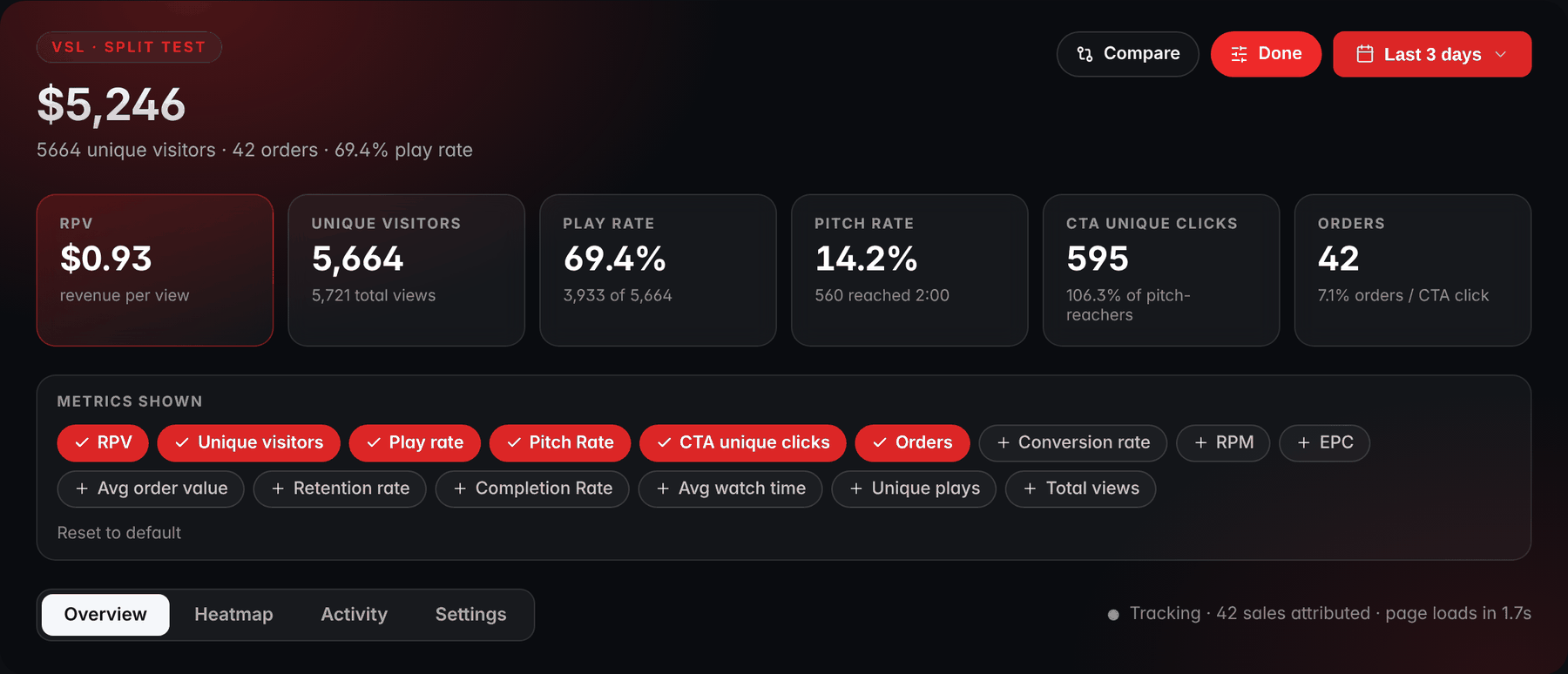
- RPVRPV comes first: revenue per visitor for the date range you pick.
- Unique visitorsTotal views sit under unique visitors: two denominators, so check which one a rate uses.
- Play rateThe play rate tile shows its count: 3,933 plays out of 5,664 unique visitors.
- Pitch ratePitch rate is this guide's pitch retention: of the viewers who started, the share still watching at the pitch second, 2:00 here.
- More metricsConversion rate, RPM and EPC are a click away: a checked chip shows as a tile.
Offer metrics: CTA click rate and checkout conversion
Use pitch viewers as the denominator when your buy button stays hidden until the pitch, because nobody before that point could click. Dividing by all visitors mixes a video problem (few people reach the pitch) with an offer problem (few who see it click), and you can no longer tell them apart.
Splitting the offer layer in two is one of the most useful habits in VSL analysis:
- Low CTA click rate, normal checkout conversion: the pitch or the offer isn't persuading. Look at the price presentation, the bundles, the guarantee, and whether the button and offer block actually show up on a phone.
- Normal CTA click rate, low checkout conversion: people want it and something stops them. Look at the checkout: a price that differs from the video, surprise shipping costs, slow loading, payment declines, too many fields.
Overall conversion rate = orders ÷ unique visitors, which equals play rate × pitch retention × CTA click rate × checkout conversion. The VSL conversion rate guide explains why published averages of this number mislead and how to derive your own target from your costs.
Money metrics: revenue per buyer, RPV, EPC, CPA and ROAS
| Metric | Formula | Use it to |
|---|---|---|
| AOV (front end) | front-end revenue ÷ orders | judge bundles and order bumps |
| Upsell take rate | upsell purchases ÷ front-end orders | judge each upsell offer |
| Revenue per buyer | total revenue ÷ orders | value one complete sale |
| RPV | total revenue ÷ unique visitors | judge pages, tests and sources |
| EPC | total revenue ÷ CTA clicks | judge what happens after the click |
| RPM | RPV × 1,000 | read small RPV changes |
| CPA | ad spend ÷ orders | compare with break-even CPA |
| ROAS | revenue ÷ ad spend | compare with break-even ROAS |
| Refund rate | refunded orders ÷ orders | catch claims that oversell |
Three notes keep these honest:
- Use net revenue. Refunds and chargebacks arrive weeks after the sale. Until they land, subtract your own historical refund rate; once they land, recompute.
- RPV is the north star. It folds conversion rate and order value, upsells included, into one number you can set directly against cost per visitor. The revenue per visitor guide covers the formulas and the traps, such as one large order distorting a test.
- EPC and RPM vary by tool. EPC can be computed per buy-button click, per ad click or per affiliate-link click; RPM can be per 1,000 visitors, views or impressions. Check the denominator before you compare two reports.
A worked VSL funnel, stage by stage
Here is one illustrative funnel with every metric computed. The numbers are invented for the example; yours will differ.
The worked funnel, stage by stage
Illustrative: 200,000 impressions at a $15.00 CPM. Each step shows its share of the step before
- Link clicks2,500
- Unique visitors80% of the step before2,000
- Started the video60% of the step before1,200
- Reached the pitch30% of the step before360
- CTA clickers25% of the step before90
- Orders50% of the step before45
Ad spend is $3,000. The 45 buyers spend $80 on average at the front end ($3,600), and 9 of them (a 20% take rate) accept a $100 upsell ($900). Assume refunds are already netted out.
- Total revenue: $3,600 + $900 = $4,500
- Revenue per buyer: $4,500 ÷ 45 = $100
- Conversion rate: 45 ÷ 2,000 = 2.25%
- RPV: $4,500 ÷ 2,000 = $2.25, which also equals 2.25% × $100
- EPC: $4,500 ÷ 90 = $50
- RPM: $2.25 × 1,000 = $2,250
- CPA: $3,000 ÷ 45 = $66.67
- ROAS: $4,500 ÷ $3,000 = 1.50
Whether this funnel makes money depends on margin, which no dashboard knows unless you tell it. Say 60% of each revenue dollar is left after product costs, fulfillment and payment fees (refunds are already out of the revenue). That is your contribution margin, and it gives you:
- Contribution: $4,500 × 0.60 = $2,700, against $3,000 of ad spend, a $300 loss
- Profit per visitor: $2.25 × 0.60 − $1.50 = −$0.15
- Break-even RPV: $1.50 ÷ 0.60 = $2.50
- Break-even ROAS: 1 ÷ 0.60 = 1.67
- Break-even CPA: $100 × 0.60 = $60
The funnel needs an RPV of $2.50 and has $2.25, an 11.1% gap. Because the stages multiply, an 11.1% lift in any single one of them closes it: play rate from 60% to 66.7%, or pitch retention from 30% to 33.3%, or checkout conversion from 50% to 55.6%.
The calculator below starts at this funnel. Put in your own numbers, with revenue per buyer (front end plus upsells) as the order value, or raise any one stage by 11.1% and watch RPV reach $2.50:
Calculator
VSL funnel calculator
From visitors to revenue, one stage at a time. Each rate is a share of the stage before it.
- Pitch reach (visitors who see the pitch)
- 360 of 2,000 visitors
- Orders
- Conversion rate
- orders ÷ unique visitors
A change at any stage multiplies through to revenue per visitor: 10% more viewers at the pitch means 10% more orders while the later rates hold. Take every number from one traffic source and one period, so the stages describe the same visitors.
North star, drivers and guardrails: how VSL KPIs fit together
Not every metric deserves the same attention. Sort them into four roles:
- North star: revenue per visitor, or profit per visitor once you know your margin and costs. This is the number you decide by.
- Drivers: the stage rates. Play or unmute rate, pitch retention, CTA click rate, checkout conversion and revenue per buyer explain why the north star moved. They also move faster, so they give you an early read while a test runs.
- Guardrails: refund rate, chargebacks and complaints. They catch wins that cost you later. A headline that lifts RPV by promising more than the product delivers shows up here weeks after the test ended.
- Health checks: load time, errors and tracking match rate. Tracking match rate = orders your analytics attributed ÷ orders your checkout recorded in the same period. When it drops, the passback broke, and every other number is suspect until you fix it.
A workable rhythm: look at health checks daily, drivers and the north star weekly, and guardrails monthly, once refunds have had time to arrive.
How do you set targets for VSL KPIs without benchmarks?
Generic benchmarks for VSL metrics are close to useless. Play rate depends on whether you autoplay and where the player sits; conversion rate depends on the denominator, the price, the traffic temperature and the offer. Nobody who publishes a number gives you all of that. Two sources give you targets that mean something.
Your economics. Break-even is a hard floor, and you can compute it for several metrics:
Break-even targets from your economics
Break-even RPVCPV ÷ contribution margin
Break-even conversion rateCPV ÷ (revenue per buyer × contribution margin)
Break-even CPArevenue per buyer × contribution margin
Break-even ROAS1 ÷ contribution margin
Example, from the worked funnel: $1.50 ÷ 0.60 = $2.50 RPV, $100 × 0.60 = $60 CPA, 1 ÷ 0.60 = 1.67 ROAS.
To build in profit, add it to the cost side. If you want $0.50 of profit per visitor in the example above, you need RPV = ($1.50 + $0.50) ÷ 0.60 = $3.33.
Your own history. Take 7 to 14 complete days of steady traffic from the same sources, compute every stage, and write the numbers down as your baseline. Note the day-to-day range as well. If play rate moved between 57% and 63% across a normal week, a 59% day is noise and a 50% day is a signal.
Keep separate baselines for segments that behave differently: mobile and desktop, cold and retargeting traffic, each major source. A blended baseline shifts every time your traffic mix shifts, and you end up chasing changes that are really mix effects.
Which VSL metric should you fix first?
Fix the biggest leak relative to your own baseline, after you have confirmed the leak is real. In order:
- Confirm tracking. Place a test order through the real funnel and check that it shows up attributed to the right click. A broken passback looks exactly like a conversion problem.
- Compute each stage against its baseline as a relative change.
- Check that the biggest change is bigger than chance. Small samples swing; the VSL A/B testing guide shows how to run a quick significance check.
- Fix that stage first. If nothing has dropped but you are below break-even, start with the stage where you have the strongest test idea, beginning with the offer and the lead, because they affect the most people.
Continuing the example, here is the current period against a 14-day baseline:
This period against a 14-day baseline
The worked example: relative change at each stage
Pitch retention is the leak. Something in the video's performance changed: a new edit, a new traffic source whose viewers don't connect with the story, a section that breaks on one device. Restoring pitch retention alone takes RPV from $2.25 to 0.60 × 0.38 × 0.25 × 0.50 × $100 = $2.85. That turns a $300 loss into a $420 profit on the same 2,000 visitors ($2.85 × 0.60 − $1.50 = $0.21 per visitor).
The table also protects you from the natural reaction to falling sales, which is to rewrite the offer or rebuild the checkout. Here, both were fine.
The VSL metrics diagnostic table
| Metric | Formula | When it worsens, suspect | First move |
|---|---|---|---|
| CTR (link) | link clicks ÷ impressions | creative fatigue, weak hook | new hooks and angles |
| CPC | spend ÷ link clicks | CPM up or CTR down | find which one moved |
| Landing rate | visitors ÷ link clicks | slow load, redirects, bots | load test on a phone |
| Play or unmute rate | plays ÷ visitors | slow start, weak headline, ad mismatch | headline and poster tests |
| 30-second retention | viewers at 0:30 ÷ starters | opening breaks the ad's promise | rewrite the opening |
| Pitch retention | viewers at pitch ÷ starters | a mid-video cliff, slow story | fix the steepest drop |
| CTA click rate | clickers ÷ pitch viewers | weak offer, button hidden on mobile | offer and layout tests |
| Checkout conversion | orders ÷ clickers | price mismatch, friction, declines | buy on a phone yourself |
| Revenue per buyer | revenue ÷ orders | broken bundle or upsell step | walk the order flow |
| Refund rate | refunds ÷ orders | video oversells the product | align claims with reality |
| RPV | revenue ÷ visitors | any stage above | follow the chain |
| ROAS | revenue ÷ spend | higher costs or lower RPV | split CPV from RPV |
Check that you can read the numbers before you use them on your own funnel:
Check yourself: reading the numbers
Show the answer
Viewers who reached the pitch. Nobody before the pitch could click. Dividing by all visitors mixes a video problem (few people reach the pitch) with an offer problem (few who see it click), and you can no longer tell them apart.
Show the answer
The checkout. People want it and something stops them: a price that differs from the video, surprise shipping costs, slow loading, payment declines, too many fields.
Show the answer
It rises by 10%. The stages multiply, so a 10% gain at any stage becomes a 10% gain in RPV, whichever stage you improved.
Show the answer
$2.50. Break-even RPV = cost per visitor ÷ contribution margin: $1.50 ÷ 0.60 = $2.50.
Show the answer
Pitch retention. Fix the biggest leak relative to your own baseline, once you have confirmed it is real. In the example, the offer and the checkout were fine.
How to measure VSL performance reliably
Most bad decisions about VSL metrics come from measurement, not from judgment. Five habits prevent them:
- Close the tracking loop. The sale has to travel back to the click that produced it: an ID attached to the CTA click, carried through checkout, and reported back from the thank-you page or a store webhook. The VSL tracking guide explains the chain end to end.
- Use complete days in one time zone. A partial day understates everything, and a time-zone mismatch between your ad account and your analytics moves sales from one day to the next.
- Expect the ad platform to disagree with you. Platforms attribute sales with their own rules about which clicks or views get credit and over how many days, so their purchase counts rarely equal your orders. Use your own numbers for funnel decisions and the platform's numbers to steer its delivery.
- Wait for enough events. Rates built on common events, like plays, settle quickly. Rates built on rare ones, like orders, upsells and refunds, need far more traffic before a difference means anything.
- Segment before you conclude. A sitewide drop that comes entirely from one placement or one device is a different problem from a drop everywhere.
What to do this week
Tick them off as you go; the ticks stay in this browser:
This week, in six steps
0 of 6 done
If sales have stalled and you can't see why, the VSL not converting guide walks the same chain as a symptom-by-symptom checklist.
Frequently asked questions
Should I judge my VSL by conversion rate or revenue per visitor?
By revenue per visitor. It combines every stage of the funnel into one number you can compare with what a visitor costs you, while conversion rate ignores order value and upsells. Play rate and retention are early signals rather than outcomes. Use revenue per visitor to decide which version wins, and use the stage metrics to understand why it won or lost.
Does completion rate matter for a VSL?
Less than you might think. Many of your best viewers leave the video on purpose when they click the buy button after the pitch, so a lower completion rate can come with more sales. Retention up to the pitch is the number that matters. After the pitch, read the retention curve together with CTA clicks instead of treating every exit as a failure.
How many visitors do I need before my VSL metrics are reliable?
It depends on how common the event is. With 300 visitors, a 60% unmute rate is already known to within about 5 or 6 points either way, because most visitors produce the event. A 2% conversion rate on the same 300 visitors is just 6 orders, which tells you very little. Rare events like orders, upsells and refunds need thousands of visitors per variant before small differences mean anything.
Why do Facebook Ads and my VSL analytics show different sales?
Ad platforms attribute sales with their own rules: which clicks or ad views get credit, over how many days, and how they fill gaps where tracking is limited. Your analytics counts orders it can tie to a visit. The two rarely match exactly. Use your own order data for funnel decisions, use the platform's numbers to steer its delivery, and watch for sudden changes in the gap between them.
What is the difference between pitch retention and pitch reach?
Pitch retention is the share of viewers who started the video and were still watching when the offer began. Pitch reach is the share of all visitors who saw the offer, which equals play rate times pitch retention. Pitch retention diagnoses the video itself, while pitch reach tells you how much of your paid traffic ever got a chance to buy.