
Hook rate: how to calculate it, read it next to hold rate, and judge hooks by what they earn
Hook rate is the share of video ad impressions that become 3-second plays. Here is how to calculate it and hold rate from Meta's columns, why both are only attention metrics, and how to judge a hook by the revenue it sends to your VSL.
On this page
- What is hook rate in video ads?
- Hook rate vs hold rate: what each one tells you
- Hook rate vs CTR: which matters more?
- How hook rate connects to your VSL's play rate and pitch reach
- Why a high hook rate can still lose money
- How to diagnose hooks with a 2x2: hook rate vs revenue per visitor
- How to build hook variations that test cleanly
- Common hook-rate mistakes
- What to do this week
- Frequently asked questions
Hook rate is the share of a video ad's impressions that turn into 3-second plays: 3-second video plays ÷ impressions × 100. It tells you whether the first seconds of the ad stop the scroll. Meta reports the inputs; the ratio is a media-buyer convention, not a Meta metric. Use it to compare hooks on one ad body, then confirm the winner by the revenue it sends to your VSL.
What is hook rate in video ads?
Hook rate measures the first moment of a video ad: whether the person stopped scrolling long enough to watch three seconds. Video in a feed generally starts playing as it scrolls into view, so a 3-second play mostly records a decision not to scroll past. That's why some teams call the same ratio the thumbstop ratio.
The hook rate formula
Hook rate3-second video plays ÷ impressions × 100
Both inputs come from Meta Ads Manager:
- Impressions. Meta's API reference describes them as the number of times your ads were on screen.
- 3-second video plays. Meta's developer notes define a 3-second play as one that reaches three seconds, or 97% of the video if it's shorter. Only unique seconds count, so rewatching the same seconds within one impression doesn't add a play (Meta's video metrics update). Older documentation calls them "3-second video views".
Use impressions, not reach, as the denominator. Plays are counted per impression, so dividing by reach mixes two different units and drifts upward as frequency rises.
A worked example: an ad gets 50,000 impressions and 14,000 3-second plays. Hook rate = 14,000 ÷ 50,000 = 28%. Run the same calculation for every ad in a test and you can rank the openings against each other.
Compute the ratio in a spreadsheet or reporting tool, and check what each column counts before you build a formula on it, because names move. In February 2026 Meta announced it would retire several Page and post reach, impression and 3-second viewer metrics in its Graph API, pointing developers to new "media views" metrics (Graph API v25 announcement). That change covers Page and post insights, not Ads Manager columns, but it's the kind of change that quietly breaks a dashboard.
The columns you need
| Column | What it counts | Use it for |
|---|---|---|
| Impressions | Times the ad was on screen | Hook rate denominator |
| 3-second video plays | Plays reaching 3 seconds, replays excluded | Hook rate numerator |
| ThruPlays | Plays to completion or of at least 15 seconds | Hold rate |
| Video plays at 25%, 50%, 75%, 95%, 100% | Plays reaching that share of the video, including skips | Where the ad loses people |
| Link clicks, outbound clicks | Clicks on the ad's links; clicks that leave Meta's properties | Link CTR |
| Landing page views | Clicks after which your page loaded | Click-to-load loss |
Meta's ThruPlay definition appears in its ThruPlay optimization goal: people who play the ad to completion or for at least 15 seconds (ad set reference). The quartile, impression and click definitions come from the ad insights reference.
Hook rate vs hold rate: what each one tells you
Hook rate tells you whether people stopped. Hold rate tells you whether they stayed. Meta doesn't report a hold rate either, and teams compute it in different ways:
- ThruPlays ÷ 3-second plays: of the people you hooked, how many stayed 15 seconds or to the end.
- ThruPlays ÷ impressions: who stayed, as a share of everyone who saw the ad.
- Plays at 50% ÷ 3-second plays: useful for longer ads.
Use the first one unless you have a reason not to. It separates the hook from the body: a weak hook can't drag down hold rate, because hold rate only counts people who were already hooked. Whatever you pick, write the formula in your reporting sheet and don't change it mid-quarter.
One caveat. A ThruPlay means 15 seconds or completion, so on a 12-second ad it means "watched to the end", while on a 60-second ad it means "watched a quarter". Compare hold rates only between ads of similar length.
Two ads from the same test show the difference:
Ad A stops more people; Ad B keeps more of them
Illustrative test, 40,000 impressions per ad
Ad A's opening stops more people. Ad B keeps twice the share of the people it stops. Neither number says which ad makes money; that takes the next three sections.
Hook rate vs CTR: which matters more?
Link CTR is link clicks ÷ impressions. Use link CTR or outbound CTR rather than CTR (all), which Meta's reference bases on clicks of every kind, not only clicks that head to your page.
Hook rate and CTR measure different jobs. The hook earns attention; the body and the call to action earn the click. You can split CTR into the two jobs:
Link CTR, split into its two jobs
Link CTRhook rate × (link clicks ÷ 3-second plays)
Clicks per hooked viewerlink clicks ÷ 3-second plays
The second term is clicks per hooked viewer. Treat it as a diagnostic rather than a strict funnel, because some people click before three seconds, but it shows where an ad is weak. Continuing the example, say Ad A gets 400 link clicks and Ad B gets 380:
- Ad A: link CTR 1.0%, hook rate 31%, clicks per hooked viewer 3.2%.
- Ad B: link CTR 0.95%, hook rate 19%, clicks per hooked viewer 5.0%.
Nearly the same CTR, opposite problems. Ad A's opening works and its body underperforms, so test new bodies behind that hook. Ad B persuades the people it stops, so it needs a stronger first three seconds.
Work out hook rate, hold rate, link CTR and clicks per hooked viewer for your own ads here. The calculator starts with Ad A's columns:
Calculator
Hook rate and hold rate calculator
From the columns Meta reports for one video ad.
- Hold rate
- ThruPlays ÷ 3-second plays
- Link CTR
- link clicks ÷ impressions
- Link clicks per 100 hooked viewers
Hook and hold rate are media-buyer conventions built from Meta’s columns, and teams define hold rate differently — write yours down and keep it. Both measure attention; judge the ad by the revenue per visitor it sends to your VSL.
How hook rate connects to your VSL's play rate and pitch reach
Hook rate sits at the top of the chain that ends in a sale:
From impression to purchase
- Impression to 3-second playHook rate.
- 3-second play to link clickThe ad's body and call to action.
- Link click to landing page viewPage speed and accidental clicks.
- Landing page view to play or unmuteHeadline, poster and message match.
- Play to pitchThe VSL's lead and retention.
- Pitch to CTA click to purchaseThe offer and the checkout.
Each step multiplies the one before. The ad's hook and the VSL's hook are two different hooks with one shared job: the person who clicked for a promise should hear that promise again in the first seconds of the video. When the video opens on something else, the VSL play rate and the first minute of retention fall, however good the ad's hook rate looked. The VSL metrics guide covers every stage of this chain with formulas.
To compare ads by what they earn, convert everything to revenue per 1,000 impressions:
Compare ads by what they earn
Revenue per 1,000 impressions1,000 × link CTR × (landing page views ÷ link clicks) × revenue per visitor
Revenue per 1,000 impressions to break evenCPM ÷ contribution margin
Then compare it with your CPM. If it's lower, the ad loses money however high its hook rate is. To break even after product costs and fees, it has to beat CPM ÷ your contribution margin.
Why a high hook rate can still lose money
Here's the same two-ad test carried through to sales, with illustrative numbers. Both ads spend $600 at a $15 CPM:
The same two ads, carried through to sales
Illustrative numbers
Wins on attentionAd A (shock opening)
- Hook rate: 31%
- Link clicks: 400
- Landing page views: 340
- Revenue per visitor: $0.95
- Revenue: $323
- Revenue per 1,000 impressions: $8.08
- ROAS: 0.54
Wins on revenueAd B (problem story)
- Hook rate: 19%
- Link clicks: 380
- Landing page views: 330
- Revenue per visitor: $3.80
- Revenue: $1,254
- Revenue per 1,000 impressions: $31.35
- ROAS: 2.09
Ad A wins every attention metric and doesn't even earn back its spend. Ad B looks worse in Ads Manager and brings in nearly four times the revenue from the same budget: at $31.35 per 1,000 impressions against a $15 CPM, it breaks even at a contribution margin of about 48% ($15 ÷ $31.35) and makes money above that. Three common reasons a strong hook fails downstream:
- It attracts the curious, not the buyers. A shocking visual stops everyone, including people with no use for the product.
- The VSL doesn't pay off the hook. The ad promises one thing and the video opens with another, so viewers leave in the first minute. The retention graph shows this as a cliff in the opening seconds.
- It overpromises. People who bought on an exaggerated promise ask for refunds and file chargebacks, weeks after the ad report looked great.
The honest version of a strong hook is surprising and true. In the US, ads must be truthful and not misleading, and advertisers need proof for both express and implied claims before the ad runs (FTC advertising FAQs). The hook is part of the ad. This isn't legal advice, but a hook you couldn't defend in writing is a hook you shouldn't run.
How to diagnose hooks with a 2x2: hook rate vs revenue per visitor
Plot every ad on two axes: hook rate, and revenue per visitor (RPV) on the VSL from that ad's traffic. "High" and "low" mean above or below your account's median for the same period and placements.
Answer two questions about an ad to find its quadrant and what to do with it:
The 2x2: hook rate against revenue per visitor
High or low means above or below your account median, for the same period and placements
Is the ad's hook rate above your account's median?
Is the revenue per visitor from its traffic above the median too?
Judge this axis only once the ad has a few dozen sales.
Is the revenue per visitor from its traffic above the median?
Judge this axis only once the ad has a few dozen sales.
Best fit
Winner
Hook rate high, RPV high: scale it and write variations of the hook.
Best fit
Mismatch
Hook rate high, RPV low: the hook pulls the wrong people or overpromises; fix the bridge to the VSL or cut it.
Best fit
Hidden gem
Hook rate low, RPV high: the angle sells but the opening doesn't stop the scroll; write new first seconds.
Best fit
Loser
Hook rate low, RPV low: cut it.
The two axes fill up at very different speeds. Impressions are plentiful, so hook rate settles fast. At 2,000 impressions per ad, a gap between 25% and 27% is within noise (z ≈ 1.44, below the 1.96 needed for 95% confidence). At 10,000 impressions per ad, the same gap is very unlikely to be chance (z ≈ 3.22).
Sales are scarce. A rough rule of thumb for counts: the relative 95% uncertainty on a number of sales is about ±2 ÷ √(sales). With 25 sales that's ±40%; with 100 sales, ±20%. So sort ads on hook rate within days, but don't place them on the RPV axis until each has a few dozen sales. Until then, use pitch reach or CTA clicks per visitor from that ad's traffic as a provisional signal.
You need ad-level revenue to build this chart, and the ad platform's own purchase count is only part of the picture. In RevvyScales, the rvs URL parameter attributes sales to the campaign, ad set and ad across Meta, Google and TikTok (how the rvs parameter works), which gives you the revenue side of the chart.
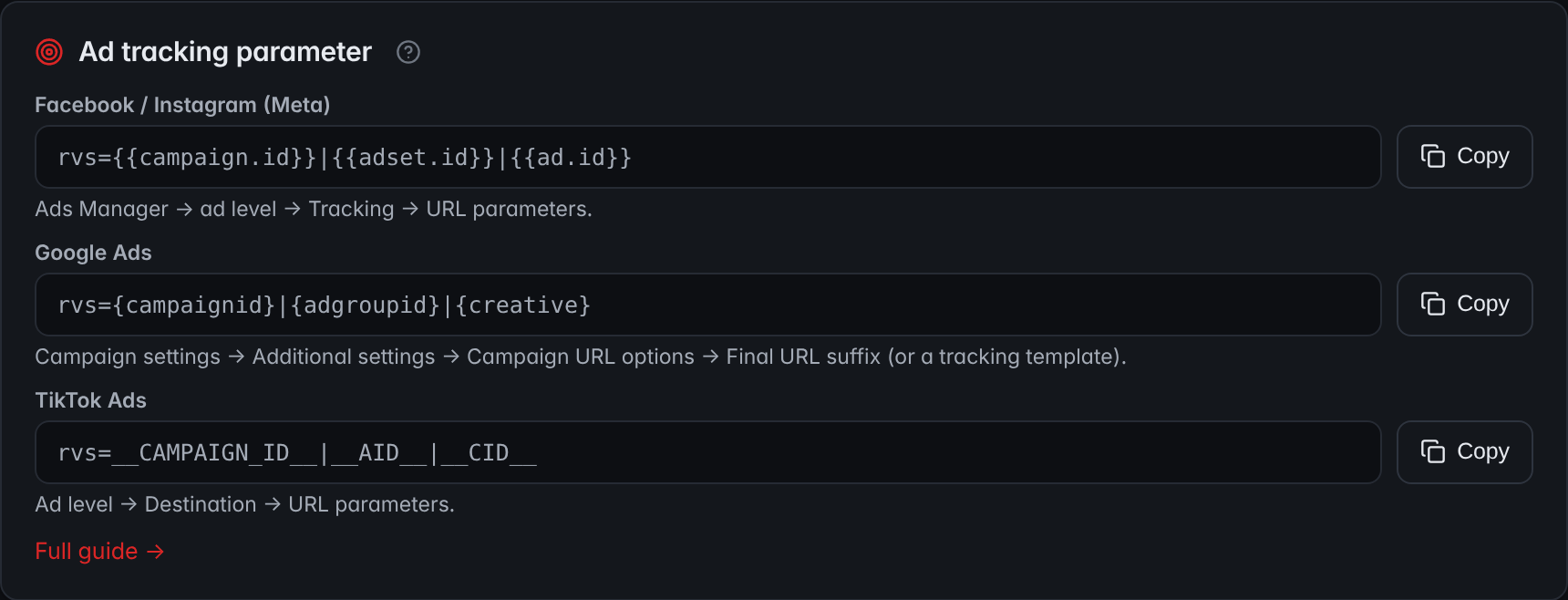
- MetaThe line for Facebook and Instagram carries the campaign, ad set and ad IDs, so each sale is attributed down to the ad.
- Google AdsGoogle Ads gets its own line, with the campaign, ad group and creative IDs.
- TikTok AdsTikTok Ads gets its own line too.
How to build hook variations that test cleanly
A hook test isolates the first one to three seconds. Keep everything after that identical, so any difference in hook rate, clicks and RPV belongs to the opening.
- Pick a body that already sells. Testing hooks on an unproven body only tells you which opening is least bad.
- Write three to five openings with different ideas, not different wording. Vary the visual (motion, a face mid-sentence, the product in use), the on-screen text and the first spoken line. The VSL hook examples guide has formulas you can adapt to ads.
- Make each opening lead into the body. The second after the hook should feel like a continuation, not a restart.
- Launch them in the same ad set. Same audience, same placements, same budget, same days.
- Name them so you can join the data later. A pattern like body03-hook02-story, used in both the ad name and your tracking parameters.
- Judge in two passes. First pass: hook rate and clicks per hooked viewer once each ad has several thousand impressions. Second pass: RPV once each survivor has enough sales.
- Feed the winner back into the VSL. If a hook wins on RPV, test the same idea as the VSL's opening line.
Break results down by placement too; Meta's insights support platform and placement breakdowns (breakdowns reference). A feed placement and a full-screen vertical placement can produce very different hook rates for the same ad, so a shift in placement mix can move your average without any change in the creative. For campaign structure and creative volume, see running Facebook ads to a VSL.
Common hook-rate mistakes
- Comparing hook rates across placements or audiences. Compare within one ad set and one breakdown.
- Optimizing hook rate alone. It's an input. The output is revenue per 1,000 impressions.
- Judging on a day of data. Wait for several thousand impressions per ad and for whole days, so morning and evening traffic both count.
- Using CTR (all). It includes clicks that never head to your page.
- Comparing hold rates across ad lengths. A ThruPlay on a 12-second ad is a completion; on a 60-second ad it's a quarter.
- Ignoring the landing. If landing page views fall well below link clicks, the problem is load time or accidental clicks, not the hook.
- Missing fatigue. Track each ad's hook rate over time. A steady decline with stable placements is one early sign the audience has seen it enough.
What to do this week
Work through these in order; the ticks stay in this browser:
Six steps for this week
0 of 6 done
Frequently asked questions
What is a good hook rate for Facebook video ads?
There is no reliable universal number. Hook rate depends on placement, audience, video format and creative style, so figures quoted online rarely transfer to your account. Set your own baseline: the median hook rate of your recent ads in the same placements. Treat ads well above it as strong openings, then check whether they also produce revenue per visitor on the VSL, which is what pays for the media.
How do you calculate hook rate in Meta Ads Manager?
Add the Impressions and 3-second video plays columns to your view, divide 3-second video plays by impressions and multiply by 100. Meta reports both inputs but not the ratio, so compute it in a spreadsheet or a reporting tool that supports formulas. Compare ads only within the same placements and audience, and over the same dates.
Is hook rate the same as thumbstop ratio?
In practice, yes. Both names describe the share of impressions that turn into 3-second video plays, a measure of whether the opening stops the scroll. Some teams use a different denominator or view threshold, so write down the exact formula your team uses and keep it fixed. If the formula changes, week-over-week comparisons stop meaning anything.
What is hold rate in video ads?
Hold rate measures whether people who stopped for the hook keep watching. A common version is ThruPlays divided by 3-second video plays, where a ThruPlay is a play to completion or of at least 15 seconds. Other teams divide by impressions or use the 50% play count. Definitions vary, so compare hold rates only between ads of similar length using one formula.
Does hook rate apply to TikTok and YouTube ads?
The idea does: wherever a video starts on its own in a feed, the share of impressions that turn into early views tells you whether the opening stops the scroll. The inputs differ, though. Each platform reports early views under its own names and thresholds, so build the ratio from that platform's own columns, write the formula down, and compare hook rates only within one platform, never across them.
How many impressions do I need before judging hook rate?
Several thousand per ad is a practical floor. At 2,000 impressions each, a gap between a 25% and a 27% hook rate can be random noise; at 10,000 impressions each, the same gap is very unlikely to be chance. Sales accumulate much more slowly, so judge revenue per visitor only after each ad has a few dozen sales.
Sources
- Updates to Video Metrics in Insights API — Meta for Developers
- Ad Insights reference — Meta for Developers
- Ad Set reference (optimization goals) — Meta for Developers
- Insights API breakdowns — Meta for Developers
- Introducing Graph API v25 and Marketing API v25 — Meta for Developers
- Advertising FAQ's: A Guide for Small Business — Federal Trade Commission