
Play rate: how to measure, diagnose and increase your VSL's play rate and unmute rate
Play rate tells you how many visitors actually start your video sales letter. Here is the exact formula, how muted autoplay changes what you should measure, how to diagnose a low number, and the tests most likely to move it.
On this page
- What is play rate and how do you calculate it?
- Why muted autoplay changes what you measure
- Play rate vs unmute rate vs hook rate
- What is a good play rate?
- What moves play rate, and why
- How to diagnose a low play rate
- How to increase play rate: tests to run
- Worked example: is a play-rate lift real?
- A play rate checklist
- Frequently asked questions
Play rate is the percentage of unique visitors who start your video: plays ÷ unique visitors × 100. On a click-to-play page it measures how many people chose to watch. On a page with muted autoplay almost everyone "plays", so the real signal becomes unmute rate, the share of visitors who tap for sound. Judge either number against your own baseline, not a generic benchmark.
What is play rate and how do you calculate it?
Say 2,400 unique visitors land on your page and 1,380 of them start the video. Play rate is 1,380 ÷ 2,400 = 57.5%.
Two details change the number more than people expect:
- The denominator. Some tools divide by page loads instead of unique visitors. If those 2,400 visitors produced 3,000 page loads, the same 1,380 plays give 46% per load. Neither figure is wrong, but you can't compare one with the other. For funnel math, use unique visitors, the same unit you use for conversion rate and revenue per visitor.
- The event. A "play" might be the first frame, a few seconds of playback, or a deliberate tap. On an autoplay page it might be the muted start or the unmute. Look up the definition in your analytics docs once and write it next to your baseline.
In RevvyScales, the play rate tile shows the count behind it, and the visitors tile shows total views under unique visitors:
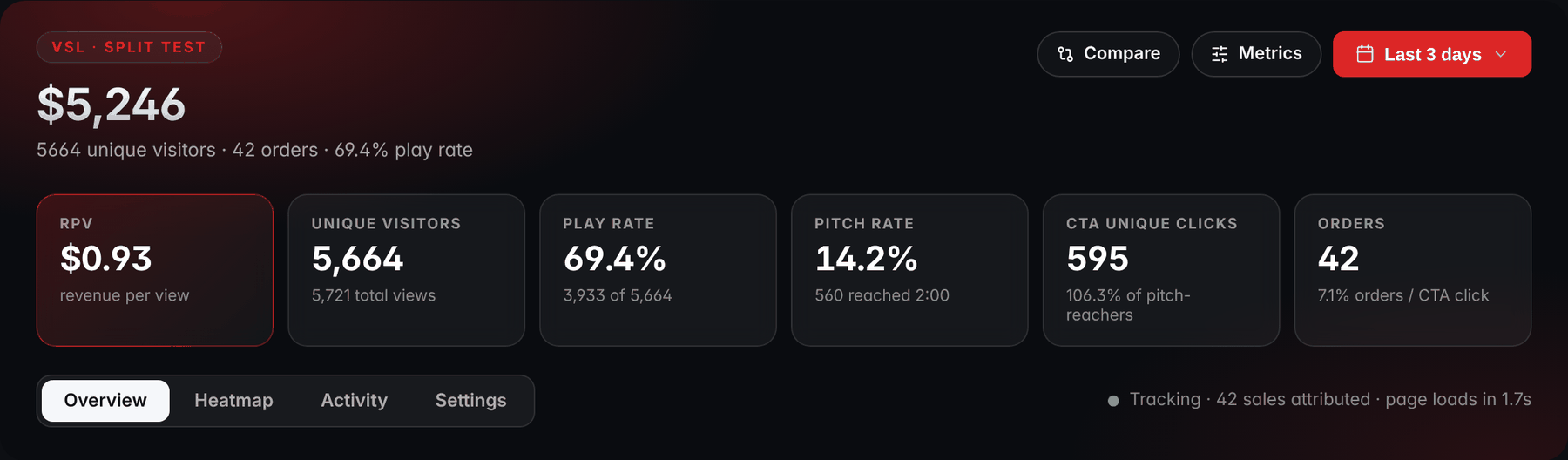
- Play rateThe play rate tile shows its count under it: 3,933 plays out of 5,664 unique visitors.
- Unique visitorsTotal views (5,721) sit under unique visitors: divide by one or the other and the same plays give a different rate.
Play rate sits between two other numbers in the VSL metrics chain. Upstream is the ad's hook rate (3-second video plays ÷ impressions), which tells you whether the creative stops the scroll; the hook rate guide covers it. Downstream is retention: whether the people who start keep watching. Play rate answers only the middle question: of the people who arrived, how many began watching.
Why muted autoplay changes what you measure
Browsers treat muted and audible autoplay differently:
- Chrome always allows muted autoplay. Autoplay with sound is allowed only in limited cases, such as after the visitor has interacted with your site.
- Safari on iOS: WebKit's 2016 video policy for iOS 10 lets muted video autoplay, but it only starts once it is visible on screen and pauses when it is scrolled out of view. A video that becomes unmuted without a user gesture pauses.
- Firefox blocks media with sound by default, and users can choose to block all autoplay, muted video included.
Browsers update these rules, so test on current devices rather than relying on any article, this one included.
On an autoplay page, then, a "play" mostly tells you that the page loaded, the player was visible and the browser allowed it. The persuasion happens one step later, when a visitor decides your teaser is worth hearing. Split the number in two:
- Autoplay start rate = visitors whose muted teaser started ÷ unique visitors. It diagnoses technology: load speed, player position, blocked autoplay.
- Unmute rate = visitors who turned on sound ÷ unique visitors. This is your real play rate: the share of visitors who chose to listen.
A worked example: 2,400 visitors land. The muted teaser starts for 2,280 of them (95%); the rest left before it loaded or had autoplay blocked. Then 1,320 tap for sound. Unmute rate is 1,320 ÷ 2,400 = 55% of visitors, or 57.9% of the visitors who actually saw the teaser. If the first number falls while the second holds, you have a loading or placement problem. If the second falls, your teaser, headline or prompt stopped persuading.
One autoplay page, 2,400 visitors
The worked example: each step shows its share of the step before
- Unique visitors2,400
- Muted teaser started95% of the step before2,280
- Turned on sound57.9% of the step before1,320
Restarting on unmute matters here too. A viewer who taps for sound at 0:08 has missed eight seconds of your hook, and the hook is what earns the rest of the video. RevvyScales starts the video as a muted teaser and, when a first-time viewer taps for sound, rewinds to 0:00 so they hear the hook from the first word (player conversion features). Designing the prompt itself is covered in the VSL autoplay guide.
Play rate vs unmute rate vs hook rate
Here is where each number sits, from the ad to the first seconds of the video:
Five numbers, from the ad to the video
- Hook rate3-second plays ÷ impressions, in the ad platform: does the ad stop the scroll?
- Autoplay start rateTeaser starts ÷ unique visitors, on an autoplay page: did the player load and run?
- Play rate or unmute rateOn a click-to-play page, play rate = plays ÷ unique visitors: do visitors choose to watch? On an autoplay page, unmute rate = sound-on viewers ÷ unique visitors: do visitors choose to listen?
- 30-second retentionViewers at 0:30 ÷ starters, in the video: did the hook land?
Read them together. A strong hook rate with a weak play rate points to the page: it loads too slowly, or it breaks the promise the ad made with a different headline, face or topic. A strong play rate with weak 30-second retention means the page earned the start and the first lines of the video lost it.
What is a good play rate?
There isn't a universal one, and a figure you read online can't tell you much. Play rate depends on whether the page autoplays, where the player sits on a phone screen, how warm the traffic is, the device mix, and what the tool counts as a play. Two pages with equally persuasive headlines can show very different play rates for those reasons alone.
The useful comparison is with yourself:
- Pick 7 to 14 complete days of steady traffic from the same sources.
- Compute play or unmute rate per day, split by device and by major traffic source.
- Write down the average and the normal daily range for each segment.
- Treat a day outside that range as a signal and a day inside it as noise.
"Normal" is wider than most people assume. At 300 visitors a day, a page whose true unmute rate is 60% will land between about 54.5% and 65.5% on 19 days out of 20, by chance alone. The math: 60% ± 1.96 × √(0.6 × 0.4 ÷ 300) = 60% ± 5.5 points. Reacting to a 4-point dip on a 300-visitor day is reacting to noise.
How wide is a normal day?
Where a true rate lands on 19 days out of 20, by chance alone
Normal daily rangerate ± 1.96 × √(rate × (1 − rate) ÷ visitors that day)
Example: at 300 visitors a day and a true unmute rate of 60%, 60% ± 1.96 × √(0.6 × 0.4 ÷ 300) = 60% ± 5.5 points, so anywhere from about 54.5% to 65.5%.
The target that matters is economic. Play rate is the first multiplier in revenue per visitor, so every extra point raises everything below it, as long as the extra viewers stay.
What moves play rate, and why
Nearly everything that affects play rate happens in the first seconds of the visit, mostly above the fold:
- Load speed and time to first frame. Some visitors who stare at a black box leave before they can play, and on iOS a muted video doesn't start until it is on screen. Measure on a mid-range phone over mobile data; the VSL page speed guide covers the fixes.
- Player position. On a phone, the video should be visible without scrolling. Anything that pushes it down, such as a large logo, a three-line headline or a cookie banner, costs plays.
- The headline above the video. It gives the reason to press play or tap for sound. A specific promise that continues the ad's message gives people a reason to start; a clever line that needs the video to explain it doesn't. Testing headlines is covered in the VSL headline guide.
- The poster or teaser frame. On click-to-play pages the poster is the ad for the video; on autoplay pages the first muted seconds play that role. A face mid-sentence with a short line of readable text gives people something to react to; a logo or a dark frame gives them nothing. More in the VSL thumbnail guide.
- The unmute prompt. Big, high-contrast and explicit about what it does: "Tap for sound". A small speaker icon in a corner is easy to miss on a phone.
- Message match. The page should look like the next step of the ad: same promise, same words, ideally the same face. Visitors who feel they landed somewhere else hesitate.
- Traffic quality. Accidental clicks, some placements and bots add visitors who were never going to play. They lower play rate without telling you anything about your page.
How to diagnose a low play rate
Work from measurement outward. Many play-rate problems turn out to be a segment problem or a counting problem.
- Confirm the counting. Check that the play event fires on every device, and that the denominator didn't change (a new tool, a new filter, page loads instead of visitors).
- Segment. Split by device, browser, traffic source and placement, and new vs returning visitors. A drop concentrated in one segment is a different problem from a drop everywhere.
- Load the page like a visitor. Use a mid-range phone on mobile data. Time the first frame and check what is visible without scrolling.
- Check autoplay on real devices. An iPhone, an Android phone and a desktop browser or two. Confirm the teaser starts, the prompt shows and a tap restarts the video with sound.
- Put the ad next to the page. Read them side by side. Someone who clicked that ad should recognize the page as its continuation.
- Inspect the traffic. Sudden spikes from one placement, visits with near-zero time on page, or visitors from countries you don't target point to junk traffic.
Then match what you found to its likely cause and the check that confirms it:
Why is play rate low?
Pick what you see; each answer ends at the likely cause and the check
What do you see?
Which segment?
Did it follow a page edit?
Best fit
Slow load or video below the fold
Play rate is low on mobile only. Likely cause: a slow load or the video below the fold. Check: load it on a real phone.
Read more: VSL Page Speed: Make Video Pages Load Fast on Mobile
Best fit
Autoplay or player issue
Play rate is low on one browser. Likely cause: an autoplay or player issue. Check: test that browser.
Best fit
Message mismatch or junk traffic
Play rate is low on one ad or placement. Likely cause: a message mismatch or junk traffic. Check: the ad side by side with the page, and time on page.
Best fit
Headline, poster or layout change
Play rate dropped after a page edit. Likely cause: the headline, poster or layout change. Check: compare the old and new versions.
Best fit
Tracking or player outage
Play rate dropped everywhere at once, with no page edit behind it. Likely cause: a tracking or player outage. Check: test the play event.
Best fit
Teaser or prompt not persuasive
The teaser starts, but few visitors unmute. Likely cause: the teaser or prompt is not persuasive. Check: prompt and headline tests.
Read more: VSL Autoplay: Muted Autoplay That Earns the Unmute
How to increase play rate: tests to run
Run tests one variable at a time, with traffic split between versions at the same time rather than before and after (your traffic mix changes from week to week), and run full weekly cycles.
- Fix load speed first. It isn't really a test; it's a repair, and it helps every test that follows.
- Headline test. Two or three versions with genuinely different promises, not word tweaks.
- Poster or teaser test. A face mid-sentence against your current frame; readable text against none.
- Unmute prompt design. Size, color, wording and position.
- Mobile layout. Move the video up and shorten whatever sits above it.
- Message match. Rewrite the headline in the words of your best-performing ad, or build a page variant for your biggest ad angle.
For each test, play or unmute rate is the early read and revenue per visitor is the decision. In RevvyScales (Growth plan and up), headline and poster variants can run inside one VSL: each variant is shown by the weight you set and stays sticky per viewer, so a returning visitor sees the same version (how split tests inside one VSL work).
Worked example: is a play-rate lift real?
You test a new headline. Version A gets 550 unmutes from 1,000 visitors (55%); version B gets 580 from 1,000 (58%). B looks 3 points better, and a quick check tells you whether that is real. The standard tool for comparing two rates is the two-proportion z-test:
Is a 3-point lift real?
Worked example: version A gets 550 unmutes from 1,000 visitors (55%), version B 580 from 1,000 (58%)
Not yet1,000 visitors per version
- Pooled rate: (550 + 580) ÷ 2,000 = 56.5%
- Standard error: √(0.565 × 0.435 × (1 ÷ 1,000 + 1 ÷ 1,000)) = 0.0222
- z = (0.58 − 0.55) ÷ 0.0222 = 1.35
Below 1.96: well within what chance produces. Keep the test running.
Clears 95%3,000 visitors per version
- The same rates: 55% and 58%
- Standard error: 0.0128
- z = 2.34
Above 1.96: the lift clears the 95% bar.
For 95% confidence, z needs to reach 1.96. At 1.35, a 3-point gap is well within what chance produces, so keep the test running. If the same rates hold at 3,000 visitors per version, the standard error falls to 0.0128 and z rises to 2.34. Now the lift clears the 95% bar.
Then price it. Say the page gets 10,000 visitors a week. Three extra points means 300 more people hearing your hook. If they behave like your other sound-on viewers (30% reach the pitch, 25% of those click, half of the clickers buy, $100 of revenue per buyer), that is 300 × 0.30 × 0.25 × 0.50 = 11.25 extra orders, or about $1,125 a week. Treat that as a ceiling: the people a new headline persuades to listen may be less committed than the ones who would have listened anyway.
And here is why revenue per visitor stays the judge. Suppose a curiosity-bait poster lifts play rate from 55% to 60%, but pitch retention falls from 30% to 26% because the video doesn't deliver what the poster teased. Pitch reach goes from 0.55 × 0.30 = 16.5% of visitors to 0.60 × 0.26 = 15.6%. More plays, fewer people seeing the offer.
More plays, fewer people at the offer
Illustrative: pitch reach before and after a curiosity-bait poster
A play rate checklist
Tick these off as you go; the ticks stay in this browser:
Play rate, step by step
0 of 9 done
Frequently asked questions
Does muted autoplay count as a play?
It depends on the tool. Some analytics count the muted start as a play, which pushes play rate close to the share of visitors whose page loaded. Others count a play only when the viewer turns on sound or presses play. Check the definition in your analytics docs, and on autoplay pages track unmute rate separately so you can see how many visitors chose to listen.
Why is my play rate lower on mobile than on desktop?
Common causes are slower loading on mobile networks, a layout that pushes the video below the fold on small screens, and autoplay rules that wait until the video is visible. Load the page on a real phone over mobile data and check what appears without scrolling. If mobile is lower for only one traffic source, check that ad's message match and placement.
Should a VSL autoplay or use click to play?
Muted autoplay with a clear tap-for-sound prompt shows every visitor a moving preview without asking for a decision first, while click to play asks for that decision before anything happens. The right answer for your page comes from a test: split traffic between the two and compare revenue per visitor. Offer visible controls and captions either way, for accessibility.
How long should I run a play rate test?
Run at least one full week so every weekday is represented, and keep going until the difference passes a significance check. For a sense of scale, having an 80% chance of detecting a lift from a 55% to a 58% unmute rate at 95% confidence takes roughly 4,300 visitors per version. Smaller differences need far more traffic, bigger ones need less.
Can a play rate be too high?
A very high play rate is only a problem when it doesn't carry through. If autoplay counts as a play, the number mostly measures page loads. If a teaser or poster baits curiosity the video doesn't satisfy, plays rise while retention and sales fall. Judge play rate together with 30-second retention, pitch reach and revenue per visitor.