
VSL for Shopify: how to add a video sales letter to your store, send buyers to checkout and track every sale
A VSL for Shopify works best for a hero product that needs explaining and sells on paid social traffic. This guide compares the two ways to set it up, shows how to send each offer straight to checkout with cart permalinks, and explains how to track sales through Shopify's checkout without double-counting purchases in Meta.
On this page
- When does a VSL make sense for a Shopify store?
- Two ways to set up a VSL for Shopify
- How to send VSL buyers straight to checkout with cart permalinks
- How do you track VSL sales through Shopify checkout?
- How to avoid double-counted purchases in Meta
- Upsells after a Shopify VSL sale
- Judge a Shopify VSL on profit, not ROAS
- Launch checklist: VSL for Shopify
- Frequently asked questions
A VSL for Shopify works best for a hero product that needs explaining, sold to cold paid-social traffic. Host the VSL on its own fast page, send each offer button straight to Shopify checkout with a cart permalink, carry the click ID through to the order, and make sure only one system reports each purchase to Meta.
When does a VSL make sense for a Shopify store?
A VSL earns its runtime when a buyer needs to understand something before paying: why the problem happens, how the product fixes it and why this offer beats waiting. A product page earns its place when the buyer already knows what they want and is comparing options. Use these signals to decide.
VSL or product page: five signals
Lean toward a VSL
- Catalog: One hero product, maybe with bundles.
- Purchase driver: A problem the buyer feels.
- Explanation needed: A demo or a mechanism makes the sale.
- Traffic: Cold paid social, problem-aware.
- Order value: High enough that bundles can carry ad costs.
Lean toward a product page
- Catalog: Many products, built for browsing.
- Purchase driver: Style, taste or replenishment.
- Explanation needed: Photos and specs are enough.
- Traffic: Search, brand and returning customers.
- Order value: Impulse price with a thin margin.
If three or more signals point to a VSL, build one and test it against your best product page on the same traffic. Product fit, script structure and bundle economics are covered in depth in VSL for ecommerce.
Two ways to set up a VSL for Shopify
Setup A: a separate VSL page that sends buyers to Shopify checkout
The VSL lives on its own page, for example on a subdomain such as try.yourbrand.com, built for one job: play the video, reveal the offer at the pitch and send the buyer to checkout. Each offer button is a cart permalink that drops the chosen bundle straight into Shopify checkout. Nothing on the page competes with the video: no menu, no collection links, no cart drawer and no pop-up from an app you forgot you installed. What to require from the host behind that page is covered in the VSL hosting guide.
Setup B: the player embedded on a Shopify page
You paste the player's embed code into a Shopify page, product description or blog post; Shopify's rich text editor has a Show HTML button for exactly this (Shopify rich text editor). It's quick and keeps everything on your store domain, but the theme brings its navigation, scripts and apps along. An offer block that appears at the pitch second needs the page to react to the player, which may mean theme code.
Shopify's native product video isn't a substitute for a full VSL. Uploaded product videos are limited to 10 minutes and 1 GB, and the only external videos product media accepts are YouTube and Vimeo links (Shopify product media).
Side by side, the two setups compare like this:
Setup A vs Setup B
Setup A: separate VSL page
- Distractions: None by design.
- Offer timed to the pitch: A setting on a VSL host such as RevvyScales.
- Page speed: Controlled by the VSL host.
- Testing: Split pages, offers and players.
- Sale tracking: A click ID for every CTA click.
- Best for: Cold paid traffic.
Setup B: embedded on Shopify
- Distractions: Theme navigation, apps, pop-ups.
- Offer timed to the pitch: Custom theme code.
- Page speed: Depends on the theme and its apps.
- Testing: Depends on your theme and tools.
- Sale tracking: Store analytics plus your pixels.
- Best for: Warm visitors, organic traffic, returning buyers.
How to send VSL buyers straight to checkout with cart permalinks
Before you point paid traffic at a Shopify checkout, check that the product can use Shopify Payments: selling supplements on Shopify covers its limits on health-claim products and the third-party gateway route.
A cart permalink is a link that builds a cart and opens checkout in one step. Shopify documents the format as your store's domain, then /cart/, then one or more variant-ID:quantity pairs separated by commas (Shopify cart permalinks). By default the buyer lands in checkout; adding storefront=true sends them to the cart instead.
Shopify's developer documentation lists optional parameters worth knowing (cart permalinks for developers):
- discount applies one or more discount codes, separated by commas.
- attributes adds cart attributes, which Shopify lists for conversion tracking. They appear in the Notes section of the order.
- ref shows up as a referral code in the order's Conversion summary.
- note adds an order note, and the checkout email and shipping fields can be prefilled when you already have them.
One limit matters for subscription offers: "Selling plans don't work with cart permalinks." A subscribe-and-save option needs another path, such as sending that button to the product page, where the buyer can pick the subscription.
Mapping bundles to links
Give each offer button its own permalink. There are two ways to price a bundle:
- Dedicated bundle variants. Create 1-pack, 3-pack and 6-pack variants with their own prices. The price on the button matches checkout exactly, with no code to show or lose. The catch is inventory: a 3-pack variant doesn't draw down single units unless an app or your own process handles it.
- Quantity plus a discount code. Link the single variant at quantity 3 with a code. There's one variant to manage, but buyers see the code at checkout, and if the code expires or is removed, the page price and the checkout price stop matching.
A worked example with illustrative numbers:
| Offer button | Link pattern | Price |
|---|---|---|
| 1 bottle | /cart/111:1 | $49 |
| 3 bottles | /cart/222:1 (the 3-pack variant) | $117 |
| 6 bottles | /cart/333:1 (the 6-pack variant) | $198 |
Out of 100 orders, say 45 choose one bottle, 40 choose three and 15 choose six. Revenue is 45 × $49 + 40 × $117 + 15 × $198 = $9,855, an average order of $98.55, about double the single-bottle price. That's why the bundle structure deserves as much thought as the video.
Put in your own prices and bundle mix; it starts at this example:
Calculator
Average order value from your bundle mix
Prices and the share of buyers who pick each bundle.
- Bottles per order
- Versus selling only single bottles
- Shares add up to
The shares are scaled to 100% if they don’t add up exactly.
Price bundles honestly: per-unit savings must be real, and any "regular price" you show must be a price you actually charge. Offer design is covered in the VSL offer guide.
How do you track VSL sales through Shopify checkout?
The tracking chain breaks at one point: the buyer leaves your VSL page and enters Shopify's checkout, and the campaign data that arrived with the ad click doesn't follow them on its own. There are three ways to rejoin it.
- Carry an ID into the order. Capture the click ID on the VSL page and pass it in the permalink as a cart attribute, which Shopify stores with the order. A server-side process then matches new orders to clicks.
- Fire tracking on the Thank you page. August 26, 2026 was Shopify's deadline to move to the new Thank you and Order status pages, and stores that hadn't upgraded were upgraded automatically (Shopify upgrade notice). Additional scripts aren't supported on the new pages. Tracking runs through app pixels, which Shopify recommends, or a custom pixel when no app fits. Pixels only track customers who've consented, so expect fewer events than orders (replacing additional scripts).
- Use a store webhook. The store notifies your tracking system about each order, server to server, without depending on the buyer's browser.
Make a server-side path your source of truth and treat browser pixels as a supplement. In RevvyScales, each CTA click gets a click_id, and the Shopify integration connects your store, its permissions and a webhook so sales are reported back to the VSL that earned them (connect Shopify). Put the rvs parameter on your ad URLs to attribute those sales to campaign, ad set and ad. The full chain from ad click to purchase event is laid out in the VSL tracking guide.
The Shopify connection lives under Settings → Integrations:
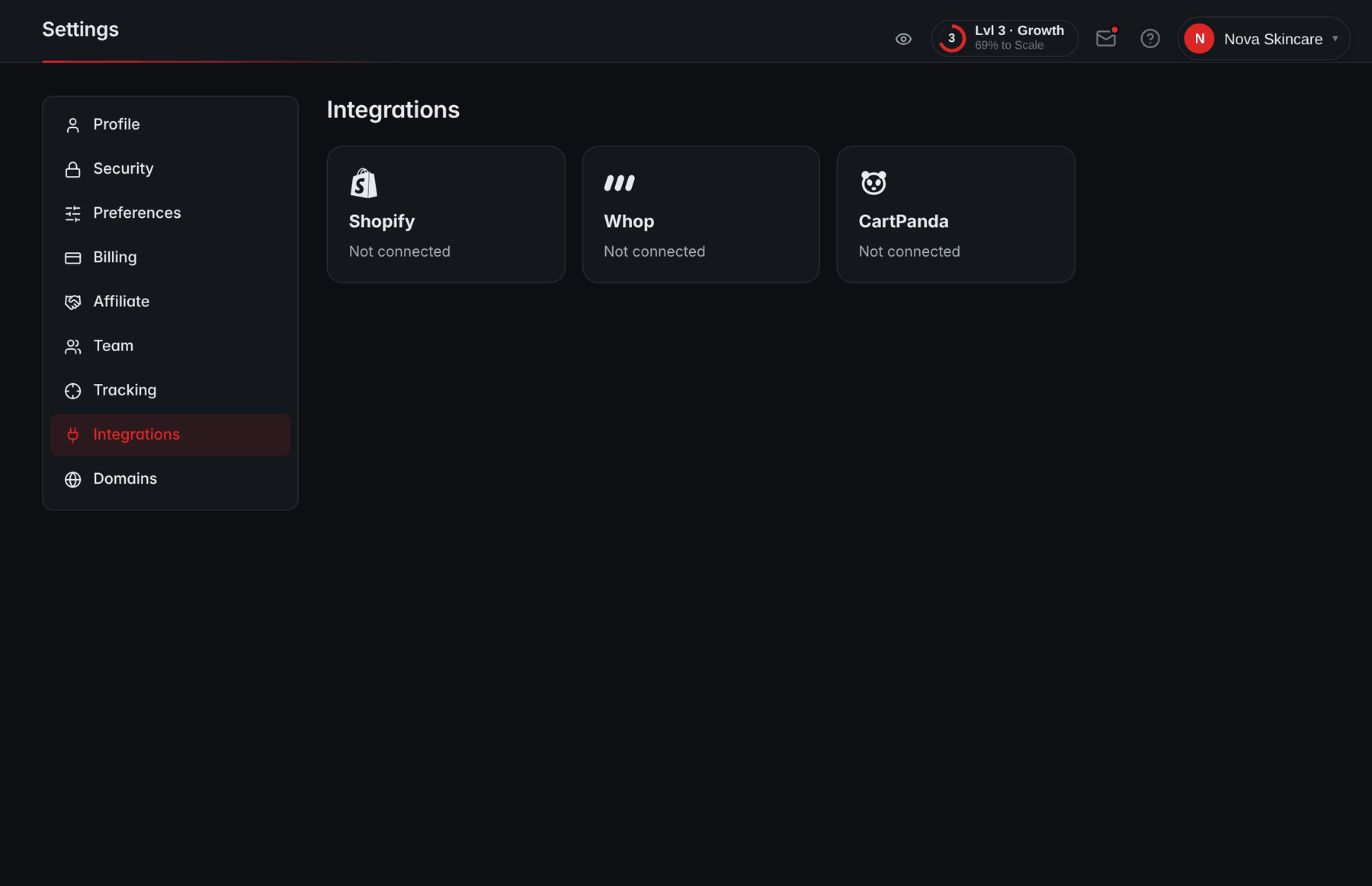
- ShopifyConnects your store, its permissions and a sales webhook, so orders are reported back to the VSL that earned them.
- WhopThe Whop integration, for sales made through Whop.
- CartPandaThe CartPanda integration; any other checkout can report the click_id from its thank-you page.
Test the chain before you spend
- Open the VSL on a phone from an ad-style URL that carries your campaign parameters.
- Watch to the pitch, tap the 3-bottle button and place a real order.
- In Shopify, open the order and check it. If you passed a cart attribute, it should be in the order's notes.
- In your VSL dashboard, check that the sale landed on the right VSL and campaign.
- In Meta Events Manager, check that one Purchase arrived, not two.
- Refund the order.
How to avoid double-counted purchases in Meta
Shopify's Facebook & Instagram app has three customer data-sharing levels. At Enhanced and Maximum, the store uses Meta's Conversions API, and in Shopify's words, "the Conversions API sends the purchase event between Shopify and Facebook servers" (Shopify data sharing).
If your VSL host also sends a server-side Purchase for the same order, Meta needs a way to know they're one sale. Meta's documentation matches duplicates by event name and event ID, received within 48 hours of the first event, and says its alternative method, based on browser identifiers, doesn't discard two server events that carry the same information (Meta deduplication). Two independent systems normally assign their own IDs, so unless they're coordinated, both purchases can count.
The cost is real. Say a day brings 120 actual orders from VSL traffic, worth $9,000, on $6,000 of spend: a true ROAS of 1.5. If duplicates push reported purchases to 205, reported ROAS looks like about 2.6, and scaling on that number spends money you aren't making.
The same day, counted once and counted twice:
One day of VSL sales, counted once and counted twice
Illustrative: 120 real orders worth $9,000 on $6,000 of spend
- Give the Purchase event one owner per pixel. Decide which system reports purchases to the pixel your VSL ads optimize on, and stop the other from sending purchases to that same pixel.
- Reconcile daily after any change. For one full day, compare Shopify orders from VSL traffic with Purchase events in Events Manager. A big surplus of purchases means duplicates; a big shortfall means a broken link in the chain.
- Switch off old scripts once the new path works. Shopify's own advice when replacing old tracking is to deactivate the old script after the new pixel is connected and tested.
On the Growth plan and up, RevvyScales sends server-side events through the Meta Conversions API, deduplicated so each sale reaches Meta once from its side (Meta CAPI setup). Deciding which system owns Purchase for each pixel is still your call.
Upsells after a Shopify VSL sale
A one-click upsell after checkout raises the value of each buyer without new ad spend. On Shopify it comes from apps: the post-purchase page appears "after the order is confirmed, but before the Thank you page", and the extension that powers it is still in beta, with access required for live stores (Shopify post-purchase extensions).
Choose an upsell app that supports your checkout, keep the upsell video short (congratulate, bridge from what they just bought, make one offer) and judge it by added revenue per buyer, not by take rate alone. Sequencing and math are in the upsell funnel guide.
Judge a Shopify VSL on profit, not ROAS
ROAS hides the costs that decide whether a Shopify VSL makes money: product cost, shipping, payment fees and refunds. Here is a worked example using the bundle mix above.
From $9,855 of revenue to $1,135 of profit
Worked example: 100 orders at $98.55, from the bundle mix above
ROAS here is 1.9, which sounds thin, yet the campaign is profitable. The number to manage by is break-even ROAS: revenue divided by contribution before ads, here $9,855 ÷ $6,335 ≈ 1.56. Above it you make money; below it you don't. RevvyScales' profit tracking (Growth plan and up) subtracts ad spend from a connected Meta account, product costs and gateway fees from revenue, and shows ROAS and margin by campaign (product costs).
Work out your own break-even ROAS; it starts at this example's numbers per order:
Calculator
Break-even ROAS and CPA calculator
Your numbers per order. Below the break-even ROAS, every order loses money before fixed costs.
- Profit per order before ads
- Contribution margin
- Break-even cost per order (CPA)
ROAS = revenue ÷ ad spend. Refunds are counted as revenue you give back; the product cost and shipping of a refunded order are already spent.
Launch checklist: VSL for Shopify
Tick each step as you finish it; the ticks stay in this browser:
Launch checklist: VSL for Shopify
0 of 8 done
Frequently asked questions
Can I upload a long VSL as a Shopify product video?
Not a long one. Shopify limits uploaded product videos to 10 minutes and 1 GB, and product media only accepts external videos from YouTube or Vimeo. That's fine for a short demo, but a full VSL with a timed offer belongs on a dedicated page whose buttons link to checkout. You can still add a short cut of the VSL to the product page for shoppers who arrive there directly.
Do cart permalinks work for subscription products?
No. Shopify's developer documentation states that selling plans don't work with cart permalinks, so a subscribe-and-save option can't be added through the link. If subscriptions matter to your offer, send that button to the product page, where the buyer can choose the subscription, and test the full path from the VSL to the finished order before you launch.
Should the VSL button go to the cart or straight to checkout?
Straight to checkout for a single offer. Every extra page is a chance to leave, and a cart permalink can carry the bundle, a discount code and tracking attributes in one click. Send buyers to the cart only when you want them to add other products, and measure whether that extra step earns more revenue per visitor than it loses.
Why did my Shopify thank-you page tracking stop working?
Most likely because your store moved to the new Thank you and Order status pages. August 26, 2026 was Shopify's deadline, and stores that hadn't upgraded were upgraded automatically. Additional scripts aren't supported on the new pages, so tracking has to run through app pixels or custom pixels, or through a server-side webhook. Pixels also respect customer consent, so they record fewer events than orders.
Can my VSL live on my Shopify store's domain?
Yes, in two ways. You can embed the player on a page of your Shopify store, or point a subdomain of your store's domain, such as watch.yourbrand.com, at your VSL host so the page carries your brand but sits outside the theme. The subdomain route keeps the store's navigation and apps off the sales page while customers still see your domain in the address bar.
Sources
- Cart permalinks — Shopify Developer Documentation
- Creating cart permalinks — Shopify Help Center
- Product media types and requirements — Shopify Help Center
- Upgrading the Thank you and Order status pages — Shopify Help Center
- Reviewing and replacing additional scripts — Shopify Help Center
- Meta customer data sharing and the Conversions API — Shopify Help Center
- Deduplicate Pixel and server events — Meta for Developers
- Post-purchase checkout extensions — Shopify Developer Documentation