
Facebook ads URL parameters: one tracking line built from Meta's macros and Google's UTM tags
URL parameters tell your store, your analytics and your VSL host which campaign, ad set and ad sent each visitor. Set the line up once and every ad labels its own traffic; misspell one tag and those visits land in (not set). This tutorial builds the line from Meta's six documented macros and Google's UTM definitions, then tests it on a real click.
Reading pathPart 4 of 8 · Meta ads for supplement offers
- Facebook Ads for Supplements: Rules, Hooks and Setup
- Advantage+ Sales Campaigns: What You Still Control
- Facebook Ads Learning Phase: 50 Events, Budget, Edits
- Facebook Ads URL Parameters: Macros, UTMs, Naming
- Facebook Attribution Window: 7-Day Click, 1-Day View
- Facebook Ad Scheduling: Setup and When It Pays Off
- Ad Fatigue: How to Spot It and What to Refresh First
- Ad Creative Testing: Budgets, Metrics and Kill Rules
On this page
- The six dynamic URL parameters Meta documents for Facebook ads
- UTM parameters, by Google's definitions
- IDs or names: which to send
- The rvs line in RevvyScales
- The fbclid Meta adds
- A naming convention that survives scaling
- Supplement brands: keep health conditions out of URLs and names
- Test that the parameters arrive
- Facebook URL parameters not working? Start from the symptom
- Frequently asked questions
Put one line of URL parameters on every Facebook ad and each visit reaches your page labeled with the campaign, ad set and ad that sent it. Meta fills in six documented macros for you: the campaign, ad set and ad IDs, and their names. Use the IDs as your key, add Google's UTM tags for analytics, leave fbclid alone, and test a live click before the ad spends.
Pull a tracked Facebook ad link apart and you find six pieces:
Anatomy of a tracked Facebook ad URL
Destinationhttps://example.com/vsl, the page the ad sends people to
Separators? before the first pair, & before every pair after it
Source and mediumutm_source=facebook and &utm_medium=paid_social
Campaign&utm_campaign={{campaign.name}} and &utm_id={{campaign.id}}
Ad set and ad&utm_term={{adset.id}} and &utm_content={{ad.id}}
Click ID&fbclid=…, added by Meta on the click; leave it exactly as it arrives
After a click, with illustrative values, the pieces arrive joined into one address with no spaces: https://example.com/vsl ?utm_source=facebook &utm_medium=paid_social &utm_campaign=vx01-sales-scale &utm_id=120200000000000001 &utm_term=120200000000000002 &utm_content=120200000000000003 &fbclid=…
The six dynamic URL parameters Meta documents for Facebook ads
Meta's developer documentation lists six macros you can put in an ad's URL parameters, each written inside double curly braces: campaign.id, adset.id and ad.id, plus campaign.name, adset.name and ad.name (Meta for Developers). Meta replaces them with the real values when the ad is rendered, so one line of parameters can sit on every ad in the account and still report the right campaign, ad set and ad. In Meta's API the field is the ad creative's url_tags, described as key=value pairs added to the clicked URL.
One detail changes how you should use them. Meta stores the name values "in a snapshot" when an object is first published. Rename a campaign after launch and the campaign.name macro keeps sending the old name. IDs never change, which makes them the safer key for anything you'll join or compare later. The ID macros send long numbers; the name macros send whatever characters the names contain, spaces and symbols included, which is one more reason to name things in lowercase with hyphens.
If a guide lists other macros, test with a live click that they fill in before you rely on them. Meta's URL-tag documentation names these six.
UTM parameters, by Google's definitions
UTM tags belong to Google Analytics, and Google defines each one (Analytics Help):
- utm_source: the referrer, for example google, newsletter4 or billboard.
- utm_medium: the marketing medium, for example cpc, banner or email.
- utm_campaign: the product, slogan or promo code, for example spring_sale.
- utm_id: the campaign ID, used to identify a specific campaign or promotion.
- utm_content: used to tell creatives apart.
- utm_term: the paid keyword.
Google says you should always use utm_source, utm_medium and utm_campaign, and it strongly recommends adding utm_id. Missing tags show up as (not set) in reports, and values are case-sensitive: utm_source=google and utm_source=Google are two different sources.
Mapped onto a Meta ad, that gives a natural layout. The source is facebook, in one spelling you never vary. The medium is whatever value you use for paid social everywhere else. utm_id takes the campaign ID macro, which is exactly Google's definition, and utm_campaign the campaign name, for readability. utm_content takes the ad, the creative Google means. Meta ads have no keywords, so utm_term is free; putting the ad set there is a convention, not a Google rule.
Three ways to write the whole line, depending on what you need to read later:
The parameter line, written three ways
One pair per line here for reading. Paste them as a single line, with no line breaks and no leading question mark
Every level by ID
utm_source=facebook
&utm_medium=paid_social
&utm_campaign={{campaign.id}}
&utm_term={{adset.id}}
&utm_content={{ad.id}}
Survives every rename. Reports show numbers, so keep a lookup of IDs and names next to them.
Names to read, IDs to join
utm_source=facebook
&utm_medium=paid_social
&utm_campaign={{campaign.name}}
&utm_id={{campaign.id}}
&utm_term={{adset.name}}
&utm_content={{ad.id}}
Readable at a glance. Names freeze at first publish, so settle them before launch.
For a VSL on RevvyScales
rvs={{campaign.id}}|{{adset.id}}|{{ad.id}}
&utm_source=facebook
&utm_medium=paid_social
&utm_campaign={{campaign.name}}
One parameter for RevvyScales, UTM tags for everything else. The rvs value carries the three IDs; the UTM tags still feed your analytics.
IDs or names: which to send
Both have a job, but only one is safe as the key your reports join on. An ID in the order points at exactly one ad, however often it has been renamed, and that's what lets you price each ad yourself. Say an ad spent $1,240 last week and your store has 29 orders whose utm_content holds that ad's ID: your own cost per purchase for that ad is $42.76, whatever Ads Manager reports. The join needs only the ad ID and spend from the platform's export and the ad ID on each order. Try it on names after a single rename and the spend sits under the new name while the orders keep arriving under the old one.
The two kinds of macro, compared:
ID macros or name macros
Use as the keyIDs
{{campaign.id}}, {{adset.id}}, {{ad.id}}
- Never change, so a renamed campaign keeps its history
- Match the IDs in spend exports and platform reports
- Plain digits: nothing to encode, nothing to mistype
The catch: unreadable on their own, so you need a lookup.
Use for readingNames
{{campaign.name}}, {{adset.name}}, {{ad.name}}
- Readable in any report
- Frozen at first publish: a rename doesn't reach the URL
- Spaces and symbols get percent-encoded in the URL
- Two spellings of one name split your reports
The rule: settle names before launch, or not at all.
The working rule: IDs in every line, names where a person needs to read them. When a campaign must be renamed, rename it before launch, or accept that the name macro will keep the old name.
The rvs line in RevvyScales
For a VSL on RevvyScales, one parameter carries the attribution: rvs, which holds the campaign, ad set and ad for Meta, Google and TikTok ads. The settings give you a ready line for each platform (the rvs setup guide):
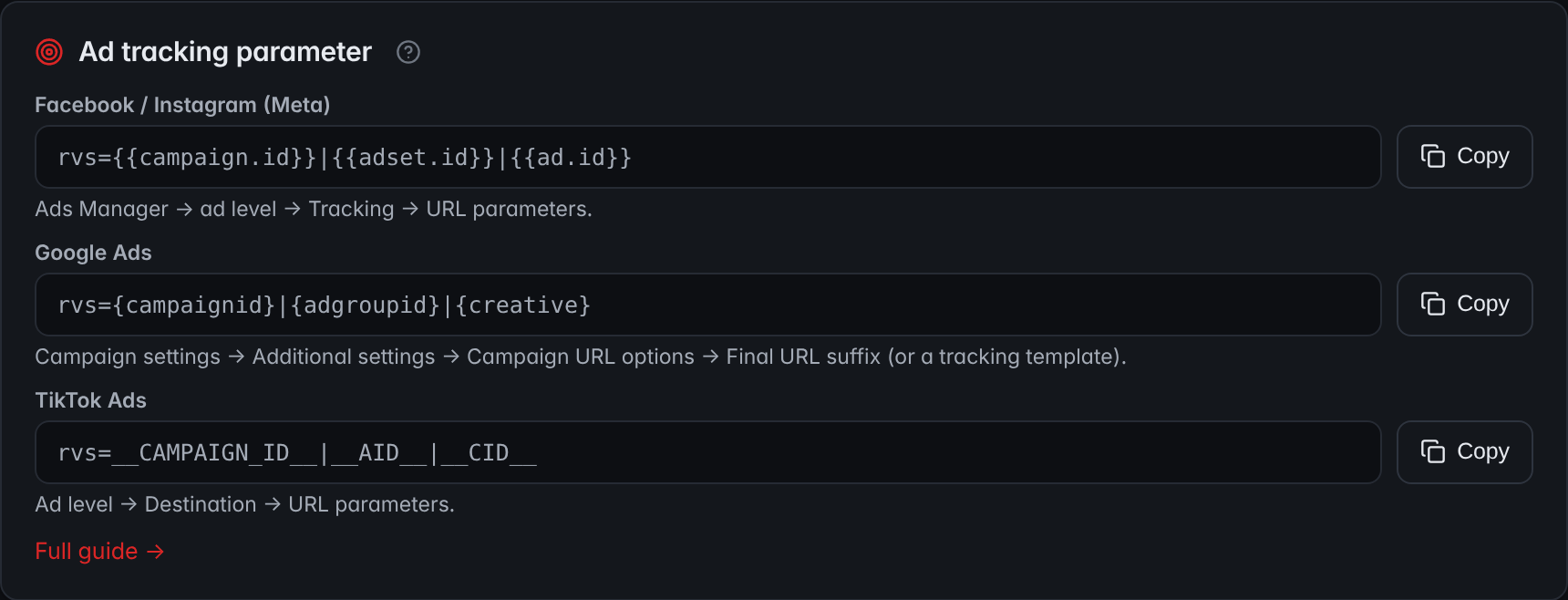
- The Meta lineThe line for Facebook and Instagram ads holds the campaign, ad set and ad ID macros, joined by vertical bars.
- CopyCopy the line and paste it into the URL parameters of every ad.
- Other platformsGoogle Ads and TikTok Ads get the same parameter, written with their own macros.
From there the sale follows the visit. The VSL's CTA click gets a click_id, the checkout returns it with the order, from its thank-you page or through a store webhook (conversion tracking setup), and the order lands on the campaign, ad set and ad in the rvs value. If you already use UTM tags, keep them: the rvs pair joins them in the same line with an ampersand, as the third tab above shows. Expect your order count per ad to come in under Ads Manager's; Meta's attribution window is the usual reason.
The fbclid Meta adds
You don't add fbclid; Meta does. Its documentation describes the click ID as "a Meta-generated parameter" that travels with your website's URL when a person clicks one of your ads on Facebook or Instagram (Meta for Developers). Three rules follow from the same page:
- Don't touch it. The value is case-sensitive and must not be modified, so a script that lowercases or trims URLs breaks it.
- Let the pixel keep it. The Meta Pixel stores the click ID in a first-party cookie called _fbc on your domain: a value that starts with fb, then a subdomain index and the time it was created, then the fbclid itself. If your server sets that cookie instead, Meta recommends a 90-day expiry.
- Send it with server events. Meta recommends always sending the _fbc value and the browser ID cookie, _fbp, with Conversions API events. Without a pixel, the fbc value can be built from the fbclid in the landing-page URL.
The weak point sits before the pixel ever loads. Anything that strips the query string on the way to your page takes fbclid with it, and the pixel can't store a click ID that never arrived. The VSL tracking guide covers how the pixel and server events fit together, and how to keep them from counting one sale twice.
A naming convention that survives scaling
IDs do the joining, but people still read names: in Ads Manager, in exports and in the name macros. A convention pays for itself once an account has dozens of ads:
- Fixed order, fixed separators. Offer, then stage, then audience: vx01-scale-us-new reads the same way in every report.
- Lowercase and hyphens, no spaces. Analytics values are case-sensitive, and a space becomes %20 or a plus sign in the URL.
- A code for every creative. h07-ugc-v2 says hook 7, a UGC-style video, second edit, and the code survives when the ad's text changes.
- No health conditions. Names travel into URLs, exports and audiences; the next section covers the Meta restriction behind this rule.
- Name before launch. The name macros keep whatever the name was at first publish.
An illustrative account: campaign vx01-sales-scale, ad sets vx01-us-new and vx01-us-existing, ads h07-ugc-v2 and h11-demo-v1. Anyone on the team can read a row of an export without opening Ads Manager. For how to structure the campaigns themselves around a VSL offer, our Facebook ads guide for VSLs covers testing and scaling.
Supplement brands: keep health conditions out of URLs and names
Supplement brands have one more reason to name things carefully. On September 2, 2025, Meta began rolling out restrictions on custom audiences and lookalike audiences that suggest specific health conditions or financial status; its own examples of conditions are "arthritis" and "diabetes". Flagged audiences can't be used to run campaigns, and advertisers with active campaigns are told to edit or pause them and choose a different audience (Meta for Developers). Custom conversions that suggest health conditions get the same treatment: once flagged, they're off-limits for new campaigns, though you can request a review (Meta for Developers).
Meta doesn't say what its check reads, whether the audience's name, its rules or the URLs behind it. So treat every name and every URL as something it might read. Custom conversions are often defined by URL rules, and your parameter values are part of the URL. Here is one offer named both ways:
One offer, named two ways
Illustrative names for an offer coded vx01
AvoidNames a health condition
- Parameter value: utm_campaign=diabetes-offer
- Page path: /arthritis-relief/thank-you
- Audience name: "joint pain buyers"
- Custom conversion named "arthritis buyers", with its rule on that path
Use insteadUses a neutral offer code
- Parameter value: utm_campaign=vx01-scale
- Page path: /vx01/thank-you
- Audience name: "vx01 buyers 180 days"
- Custom conversion named "vx01 purchase", with its rule on /vx01/thank-you
Neutral codes cost nothing and keep your audiences and conversions usable. Starting neutral also saves rework: a custom conversion built on a condition-named page path can't simply be renamed, because the path itself is the rule, so the page or the parameter has to change first. What the VSL itself may claim about health is a separate question with its own rules, and so is what state privacy laws say about the health data a pixel sends: the My Health My Data Act post covers those laws.
Test that the parameters arrive
A parameter you never checked is a parameter you don't have. Before an ad takes real money, trace one click from the ad to a finished order, checking each hop on the way:
One test click, from the ad to the order
Where parameters get lost, hop by hop
1Click the live ad
What happens: Open the live ad on a phone and tap through, as a buyer would.
Why it matters: Meta replaces the macros when the ad is rendered, so only a real click shows real values.
What goes wrong:
- Testing a link you typed yourself, which never passes through Meta.
2Read the address bar on arrival
What happens: Check that every parameter is there with a real value: digits for the IDs, your names for the name macros, and an fbclid.
Why it matters: If the macro text itself shows instead of a value, the macro was not filled.
What goes wrong:
- A redirect or link shortener that dropped the query string.
- A second question mark, which turns the pair after it into part of an earlier value.
3Follow the presell button
What happens: If a presell sits in front of the VSL, click its button and check that the parameters reach the VSL URL.
Why it matters: A presell is a page of its own; its button has to carry the parameters forward.
What goes wrong:
- A button hard-coded to the bare VSL address.
Read more: Presell Page: What It Is, Formats and How to Write One
4Check the visit was recorded
What happens: Find the visit in your VSL analytics or page analytics with its campaign, ad set and ad.
Why it matters: This is where the click meets the video, and where the CTA click starts the trip to the checkout.
What goes wrong:
- A page builder that strips parameters when it loads the page.
5Place a test order
What happens: Buy through the CTA and find the order in your records with the right campaign, ad set and ad.
Why it matters: Only the order proves the whole chain. Every earlier hop can look fine while the last one fails.
What goes wrong:
- A thank-you page that never reports the sale.
- A test order left in your revenue: refund it or tag it.
Repeat the test after anything changes between the ad and the checkout: a new presell, a new domain, a redirect, a checkout app. Those are the moments parameters go missing without anyone noticing. Keep the landing URL and the test order number from each run in a dated note; when the numbers drift months later, it's the quickest way to see what changed.
Facebook URL parameters not working? Start from the symptom
Once ads are live, a broken line usually shows up in a report long before anyone finds the cause. Match what you see to where it comes from:
- The macro text arrives instead of a number. Meta fills the macros in when the ad is rendered, so a link you typed or pasted yourself never gets real values. Check with a live click; if the text still shows, compare its spelling with Meta's six macros character by character.
- Visits land in (not set). Google Analytics shows (not set) when a tag is missing. Either the line lacks utm_source, utm_medium or utm_campaign, or a redirect, link shortener or page builder dropped the query string on the way.
- One source or campaign shows up as two rows. Values are case-sensitive, so facebook typed as Facebook on a few ads becomes a second source. Settle one lowercase spelling for every value and join your reports on IDs.
- A campaign reports under a name nobody uses any more. It was renamed after it was first published, and the name macro still sends the snapshot. The ID underneath never changed.
- Visits carry the IDs but orders don't. The parameters died between the page and the checkout. Look at two places: a presell page whose button points at the bare VSL address, and a checkout that never sends the sale back. A test order tells you which one broke.
- fbclid is missing or altered. A redirect dropped it, or a script lowercased, trimmed or decoded it on the way. Meta says to use the value exactly as it arrives.
Frequently asked questions
What is fbclid and should I remove it from my URLs?
fbclid is the click ID Meta adds to your website's URL when someone clicks an ad on Facebook or Instagram. Don't remove or edit it: Meta says the value is case-sensitive and must not be modified. The Meta Pixel stores it in the _fbc cookie on your domain, and Meta recommends sending that value with Conversions API events, so stripping fbclid leaves the pixel nothing to store.
Why does my campaign show an old name in Google Analytics?
Because Meta takes the values for its name macros from a snapshot made when the campaign, ad set or ad was first published. If you rename it later, the campaign name macro keeps sending the original name. Use the ID macros as your key and treat names as labels, or settle names before launch. Campaign IDs never change, so reports keyed on them survive any rename.
What is the difference between utm_campaign and utm_id?
Google Analytics defines utm_campaign as the product, slogan or promo code, such as spring_sale, and utm_id as the campaign ID, used to identify a specific campaign or promotion. For a Meta ad that maps neatly onto the two campaign macros: the campaign name in utm_campaign for readability, and the campaign ID in utm_id as a key that survives renames.
Are UTM parameters case sensitive?
Yes. Google's Analytics help says parameter values are case-sensitive, so utm_source=google and utm_source=Google are treated as two different sources. Pick one spelling for every value, in lowercase, and use it on every ad and every channel. Mixed case is an easy way to split one campaign into two rows in a report and lose track of what it really earned.
Do Facebook URL parameters work on Instagram ads?
Yes. The parameters sit on the ad creative (its url_tags, in Meta's API), and Meta files its URL-tag guide with its Instagram ads documentation. Meta also passes its click ID, fbclid, on clicks from Facebook and Instagram ads alike. A line built from the six macros Meta documents won't tell the two apart, though: they identify the campaign, ad set and ad, not the placement. If a guide offers a placement macro, test it with a live click first.
Do I need UTM parameters if I use the Meta Pixel?
They do different jobs. The pixel reports events to Meta for Meta's own attribution and optimization. UTM tags and ID parameters tell your analytics, your store and your VSL host where each visitor came from, which is what you need to check Meta's numbers against your own. Use both, and keep fbclid intact so the pixel can store the click.
Sources
- Use URL Tags for Tracking — Meta for Developers
- Ad Creative reference, Graph API v25.0 — Meta for Developers
- ClickID and the fbp and fbc Parameters — Meta for Developers
- URL builders: Collect campaign data with custom URLs — Google Analytics Help
- Customer File Custom Audiences — Meta for Developers
- Conversion Tracking (Meta Pixel) — Meta for Developers