
YouTube ads for ecommerce: formats, campaign types, targeting and tracking for product brands
YouTube ads let a product brand put a full sales argument in front of people who came to watch video. Here are the formats and their rules, the campaign type to use now that Demand Gen has replaced video action campaigns, how to target buyers, how to write for the skip button and how to judge it all by real sales.
On this page
- Why YouTube ads work for ecommerce VSL offers
- YouTube ad formats and their rules
- Which campaign type: Demand Gen replaced video action campaigns
- How to target buyers with YouTube ads
- Where to send the click: VSL page or product page
- How to make a YouTube ad people don't skip
- Conversion tracking basics for YouTube ads
- How to measure YouTube ads by real sales
- Google's ad policies for supplement brands
- A YouTube ads launch checklist
- Frequently asked questions
YouTube ads for ecommerce are video ads, such as skippable in-stream or in-feed ads, that send viewers to a product page or a VSL page, bought through Google Ads. For sales, the main campaign type is now Demand Gen, which replaced video action campaigns. Earn the viewer before the skip button appears at 5 seconds, track purchases on your thank-you page, and judge everything by real revenue per visitor.
Why YouTube ads work for ecommerce VSL offers
A VSL sells by explaining: the problem, why other fixes fall short, how the product works, the proof, the offer. A scrolling feed gives you a few seconds of a thumb's attention. YouTube gives you a viewer who came to watch video, and three structural advantages:
- Room to explain. A skippable in-stream ad has no maximum length. Google recommends keeping it under 3 minutes, which still leaves room for a two-minute argument.
- Intent you can target. In-feed ads appear in YouTube search results, and custom segments can reach people based on what they searched on Google and YouTube.
- A viewer in watching mode. In-stream ads play before, during or after other videos, so the ad lands in a session that is already about watching, not scrolling.
The catch is the skip button. Anyone can leave after 5 seconds, and with conversion-focused bidding you pay for impressions, so a weak opening costs money whether people stay or not. The first five seconds decide whether the rest of the ad exists.
YouTube ad formats and their rules
Google's video ad formats page sets the numbers that shape every script:
The numbers that shape a YouTube ad
Here is each format, with the campaign types it runs in:
| Format | What Google's page says | Main campaign types |
|---|---|---|
| Skippable in-stream | Skip button after 5 seconds; no maximum length, under 3 minutes recommended; YouTube watch pages and Google video partners | Demand Gen, video view, video reach, Performance Max |
| In-feed | A thumbnail from your video with some text, in YouTube search results, Watch Next and the Home feed | Demand Gen, video view, video reach, Performance Max |
| Shorts | Shown between organic Shorts in the Shorts feed | Demand Gen, video view, video reach, Performance Max |
| Non-skippable in-stream | 60 seconds or shorter (15 to 60, depending on the campaign subtype) | Video reach, reservations |
| Bumper | Non-skippable, 6 seconds (5 at minimum) | Video reach, reservations |
Three details on the same page matter for a product brand. The video in your ad must be hosted on YouTube; the VSL page it sends people to doesn't have to be, and our guide to hosting a VSL on YouTube, Vimeo or Wistia explains what you give up if it is. With cost-per-view bidding, you pay when a viewer watches 30 seconds (or the whole ad, if it's shorter) or interacts with it, whichever comes first; with Target CPA, Maximize conversions or Target CPM, you pay for impressions. And since October 2025 the "Views" metric is called "TrueView views" in Google Ads, so older and newer reports use different names for the same count.
Which campaign type: Demand Gen replaced video action campaigns
If you learned YouTube ads with video action campaigns, that campaign type no longer exists. Google's help page gives the timeline (Google Ads Help):
- April 2025: Google removed the option to create new video action campaigns.
- July 2025: existing ones began moving to Demand Gen automatically.
- April 2026: the last campaigns were to be upgraded by then.
Demand Gen covers what video action campaigns did and adds more. Its inventory goes beyond YouTube to Discover, Gmail and the Google Display Network, it accepts image ads as well as video, and it adds lookalike segments built from a seed list. Its bidding options include Maximize conversions, Target CPA, Maximize conversion value and Target ROAS, plus Maximize clicks. Because it reaches beyond YouTube, a Demand Gen campaign's results can include those other surfaces too.
Video view and video reach campaigns are named for what they buy: views and reach. For a store that measures itself on sales, Demand Gen with a purchase conversion goal is the place to start. Google's own livestream on Demand Gen covers inventory, product feeds, targeting and bidding:

How to target buyers with YouTube ads
Audience signals tell Google whom to look for. Three audience tools matter most for a product brand:
- Custom segments. You describe an audience with keywords, URLs and apps. One option reaches people who searched for your terms on Google properties such as Google.com and YouTube, and it works only on campaigns that run on Google properties (custom segments). Build one from the searches your buyers make before they buy: the problem in their words, the category, the alternatives.
- Your data segments. Google now calls remarketing "your data": past visitors to your site, people who interacted with your videos or YouTube channel, and Customer Match lists built from contact details your customers gave you (your data segments). Visitors who left your VSL before the offer are the obvious first segment.
- Lookalike segments in Demand Gen, built from a seed list such as past buyers.
Health brands need one more check. Google treats health as a sensitive interest category, covering physical or mental health conditions and products to treat or manage chronic conditions. When you promote in a sensitive category, Customer Match, your data segments, audience expansion and lookalike segments can't be used (Health in personalized advertising). The page doesn't name dietary supplements, but copy and landing pages that talk about health conditions match its description of the category. Structure/function wording protects your targeting as well as your claims.
Where to send the click: VSL page or product page
A viewer who clicks a two-minute ad has already heard the argument begin, so the next page should continue it, not restart it. Here is the path a YouTube buyer takes, and what each step needs:
The path from a YouTube ad to a sale
- Search or watchYour buyer is searching or watching on YouTube
- The adHook and brand inside 5 seconds, then the short argument
- VSL pageThe ad's promise as the first line, then the full argument and the offer
- CheckoutOn your own checkout platform
- Thank-you pageThe purchase conversion fires, with the order value
Send YouTube traffic to a VSL page when the product needs explaining, demonstrating or a mechanism. Send it to a product page when the ad already does that work and the viewer only needs the offer. Either way, the landing page's first line repeats the ad's promise. On a VSL page that autoplays muted, RevvyScales restarts the video at 0:00 when a first-time viewer taps for sound, so someone arriving from YouTube hears the opening instead of joining mid-sentence (player conversion features).
How to make a YouTube ad people don't skip
Write for the skip button. The first five seconds have two jobs: stop the right viewer and let the wrong one leave. Open with motion and a scene or a question only your buyer cares about, and show the product or say the brand's name before the button appears. The ideas behind hook rate apply here too, measured with a different platform's columns.
After the hook, the ad is a short VSL. A structure for a two-minute ad:
- 0–5 seconds: the hook, with the product or brand visible.
- 5–20 seconds: who it's for and the promise, said plainly.
- 20–75 seconds: the demonstration or the mechanism, with one piece of proof.
- 75–110 seconds: the offer, and what happens after the click.
- The last seconds: a spoken and on-screen call to action that matches the landing page's first line.
Test lengths against each other instead of guessing: a 30-to-60-second direct ad, and a two-to-three-minute version built like a mini VSL. Keep both under Google's 3-minute recommendation until a test gives you a reason to go longer.
Conversion tracking basics for YouTube ads
Google Ads can only optimize for sales it can see. The setup has three parts: the Google tag, a purchase conversion action, and an event snippet that fires on the page your customer sees after paying. Send the order value with it: Google says transaction-specific values give you a more accurate sense of your return on investment (Google Ads Help). That snippet belongs on your checkout's thank-you page, so it is set up on your checkout platform, not on the VSL page.
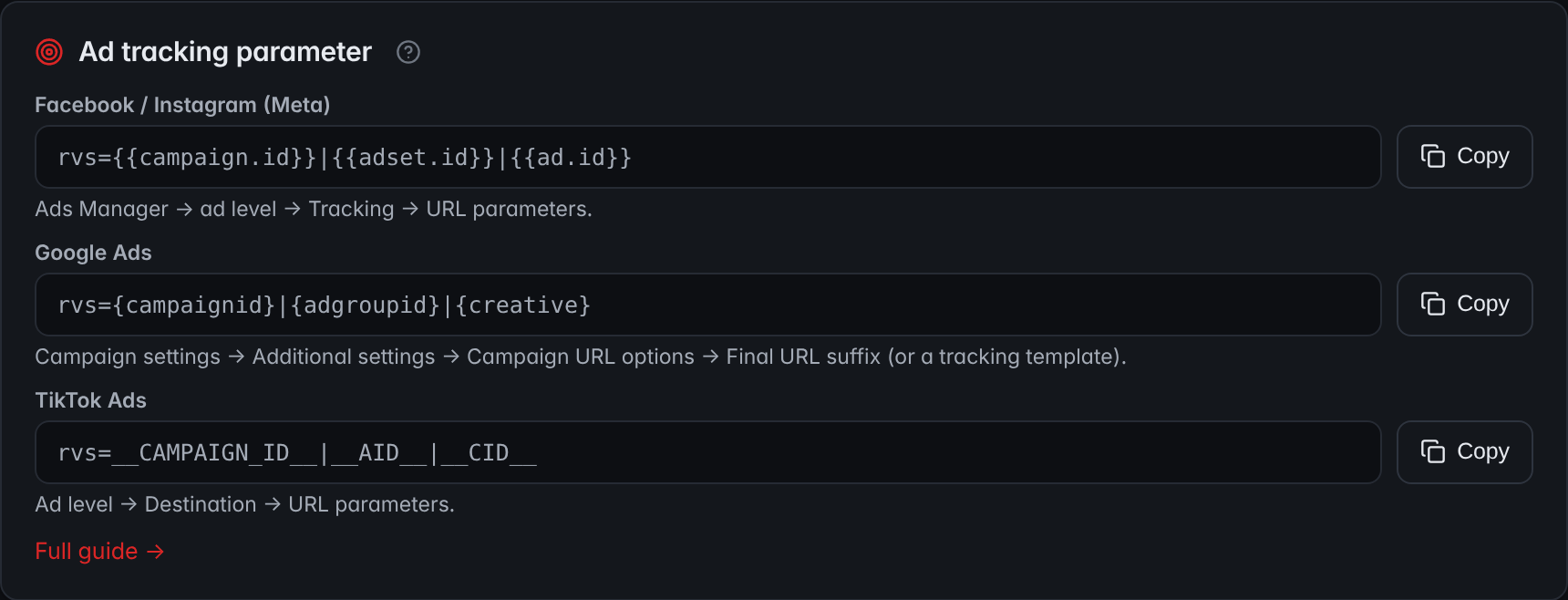
Then keep your own record, because the ad platform's count is only one view of the truth. In RevvyScales you paste your Google tag ID once on a folder, and every VSL page in it loads the tag (pixels). The rvs parameter, added to your campaign's Final URL suffix, records the campaign, ad group and ad behind each visit (ad tracking parameter). Each CTA click carries a click_id that your checkout's thank-you page reports back, which ties the sale to that visit (conversion tracking). The settings screen gives you the exact line to paste for each ad platform:
The whole chain, from click IDs to deduplication and why platform numbers differ from yours, is in our guide to VSL tracking.
How to measure YouTube ads by real sales
TrueView views count watching, not buying. Judge YouTube on the same scale as every other channel: revenue per visitor from its traffic, against what each visitor cost.
A worked example with illustrative numbers. A month of YouTube traffic sends 2,400 visitors to a VSL page. They place 41 orders at a $98 average: $4,018 in revenue, or $1.67 per visitor. At a 50% contribution margin, a visitor can cost up to $0.84 before the channel loses money. Spend was $2,300, so each visitor cost $0.96. Revenue was 1.75 times spend and the channel still lost money before fixed costs: half of $4,018 is $2,009, less than the $2,300 spent. At a 50% margin, revenue has to reach twice the spend just to break even. Here is the same math as a calculator, set to this example:
Calculator
Revenue per visitor calculator
From one traffic source or one VSL over the same period.
- Conversion rate
- orders ÷ unique visitors
- Revenue
- Break-even cost per visitor
- the most a visitor can cost you
If one ad click brings one visitor, the break-even cost per visitor is also your break-even cost per click.
Two levers close that gap. Raise revenue per visitor with a better VSL or offer, or lower the cost per visitor with creative and targeting that bring in buyers rather than viewers. Put in your own traffic, then compare the break-even figure with your cost per visitor from Google Ads.
Google's ad policies for supplement brands
Supplements can advertise on YouTube, inside Google's rules for supplement ads. Its unapproved substances policy bars certain products regardless of any claims of legality, including products that contain ephedra, hCG for weight loss, herbal and dietary supplements with active pharmaceutical or dangerous ingredients, and products that imply they are as effective as prescription drugs. DHEA products are allowed only in campaigns that target the United States (Unapproved substances). Its misrepresentation policy bans claims that present an improbable result as the likely outcome, and ads that use negative life events such as illness to induce fear or guilt (Misrepresentation).
This is a summary, not legal advice. Read the policy pages before you launch, and keep the claims in your ad, your VSL and your label the same.
A YouTube ads launch checklist
- Put the Google tag on your pages and a purchase conversion, with the order value, on your thank-you page.
- Add the rvs parameter to the campaign's Final URL suffix and run a test purchase end to end.
- Create a Demand Gen campaign with a purchase conversion goal.
- Build a custom segment from the searches your buyers make, and check whether the health-category limits apply to you.
- Cut a 30-to-60-second ad and a two-to-three-minute ad, each with the hook and the brand inside 5 seconds.
- After a week of steady traffic, compare revenue per visitor with cost per visitor, and move budget to the cut that earns more.
Frequently asked questions
Are YouTube ads good for ecommerce?
They can be, especially for products that sell better once they are shown and explained, because skippable ads have room for a full argument and in-feed ads appear in search results. Whether they work for you depends on your numbers: compare revenue per visitor from YouTube traffic with what each visitor costs, at your contribution margin. Views alone say nothing about sales.
How long should a YouTube ad be for a product?
Long enough to make the argument and no longer. Skippable in-stream ads have no maximum length, Google recommends keeping them under 3 minutes, and viewers can skip after 5 seconds. A practical test is a 30-to-60-second direct ad against a two-to-three-minute ad built like a mini VSL, judged by revenue per visitor rather than view rate.
How much do YouTube ads cost?
There is no fixed price; you bid in an auction. With cost-per-view bidding on skippable ads, you pay when a viewer watches 30 seconds, the whole ad if shorter, or interacts with it. With Target CPA or Maximize conversions you pay for impressions. The number that matters is your break-even cost per visitor: revenue per visitor times your contribution margin.
Can I run my whole VSL as a YouTube ad?
You can. Skippable in-stream ads have no maximum length, though Google recommends under 3 minutes and anyone can skip after 5 seconds. The ad video must be hosted on YouTube. The alternative is a shorter ad that sends viewers to a VSL page, which keeps the offer, the checkout link and the tracking on a page you control.
What happened to video action campaigns?
Google replaced them with Demand Gen. Its help page says the option to create new video action campaigns was removed in April 2025, automatic upgrades of existing ones began in July 2025, and the final campaigns were to be upgraded by April 2026. Demand Gen adds Discover, Gmail and the Display Network to YouTube, plus image ads and lookalike segments.
Can supplement brands advertise on YouTube?
Yes, within Google's policies. Products on its unapproved substances list are barred, including ephedra and supplements with active pharmaceutical ingredients, and DHEA is allowed only in campaigns that target the United States. Claims presenting an improbable result as likely are not allowed. Health-category promotion also restricts remarketing, Customer Match and lookalike segments. This is not legal advice.
Sources
- About video ad formats — Google Ads Help
- Video Action Campaigns are being upgraded to Demand Gen — Google Ads Help
- About custom segments — Google Ads Help
- About your data segments — Google Ads Help
- Health in personalized advertising — Google Advertising Policies Help
- Track transaction-specific conversion values — Google Ads Help
- Unapproved substances — Google Advertising Policies Help
- Misrepresentation — Google Advertising Policies Help