
How to use the Facebook Ad Library: search it, read an ad and know what it can’t tell you
Meta's Ad Library shows every active ad on Facebook, Instagram and Meta's other apps, and none of their results. Here is a research session step by step: how to search it, what to note from one ad, why a long run proves little, what EU rules and the API add, and where studying ends and copying begins.
On this page
- How to search the Facebook Ad Library
- What to note from one ad
- Why a long run proves less than it seems
- What the Facebook Ad Library doesn't show
- The Ad Library API, and the ads it won't return
- From the library to a swipe file to a test
- Studying an ad vs copying it
- What to do this week
- Frequently asked questions
The Facebook Ad Library is Meta's public archive of ads. Since 2019 it has included every active ad any Page runs, not only political ones, across Facebook, Instagram and Meta's other apps. Search it by keyword or by advertiser, narrow by country, status, platform, media type and dates, then study each ad's angle, hook, offer and landing page. It never shows an ordinary ad's spend or results.
That last point shapes the whole method. The library tells you what competitors say, not what works, so a good session ends with ideas to test rather than answers. Here is one session, stage by stage:
One research session, start to finish
Open each stage for what to do there and what goes wrong
1Start with one question
What happens: Write down what you want to learn: say, which angles lead for a magnesium sleep product sold in the US.
Why it matters: It sets the search terms, the country and what goes into your notes.
What goes wrong:
- Scrolling without a question and saving everything
- Mixing several markets in one session
2Search by keyword, then by advertiser
What happens: Search product terms in the ads' language and your market's country, then look up each competitor's Page.
Why it matters: Keywords find advertisers you didn't know about; a Page shows one brand's whole range.
What goes wrong:
- English keywords for a Spanish-language market, since Meta doesn't translate searches
3Shortlist what repeats
What happens: Keep the ideas that recur across versions or advertisers, and set one-offs aside.
Why it matters: An idea someone keeps remaking is the closest the library gets to a signal.
What goes wrong:
- Picking the most polished ad instead of the most repeated idea
- Treating the start date as proof that an ad works
4Read each ad end to end
What happens: Watch the whole video, read the text and open the page the ad leads to.
Why it matters: Stopping at the ad misses the offer and most of the claims.
What goes wrong:
- Never opening the landing page
5Log it with a date
What happens: One dated row per ad in a spreadsheet, with your tagged notes.
Why it matters: Ads stop without notice, and outside the EU Meta doesn't promise an ordinary ad stays findable.
What goes wrong:
- No date, so you can't tell later whether the ad kept running
6Turn one idea into your own test
What happens: Write the idea in your own words, with claims your evidence supports, and run it as a new ad.
Why it matters: The library never shows whether an idea worked. Your sales will.
What goes wrong:
- Copying the competitor's script or claims
- Judging the test by clicks instead of sales
Read more: Ad Creative Testing: Budgets, Metrics and Kill Rules
How to search the Facebook Ad Library
The library is at facebook.com/ads/library, and there are two ways in. A keyword search finds ads from advertisers you didn't know existed; an advertiser search shows one brand's whole range. Meta added the second in 2019, announcing that "All active ads for all Pages will be visible in the Ad Library" and that people could "search by Page, not just keywords" (Meta).
Meta's Ad Library API reference documents two rules for keyword searches, and they're worth assuming on the website too. A search looks through an ad's text, its images, the audio from its video and its call-to-action buttons, and "we do not translate your keyword searches" (Meta for Developers). So search in the language of the ads you want: "supplement" won't find a Spanish or Portuguese ad. The same reference separates a search for the words in any order, the default, from a search for the exact phrase. Use the exact phrase for a product term and any order for a topic.
Then narrow the results. Meta's reference documents these filters, and the library's own web addresses carry the same settings for country, ad type, status and media type, so here they are by what they do rather than by their labels:
- Country keeps the ads that reached a country. That's where an ad was shown, not where the advertiser is based, so pick the market you sell in and keep markets apart.
- Category separates ordinary ads from the kinds Meta keeps apart: ads about social issues, elections or politics, and the special categories for employment, housing, and financial products and services.
- Status shows active ads, inactive ones or both. Meta's 2019 announcement covers active ads and doesn't say how long an ordinary ad that ran only outside the EU stays visible once it stops, so save what you find.
- Platform picks where the ad appeared: Facebook, Instagram, Messenger, WhatsApp, Threads or the Audience Network, among others. The library covers Meta's apps and nothing else.
- Media type separates image, video and meme ads, handy when you only want the video ads a VSL funnel runs.
- Dates set a delivery window, to see what an advertiser ran around a launch or a holiday.
Run both kinds of search for every competitor: a keyword search for the product's name also finds other Pages' ads that mention it, which is how you spot the same product sold with different angles.
What to note from one ad
An ad is half a funnel. The hook and the angle are in the ad; the offer, the price, the guarantee and most of the claims are on the page it leads to. Read both, and write down the same six things every time:
What to note from one ad
A fictional ad for a fictional magnesium sleep gummy
The reason to care
The 3 a.m. wake-up, not sleep in general.
Write the angle in one line. If it takes two, the ad is mixing two ideas.
The first line and the first three seconds
A phone screen lighting up at 3:07 a.m. Voice: "I tried six things to stop waking up at this hour. This is the one I kept."
Transcribe it word for word so you can compare hooks across ads. Your own ad will say something else.
How the ad is made
A creator talking to a phone camera in a dark bedroom, captions on screen, about 45 seconds.
Keep the format apart from the angle: one angle can be tested in several formats.
What the page sells, and on what terms
The ad leads to a VSL. After the pitch: one, three or six jars, a 60-day guarantee, free shipping from three jars.
Note the guarantee and any subscription terms exactly as shown.
Why the viewer should believe it
A lab report on screen, two customer reviews and the line "clinically studied ingredient".
Note the kind of proof, not the words. Their evidence isn't yours.
When it started and where it runs
Set to start 14 August. Still active on 21 October. Facebook and Instagram, in English.
The start date is when the advertiser set the ad to start. Check again in a few weeks and log what changed.
Collected this way, twenty to forty ads from one market tell you more than any single ad can: which promises everyone makes, and which nobody makes yet.
Why a long run proves less than it seems
Plenty of research guides treat a long-running ad as a profitable one. That's a guess. The library gives you a run time and nothing else, and even the run time is softer than it looks. In Meta's reference, an ad's start date is the "Date and time when an advertiser wants to start delivering an ad", its creation time "is not the same time as when the ad ran", and an ad with no stop date runs until it's halted or its budget is spent (Meta for Developers).
So a long run fits several stories. The ad may be profitable. It may also be cheap and forgotten, a brand ad nobody judges by sales, or a test on a small budget. Repetition says more: an advertiser that keeps making new versions of one idea is paying for more of it, a stronger hint than one ad left on. Even then, the proof comes from your own test, not from their calendar. Use run time to decide how much attention an ad deserves, never as evidence:
Is a long-running ad worth studying?
A rule of thumb, not Meta's: the library shows no results for any ad
Is the ad still active, weeks after its start date?
Does the advertiser run other versions of the same idea?
Does it ask for a sale, on a page that sells what you sell?
Best fit
Study it closely
Still running, and the advertiser keeps remaking the idea: the strongest pattern the library shows. It still proves nothing about profit, so log the angle, hook and offer and test the idea in your own words.
Best fit
Worth a test, not a template
Still running, no other versions, and it asks for a sale for a product like yours: a lead, not proof. Test the idea before you build on it.
Best fit
Note the hook and move on
Still running, but it doesn't ask for a sale or sells something unlike your product, so it says little about the offers in your market. Save the hook if it's good; don't build a test around it.
Best fit
Log it and check back
Stopped, or only just started: it tells you nothing about how it did. Save it with its dates and look again in a few weeks.
What the Facebook Ad Library doesn't show
For an ordinary ad, the library shows the ad and a little about where and when it ran. The complete list of fields in Meta's reference has no results for any ad: no clicks, no conversions, no sales, no ROAS.
Spend and impressions exist only for ads about social issues, elections or politics, and only in ranges: spend runs from under 100 to over 1M in the ad's currency. Those ads also carry the "paid for by" line and breakdowns by demographics and region, and Meta said in 2019 that this part of the library kept ads for seven years. An ordinary supplement ad gets none of it.
Ads shown in the EU carry more
When the EU's Digital Services Act took effect for the largest platforms, Meta said it was expanding its Ad Library "to display and archive all ads that target people in the EU", with the dates each ran, "the parameters used for targeting (e.g., age, gender, location)" and who was served it. "These ads will be stored in our public Ad Library for a year," it added (Meta, August 2023). The API adds each ad's estimated EU reach and the beneficiaries and payers the advertiser reported, plus targeting fields for ads shown in the UK.
That data exists because the law asks for it. The Digital Services Act says very large online platforms "should ensure public access to repositories of advertisements presented on their online interfaces", holding each ad's content, the product or brand, the advertiser and whoever paid, and the targeting and delivery criteria (recital 95). The European Commission's Q&A is blunter: the DSA requires the very large platforms and search engines (VLOPs and VLOSEs) "to maintain a public advertisement repository" (European Commission).
Here is what all of that leaves you for an ordinary commercial ad:
What the library holds for an ordinary ad
A commercial ad, not one about social issues, elections or politics
What you can readEvery ad
- The ad itself: its text, images or video, and the call-to-action button
- The advertiser's Page
- The platforms it ran on, and its languages
- The start date the advertiser set, and whether it is still active
Kept for a yearAds shown in the EU
- The dates it ran
- Its targeting: age, gender and location
- Who it was served to
- Estimated EU reach, and who benefited and who paid
Meta's changes for the Digital Services Act, August 2023.
For ordinary adsNot shown
- Clicks, conversions, sales or ROAS, for any ad at all
- Spend and impressions
- Targeting and reach, unless the ad ran in the EU or the UK
Spend and impressions appear only for ads about social issues, elections or politics, in ranges.
One consequence follows for a brand. If you sell into the EU, competitors can read your targeting and your EU reach. A campaign that runs only in the US shows neither.
The Ad Library API, and the ads it won't return
Meta also offers the archive as data, through its Ad Library API: read-only results that software can work through. Its reference states the limit that matters most to a supplement brand: ads that never reached the EU "will only return if they are about social issues, elections or politics."
Put plainly, a US-only supplement ad can be read on the library's website but can't be pulled through the API; an ad that also reached the EU can. If a research tool promises every competitor ad through Meta's API, ask how it handles US-only ads, because the API doesn't return them.
Requests need an access token. In its 2019 announcement, Meta listed the steps as identity confirmation, a developer account and agreeing to its platform terms, and said confirmation "can take up to a few weeks" (Meta). Check Meta's current page before you plan around that.
One parameter matters in a health niche: the API can include ads that were removed for violating standards. The archive records what ran, which isn't the same as what was allowed to stay.
From the library to a swipe file to a test
A folder of screenshots is hard to search a month later. Log each shortlisted ad as a row instead: the link, the date you saw it active, the platforms and the six notes above. Tag every row the same way, by product, angle, hook type, format, offer and the awareness level it speaks to, so a later search for "founder stories with a three-jar offer" takes seconds. Recheck the status every few weeks and log it: "set to start 14 August, still active 21 October" is worth more than "long-running".
Then pick one idea that repeats and make it yours: your words, your footage and claims your evidence supports. The video ad script post turns an angle into a 30-second script, and hook rate tells you whether the opening holds people. The number that decides the test isn't in the library at all. It's your sales per ad, and the creative testing routine sets how much each new ad may spend before you judge it.
That's where your own tracking takes over. In RevvyScales, the rvs parameter on each ad records the campaign, ad set and ad behind every visit to your VSL (ad tracking), and on the Growth plan and up, with your Meta account connected, the Ads area lines up spend against orders and revenue:
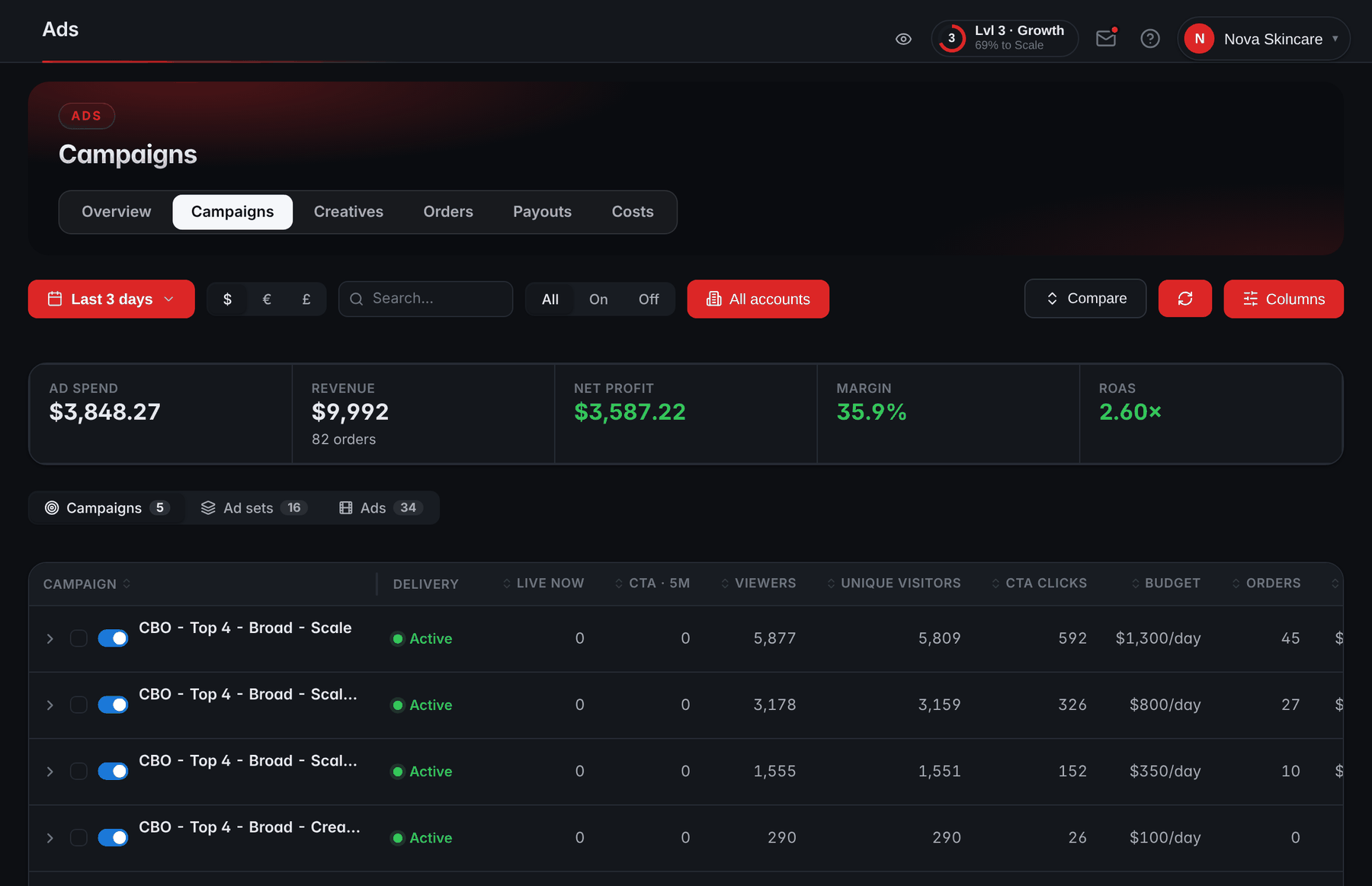
- Spend against resultsThese tiles show ad spend, revenue, profit, margin and ROAS for the date range.
- Campaign, ad set or adSwitch levels to read one test ad's results on their own.
- OrdersOrders reported by your checkout are counted against the campaign each visit came from.
Studying an ad vs copying it
US copyright law draws its line close to where good practice does. Copyright protection never extends to an idea, procedure, process, system, method of operation, concept, principle or discovery (17 U.S.C. § 102(b)), and the Copyright Office's circular says protection extends "only to the original expression in that work and not to the underlying idea" (Circular 33). An angle, a structure or a type of lead is yours to learn from. The script, the footage, the images and the edit belong to whoever made them.
Short lines are a trap of their own. The same circular says "Words and short phrases, such as names, titles, and slogans, are uncopyrightable", but a brand's tagline can still be its trademark, and false-advertising rules apply whatever copyright says. None of this is legal advice.
Two things never transfer from someone else's ad:
- Claims. A claim is only as good as the evidence behind it, and that evidence belongs to the other brand, if it exists at all. The FTC says health claims "require substantiation in the form of competent and reliable scientific evidence" (FTC): your evidence, for your product. A competitor's ad still running doesn't mean its claims are allowed.
- Testimonials and reviews. A customer's words describe that customer's experience of another brand's product. Putting them in your ad would be a fake endorsement; the Endorsement Guides post covers what real ones need.
What to do this week
Block out an hour for the first session, open a spreadsheet and work through the list:
Your first week with the Ad Library
0 of 7 done
Frequently asked questions
Can you see how much a competitor spends on Facebook ads?
Not for ordinary ads. Meta's archive returns spend and impressions only for ads about social issues, elections or politics, and then only in ranges, such as 1K to 5K in the ad's currency. For a supplement or ecommerce ad you see the creative, the advertiser, the platforms and the dates, but no spend, impressions, clicks or sales, wherever it ran.
Can you see who a Facebook ad targets?
Only for ads shown in the EU, and through the API for the UK too. Since the Digital Services Act took effect for the largest platforms, Meta archives EU ads with the dates they ran, targeting parameters such as age, gender and location, and who was served the ad; its API adds estimated EU reach and who paid. An ad that ran only in the US shows no targeting at all.
How far back does the Facebook Ad Library go?
It depends on the ad. Meta said in 2019 that ads about social issues, elections or politics were kept for seven years, and in 2023 that ads shown in the EU would be stored for a year. For ordinary ads that ran only outside the EU, Meta's 2019 announcement covers active ads and doesn't say how long inactive ones stay visible, so save what you find.
Does the Facebook Ad Library include Instagram ads?
Yes. The library covers ads across Meta's apps, and its API lists where each ad appeared: Facebook, Instagram, Messenger, WhatsApp, Threads and the Audience Network among them. It doesn't cover other companies' platforms. TikTok keeps its own repository of ads shown in the EU, which the European Commission preliminarily found in breach of the Digital Services Act in May 2025.
Why can't I find an ad I saw in my feed?
Check four things. Meta doesn't translate keyword searches, so search in the ad's own language. The country setting finds ads that reached a country, so pick the one where you saw it. The ad may have stopped, so include inactive ads. Or search for the advertiser's Page instead, because a keyword only matches what's in the ad's text, images, audio or buttons.
Sources
- A Better Way to Learn About Ads on Facebook (28 March 2019) — Meta
- New Features and Additional Transparency Measures as the Digital Services Act Comes Into Effect (22 August 2023) — Meta
- Ad Library API (ads_archive) reference — Meta for Developers
- Archived Ad reference — Meta for Developers
- Regulation (EU) 2022/2065 (Digital Services Act), recital 95 — EUR-Lex
- Digital Services Act: Questions and Answers — European Commission
- Commission preliminarily finds TikTok's ad repository in breach of the Digital Services Act (15 May 2025) — European Commission
- 17 U.S. Code § 102 — Cornell Legal Information Institute
- Circular 33: Works Not Protected by Copyright — U.S. Copyright Office
- Health Products Compliance Guidance — FTC